Appsvio
Appsvio Appsvio
ITSM Reports

Build Custom Jira Dashboards
& Gain Service Control

Track service performance & build custom ITSM reports for agent’s efficiency in Jira.

Trusted by over 2,200 clients worldwide — from Fortune 500 enterprises to fast-growing startups.

Features

Essential Reporting Features for ITSM


Create custom Service Desk Reports with charts and Jira Gadgets. Instantly get the CSAT and SLA metrics you need onto your Jira Dashboards without complex setup.

Customer & Agent Performance

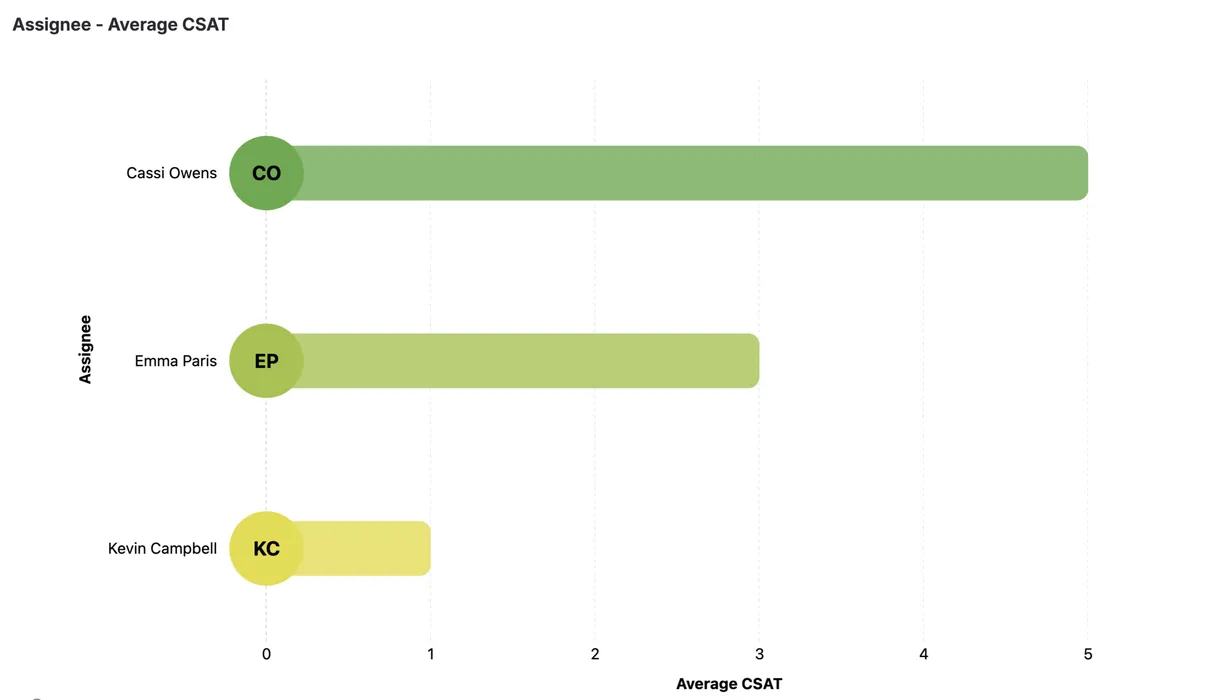
Track service quality using the Assignee Average CSAT report. Monitor customer satisfaction and analyze agent performance to streamline training.

SLA Workflow & Compliance

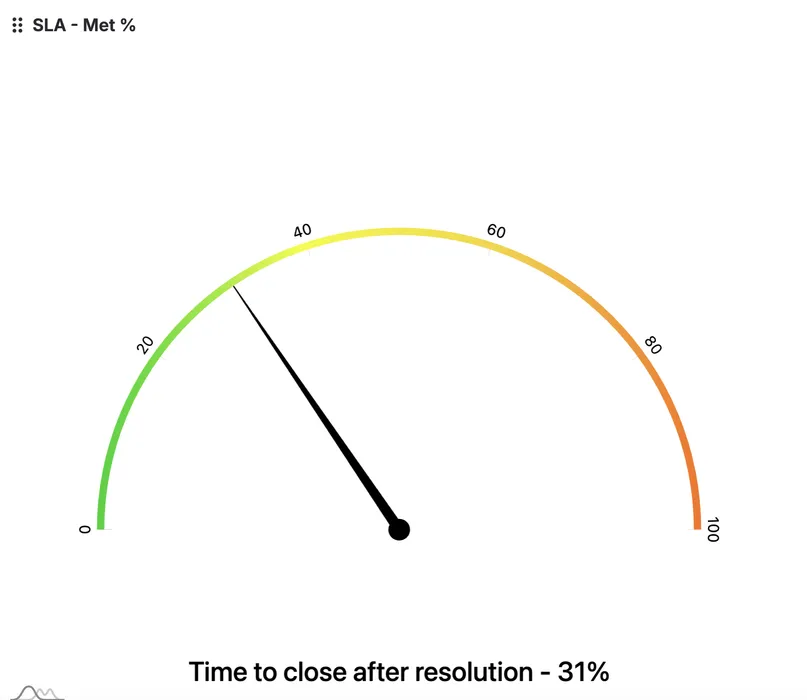
Gain compliance oversight with the SLA – % Met report.
Use these essential Service Desk Reports to eliminate bottlenecks and ensure agreements are met.

Demand & Resource Analysis

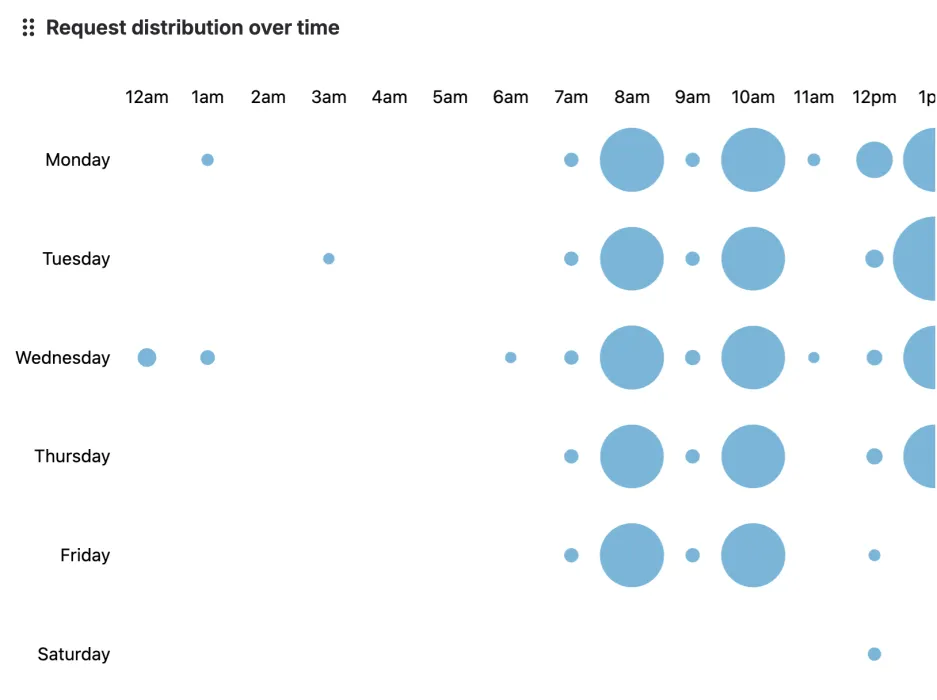
Understand operational demand by analyzing Request Distribution and Request Channel Type. Optimize agent allocation and resource planning efficiently.

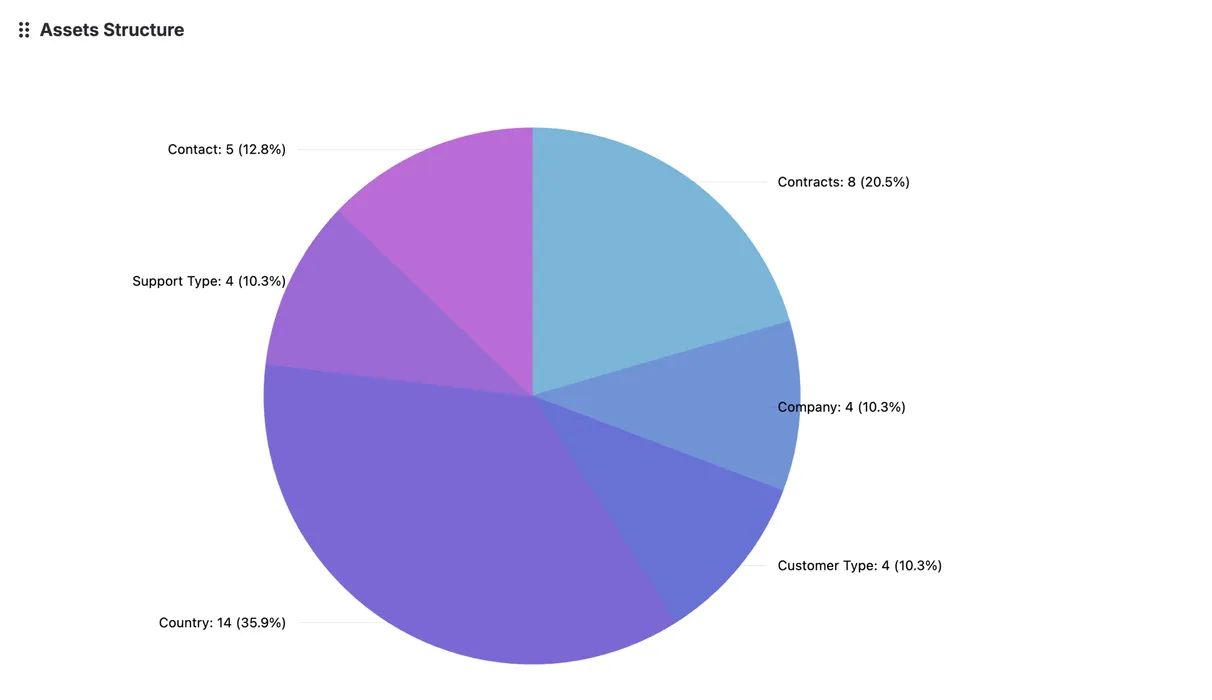
Asset Structure Reports

Visualize the distribution and structure of your assets. Link service requests directly to infrastructure data to gain critical ITSM context and strategic reporting.

Benefits

Why Teams Trust Our ITSM Reporting

Drive Strategic Business Decisions

Surface unique service desk data that links support activity to business outcomes, guiding your strategic planning.

Seamless Native Jira Dashboards

Analyze clear charts and diagrams directly within your native Jira Dashboards. No extra configuration or complex tools are required.

Boost Agent Performance with CSAT

Use direct agent scoring metrics to improve customer support. Data-driven insights lead to better team results and higher CSAT scores.

Gain Cross-Project Visibility

Access deeper insights on team and service performance, even when managing support across dozens of Jira Service Management projects.

Save Time on ITSM Reports

Achieve time efficiency with metrics that are already analyzed and ready-to-present. Skip the manual work and deliver ITSM Reports instantly.

Eliminate Workflow Bottlenecks

Identify and remove workflow issues and pain points in your service process. Use compliance data to improve process efficiency across the board.

Pricing

Simple Pricing for Your Team

Billed monthly 20% off in Annual Plan
Free
$0
Up to 10 users only
Standard
$125
per month for 100 users
Advanced
$150
per month for 100 users
Assignee - Average CSAT Report
SLA - % Met Report
Request Distribution Report
Request Channel Type Report
Organization Size Report
Assets Structure Report - -
Customer Support Basic Basic Premium
  • 30-Day Refund Policy
  • Free 30-Day Trial
  • SLA for Support
Free
$0
Up to 10 users only
Standard
$1225
annual for 100 users
Advanced
$1500
annual for 100 users
Assignee - Average CSAT Report
SLA - % Met Report
Request Distribution Report
Request Channel Type Report
Organization Size Report
Assets Structure Report - -
Customer Support Basic Basic Premium
  • 30-Day Refund Policy
  • Free 30-Day Trial
  • SLA for Support
Questions

FAQs

Get quick answers on how to measure and master your JSM service performance.

What does ITSM Reports app do?
The ITSM Reports app is the essential Jira Service Management tool that transforms raw service data into clear information. It provides customized Service Desk Reports and flexible Jira Gadgets to help you measure key metrics like CSAT, SLA compliance, agent efficiency and service demand.
How can the Request Distribution gadget help me manage agent allocation?
The Request Distribution gadget is crucial for optimizing agent staffing. It displays precisely when tickets are created throughout the day, allowing you to identify peak demand hours and allocate your agents efficiently to match the incoming service volume.
How can I track SLA compliance and service performance?
This is a core function. You can create detailed Service Desk Reports focused specifically on SLA compliance, easily tracking percentage met, and identifying service bottlenecks across all your service projects.
Can I see CSAT scores directly on my Jira Dashboards?
Yes. You can build custom Jira Gadgets to display key metrics like CSAT scores, response times, and agent performance. Add these Jira Gadgets to any Jira Dashboards for real-time visibility and management oversight.
Does this app work with assets or organizational data for reporting?
Yes. The app is designed to link service data to business context. You can run reports that analyze ticket distribution based on Organization Size and track infrastructure usage via Assets Structure reports.
How easy is it to share ITSM Reports with stakeholders?
It's very easy. Since the reports are native Jira Gadgets, you can share entire Jira Dashboards with stakeholders, ensuring they always see the latest metrics without needing separate PDF exports or external tools.
Can I customize the charts and graphs for my specific needs?
Absolutely. The app provides full customization over charts and graphs. You can select the metrics, grouping, and display types needed to create tailored ITSM Reports that align perfectly with your organization's unique service strategy.

Want to learn more?

blog-jsm-reports_x1
clock Nov 10,2023

Why do we need service desk reports?

How many times have you heard that data is powerful? Because it is. So why not use information that we already have in the service…
Read the Article
blog-performance-metrics
clock Dec 05,2023

Top 5 critical service desk metrics to measure team performance

If you’re not measuring service desk metrics and statistics, this article will explain why you should start. Keep reading to discover how to create service…
Read the Article
blog-request-channel-type
clock Jan 02,2024

Track Jira Ticket Creation: Service Desk Request Channel Reports

No matter how a customer submits a request to service desk agents, a common problem persists – the lack of clear information about where the…
Read the Article

Create your account