Test Cases
A Test Case consists of execution preconditions, test steps, expected results, and postconditions. They are designed to test a specific execution path and verify compliance with a particular requirement.
Creating a Test Case
In ATM, Test Cases are standard Jira issues. You can create them using native Jira features, such as the global Create button in the top navigation bar or the shortcut on your Kanban board. Once created, you can access all testing functionalities directly within the issue view.
During the creation process, you can immediately assign your new Test Case to a specific folder by filling out the ATM Repository custom field on the create screen. To learn more about building and managing your folder hierarchy, visit the Test Repository page.
Caution
For an issue to be recognized as a Test Case in ATM, it must be created using the specific issue type defined in your Testing Project configuration.

Test Case view
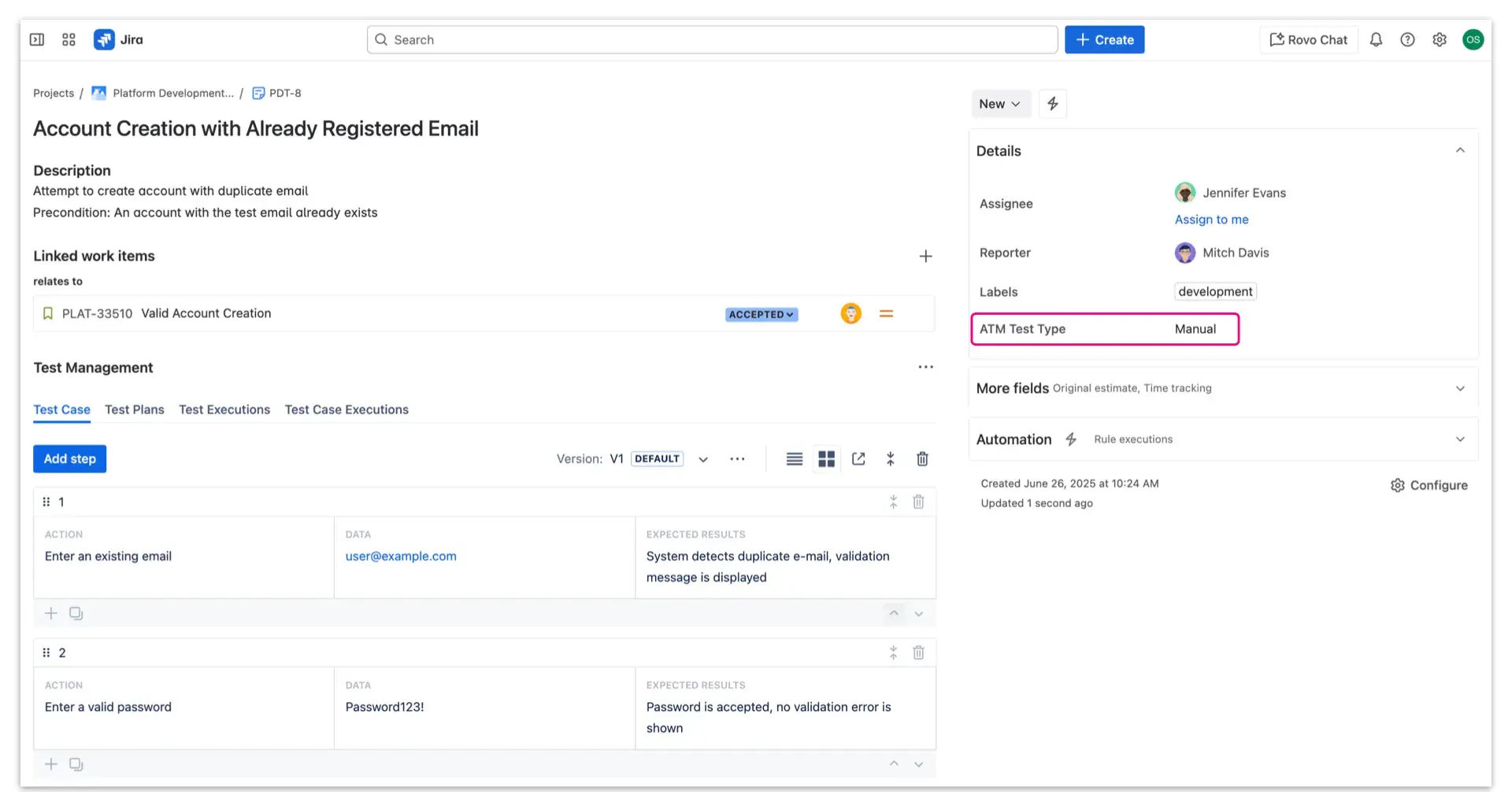
Because Test Cases are native Jira issues, they retain the standard Jira interface and navigation. Just below the description field, you will find the Test Management panel, where you can add and manage your Test Steps.
This panel is divided into four tabs to help you easily switch between related testing elements:
- Test Cases
- Test Plans
- Test Executions
- Test Case Executions
Additionally, the Test Case view includes three custom fields provided by ATM:
- ATM Preconditions
- ATM Test Type
- ATM Repository