
Why Teams Switch Jira Test Management Tools
Why QA teams switch Jira test management tools, five checks to evaluate a new one, and a vendor checklist covering cost, migration, security and maintenance.

Teams rarely replace a Jira test management tool because of one missing feature. They start looking when several problems show up at once: license costs tied to the size of the whole Jira instance, a tool that slows down as test data grows, testers repeating the same manual steps every day, and questions from compliance about where test data is stored. Switching has its own cost (migrating test cases, retraining testers, rebuilding reports), so it pays to know exactly what the new tool has to do better.
This guide covers five reasons teams reassess their test management setup and five steps to evaluate a new tool before you switch.
Key Takeaways
- Licensing and total cost: When a test management app is priced by the whole Jira user tier, companies pay for every Jira user, even if only a fraction of them write or run tests. The real cost of a tool combines the license, the migration and the ongoing admin effort.
- Daily friction: Complex configuration and poor usability cost testers more time than missing edge-case features do.
- Data residency: Test data stored on a vendor’s own servers adds another party to every security review. Apps with the Runs on Atlassian badge keep that data inside Atlassian’s infrastructure.
- Evaluation: Involve Jira admins and security teams early, let future users test the tool in their daily workflows, and judge vendors by how they respond to your feedback.
Why Teams Reassess Their Test Management Tool
The five problems that push teams to look for a new tool are usually connected: a tool that is slow and hard to use costs testers’ time on top of its license fee.
Pricing That Scales With Jira, Not With Testers
Test management apps on the Atlassian Marketplace are licensed for the same user tier as the Jira site they run on. That creates a gap between who pays and who uses the tool. Take a company with 1,000 Jira users using an app like Xray or Zephyr, with a dedicated QA team of 50. Developers and PMs occasionally view test results or linked defects, but the company still pays a full-tier license for hundreds of people who never write or run a single test case.
The gap gets harder to justify when prices go up, because every increase applies to the full user tier, not to the size of the QA team. Since all apps follow the same tier model, the price per user at your tier is what actually separates them.
A Learning Curve That Never Flattens
Dedicated issue types should make test management feel like a natural extension of Jira. Some tools, however, build an overly complex structure around them, with extensive configuration, rigid link rules and heavy administrative setup. Jira admins end up with a constant maintenance load, and new testers have to learn a confusing structure before running a single test. Instead of simplifying QA work, the tool becomes one more complex system to maintain.
Performance That Drops at Scale
Test data grows with every release: more test cases, more test plans and a new set of executions with each regression cycle. In some tools, performance drops as that volume grows. Screens load slowly, filtering takes noticeably longer and large regression runs become hard to manage.
Weak UX in Daily Testing
Testers spend most of their working day inside the tool, so usability problems cost more than missing features. Navigation that takes several steps to reach a test, long click paths for routine actions and manual work the tool could do on its own all add up. A common example: a tester marks each step of a test case as Passed and then has to set the overall status of the test case by hand, even though the result is already clear.
Test Data Outside Atlassian’s Boundary
Many test management apps store test cases, execution results and attachments on the vendor’s own servers, outside Atlassian’s infrastructure. For a security team, that means auditing another third-party vendor. In regulated industries such as automotive, finance or healthcare, external data processing alone can block an app.
Apps with the Runs on Atlassian badge avoid this, because they store and process data only inside Atlassian’s infrastructure. Step 3 below explains what the badge requires. Timing matters too: Atlassian ends support for Connect on January 31, 2027, after which Connect-based apps receive only critical security fixes. If your current tool still depends on Connect, ask the vendor about its migration plan. For more on Atlassian’s cloud options and data residency, see Atlassian Commercial vs AGC vs Isolated Cloud.
How to Evaluate a New Test Management Tool
Once the reasons for a change are clear, the evaluation comes down to five checks. Each one ends with a question worth asking the vendor or your own team.
1. Validate Costs
Start with pricing, but look at the total cost of ownership, not the license fee alone. Because Marketplace apps are priced by the Jira user tier, compare the price per user at your exact tier, for the edition that includes the features you need.
Then add migration and ongoing administration. A switch always costs time and effort upfront, but that cost can pay for itself if the new tool lowers annual license fees and takes significantly less time to maintain.
Ask the vendor: What is the total cost per user at our Jira tier, what does migrating our data involve, and what ongoing maintenance does the tool require?
2. Check Functional Requirements
Write down what your team needs before you look at feature lists. Requirements can be very specific to how a team works: custom fields for release or build tracking, test environments with several parameters, or defects visible directly on test plans.
No tool will cover every requirement on day one, so don’t rule a tool out over a missing feature before asking about it. Contact the vendor, check its public roadmap (ours is on Trello) and see how quickly it responds to what customers ask for.
Ask the vendor: Which of our requirements does the tool cover today, which are on the roadmap, and how do you handle customer feature requests?
3. Validate Security
Bring your security team in before the trial, not after. Security guidelines apply to every third-party cloud app, however useful it is to a single team. Typical questions cover where data is stored and processed, whether the app sends data outside Atlassian, which data residency regions it supports, who the vendor’s subprocessors are and which audits the vendor has passed, such as SOC 2 Type II.
For Jira apps, many of these answers follow from where the app runs. To earn the Runs on Atlassian badge, an app has to run on Atlassian’s Forge platform, store its data in Atlassian-hosted storage and send no data to outside servers. Data residency and storage then follow Atlassian’s own controls, and the vendor’s servers drop out of your audit scope.
Ask the vendor: Does the app carry the Runs on Atlassian badge, where is our data stored, and who are your subprocessors?
4. Let Future Users Test It
A demo shows the tool at its best, a trial shows how it works for your team. Run the trial with several of the testers who will use it daily, not only the person leading the evaluation, and use a sample of your own test cases to check usability and workflow friction.
Use the trial to test communication too. Share questions, edge cases and early feedback directly with the vendor. How it responds during the evaluation shows the support you will get after the purchase.
Ask the vendor: How will you respond to our team’s questions and feedback during the trial?
5. Ask Your Jira Admins About Maintenance
Jira admins carry the operational load long after the purchase, so their input is critical to understanding the tool’s true cost. Ask them to evaluate the total maintenance effort: how easily the tool fits into your current Jira setup, how much work each new project or tester requires and whether your team can manage it without outside help. With legacy, heavily customized tools, ongoing administration and partner consulting often end up costing more than the license itself.
Ask your admins: Will this tool be cheaper to maintain than the one we use today?
From Evaluation to Practice: How ATM Handles the Five Checks
A checklist is only useful if the tool on your shortlist can pass it. Appsvio Test Management (ATM) is built directly into Jira Cloud: test cases, test plans and test executions are Jira work items, the data that matters sits in Jira custom fields, and tests are executed in a panel on the work item itself. Here is how that design plays out against each check, including the areas where ATM isn’t complete yet.
Costs: A Lower License and a Migration That Pays Back
ATM follows the same Marketplace tier model as every other app, so it can’t charge you only for your QA team. What it can do is cost less per user than Xray or Zephyr, a difference that matters most at large Jira tiers. Teams with up to 10 Jira users pay nothing.
Migration is the part of the bill that doesn’t disappear. ATM imports test cases from .xlsx files, including test cases exported from Xray, and the Appsvio team helps with field mapping during the move. Import currently covers test cases, so test plans, execution history and attachments need more planning. Scope them with us before you commit.
The cost pays back in maintenance. Because test data lives in Jira work items and custom fields, admins manage it with the workflows, permissions, JQL and automation they already know, and there is no separate system to configure, monitor or audit. Over time, a lower license and a light admin load recover the one-off migration effort. That is the comparison worth making, not the license price alone.
Functional Requirements: What’s There and Where to Ask
ATM covers the core of manual testing: a test repository with folders you can search in plain JQL, test plans, test executions with environments, and requirement coverage. Defects can be created from a failed step or linked from existing bugs, and their count is visible on test plan lists. Testers can attach evidence to execution steps, and each Testing Project has a dashboard with the execution trend and each tester’s workload. One Testing Project can span several Jira spaces, so requirements stay with the product teams while test cases and reporting stay in one place.
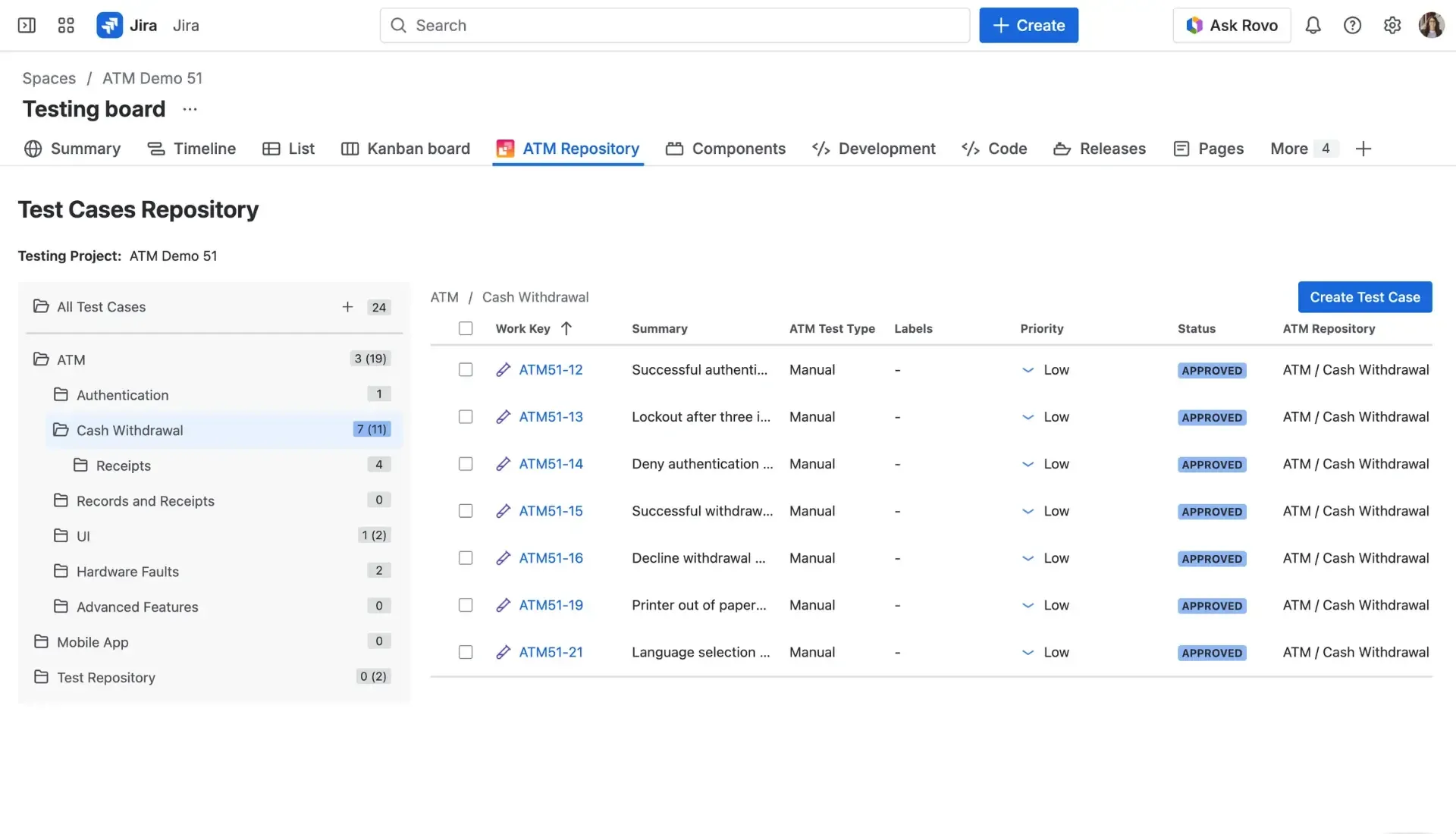
Test cases organized in folders in the ATM repository.
Iterations show the approach. When a fix touches only a few failed tests, testers re-run just those inside the same test execution, and every run stays in its history. Cloning the execution remains the better option when the whole suite has to be re-tested.
Some areas are still in progress, including BDD/Gherkin support and importing results from automated test frameworks. You can follow them on our public roadmap. If something your team needs isn’t there, tell us. Customer requests directly shape the roadmap.
Security: Data That Stays in Atlassian
ATM runs entirely on Forge and holds the Runs on Atlassian badge. The app declares no egress permissions, so test cases, executions and attachments are stored inside Atlassian’s infrastructure, in the data residency region you chose for Jira. ATM supports data residency across 12 Atlassian regions. The REST API is served by Forge as well, so connecting a CI pipeline doesn’t move data out, and AI features run on Atlassian’s own models through Rovo.
For your security questionnaire, that means no Appsvio-hosted system holding your test data and no extra subprocessor for stored files. Appsvio holds a SOC 2 Type II report, ATM is Cloud Fortified and takes part in the Atlassian Bug Bounty Program. Details, including our list of subprocessors, are in our Trust Center.
Usability: Easy to Try With Your Own Team
Testers don’t have to learn a second tool. They open a Jira work item and run the test in a panel on it, on screens built from the same components as Jira itself. To start a free trial, generate the sample project in one click: it sets up a testing project with workflows, work types and example data. Routine work takes fewer clicks: the status of a test case execution updates automatically from its steps, failing as soon as one step fails and passing once all steps pass, and testers can change statuses or assignees for many executions at once. Share your team’s feedback during the trial, and we’ll answer questions and adjust the setup with you.
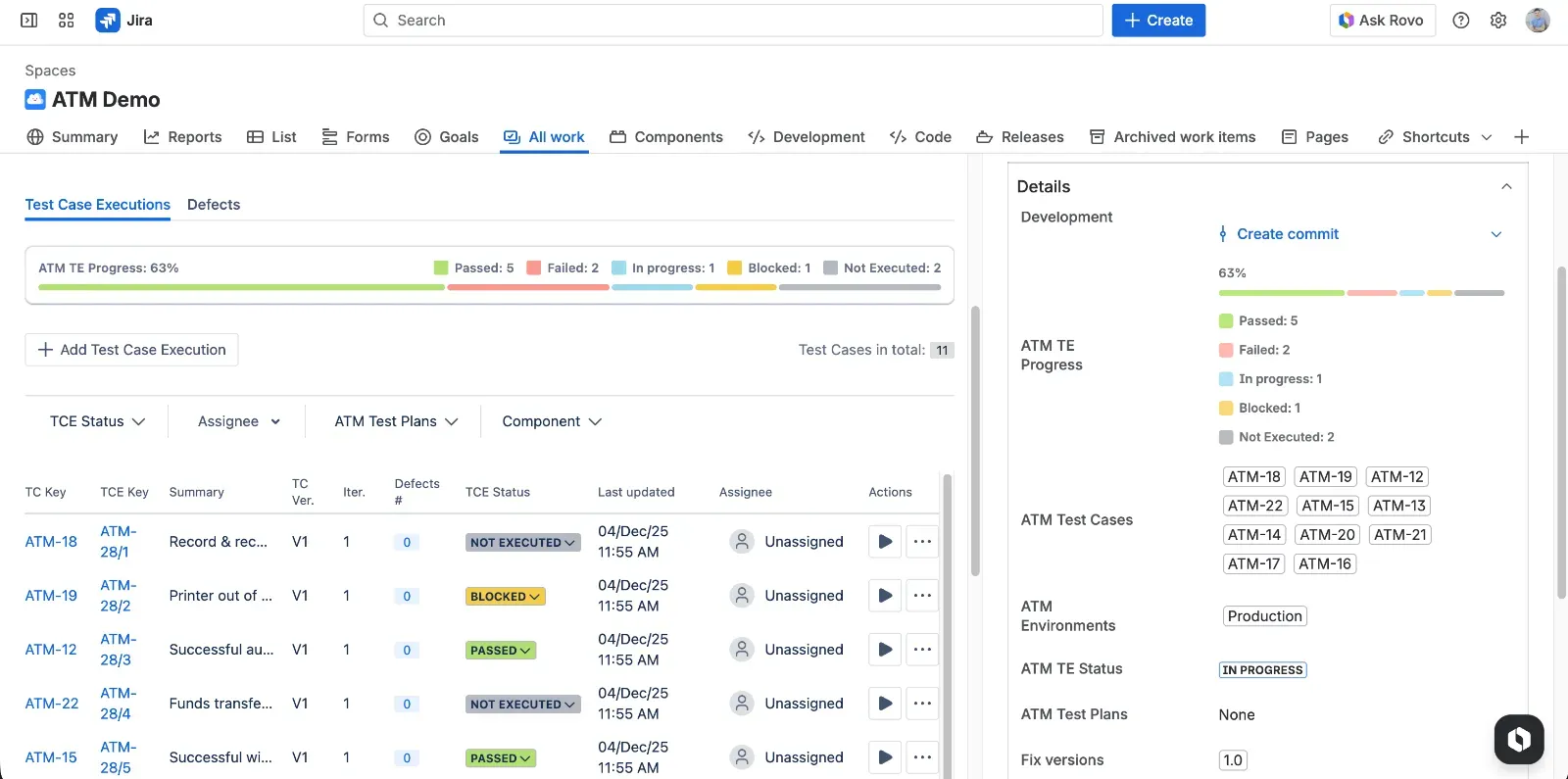
Running a test execution in a panel on the Jira work item.
How ATM Compares to Xray and Zephyr
Xray and Zephyr are the tools most teams evaluate ATM against, and both are mature products. Xray offers more configuration options than ATM and is ahead in importing automated test results and running dataset-driven tests. Zephyr keeps a simpler model that many teams find easy to start with.
The main differences come from architecture. Xray is a Forge app, but its testing data is written to Xray’s own cloud layer, and attachments sit on Xray’s servers with per-instance storage quotas. That means a separate subprocessor list to review and no eligibility for Runs on Atlassian. Testers also execute tests on a separate Testing Board rather than on the work item. Zephyr still runs partly on Connect, stores data outside Atlassian with data residency limited to the US and EU, and uses an external AI provider alongside Rovo.
Appsvio Test Management takes a different route:
- Test data, attachments and API traffic stay inside Atlassian’s infrastructure
- Testing happens on Jira work items, with no separate testing layer to learn or maintain
- The price per user is lower than Xray’s or Zephyr’s
- Missing features are listed openly on a public roadmap
Checklist Before You Sign a New Contract
Use these questions in vendor calls or copy them into your RFI. The last column shows answers that should make you look more closely.
| Question to ask the vendor | Why it matters | Red flag answer |
|---|---|---|
| 1. What does the edition with all the features we need cost per user at our Jira tier? | Marketplace pricing covers your whole Jira tier, and some features sit in a higher edition or a separate app. | No clear per-user price at your tier, or a key feature that turns out to need an extra purchase. |
| 2. What exactly transfers in a migration, and what help do you provide? | Migration is the biggest one-off cost of a switch. Knowing the scope upfront lets you plan it realistically. | No clear list of what transfers (test cases, plans, executions, attachments), or basic data transfer that requires a paid partner. |
| 3. Which of our requirements are missing, and how can we follow progress on them? | No tool covers everything on day one. What matters is whether the vendor can close the gaps that matter to you. | No public roadmap, or a vague “it’s on our list” with no way to track it. |
| 4. Does the app hold the Runs on Atlassian badge, and does it support our data residency region? | The badge confirms that data is stored and processed only inside Atlassian’s infrastructure, in the region you chose for Jira. | ”We’re built on Forge” given as the answer. Forge apps can still send data to the vendor’s servers. |
| 5. Who are your subprocessors, what data do they process and why? | Your security and legal teams need to see every party that handles your data before they approve the app. | No public subprocessor list, or unclear answers about what data leaves Atlassian. |
| 6. Can testers re-run only the failed tests inside the same execution? | Re-testing inside one execution keeps the history in one place and avoids duplicate executions in Jira. | ”You have to clone the whole test execution.” |
| 7. What does day-to-day administration of the app involve? | Admin time is a cost that lasts as long as you use the tool, and with heavily configured tools it can exceed the license. | A separate configuration layer that only trained app admins understand, or setup that needs outside consultants. |
| 8. How will you support us during the trial? | How a vendor answers questions before you buy shows the support you will get after. | Slow or generic answers, or questions redirected to documentation only. |
New test management tool checklist.
Switch for the Right Reasons
A new test management tool is worth the switch only if it solves the problems that made you start looking, at a total cost your team can justify. Running all five checks takes time, but far less than undoing a migration that didn’t pay off. If ATM is on your shortlist, start a free trial on the Atlassian Marketplace and let your testers decide.
See How ATM Fits Your Team
Book a technical walkthrough to discuss your migration path and requirements with the ATM team.
Book a walkthroughFAQs
Related posts

Dariusz Jaroń
•Oct 2, 2026

Dariusz Jaroń
•Sep 23, 2026

Katarzyna Pawlak
•Jul 3, 2026