
Test Coverage Report: What It Is, How to Calculate It & Example
What is test coverage and how do you calculate it? Formula, a sample coverage report, test vs code coverage, and how to track requirements coverage in Jira.

A test coverage report shows what share of your requirements have tests, how many of those tests were run, and how many passed. The basic formula is simple: covered requirements ÷ total requirements × 100%. The hard part is making the number mean something before a release.
This guide explains how to calculate test coverage, what a good coverage report looks like (with a worked example), how it differs from code coverage, and how to track it in Jira.
What Is Test Coverage?
Test coverage is the degree to which your requirements are verified by tests. It answers three questions:
- Do we have tests for every requirement?
- Have those tests been executed?
- Did they pass?
Coverage is about confidence, not the number of tests. A project with 2,000 test cases that aren’t linked to requirements can’t prove that the release is complete. A project with 150 well-linked tests can show exactly what was verified and what wasn’t.
What Is a Test Coverage Report?
A test coverage report is a summary of those three answers for a release, sprint, or project. A useful report shows:
- the percentage of requirements covered by at least one test,
- which requirements have no tests at all,
- execution progress: passed, failed, in progress, not run,
- coverage broken down by requirement priority or risk. QA leads use it to decide whether a release is ready. Auditors use it as evidence that every requirement was verified.
How to Calculate Test Coverage
There are two numbers worth tracking. The first tells you whether tests exist. The second tells you whether they actually prove anything.
1. Requirements coverage – how many requirements have at least one linked test case:
Requirements coverage = (requirements with at least 1 linked test case ÷ all requirements in scope) × 100%
2. Verified coverage – how many requirements have tests that were executed and passed:
Verified coverage = (requirements whose linked tests all passed ÷ all requirements in scope) × 100%
The gap between the two is your real risk. High requirements coverage with low verified coverage means the tests exist, but you can’t ship on them yet.
Example: A Coverage Report for One Release
Imagine a release with 40 requirements in scope:
| Metric | Count | Coverage |
|---|---|---|
| Requirements in scope | 40 | – |
| Requirements with at least one test case | 34 | 85% requirements coverage |
| Requirements with all tests executed | 30 | 75% |
| Requirements with all tests passed | 27 | 67.5% verified coverage |
| Requirements with a failed test | 3 | – |
| Requirements with no tests | 6 | – |
An 85% headline number looks fine. But only 27 of 40 requirements are actually verified, 3 have failing tests, and 6 have no tests at all. If any of those 9 requirements is marked Critical, the release isn’t ready, whatever the percentage says.
That’s why a good report always shows the uncovered and failing requirements by name, not just the percentage. For each uncovered one, the next step is to write a test case or record why it’s out of scope.
Test Coverage vs Code Coverage
The two terms are often used interchangeably, but they measure different things and are owned by different people.
| Test coverage (requirements coverage) | Code coverage | |
|---|---|---|
| What it measures | Share of requirements verified by tests | Share of code lines, branches or functions executed by automated tests |
| Question it answers | Did we test what we promised to build? | Which parts of the code did our tests run? |
| Typical owner | QA lead, test manager | Developers |
| Typical tools | Test management tools in Jira | JaCoCo, Istanbul, coverage.py, built into CI |
| Blind spot | Doesn’t show untested code paths | Doesn’t show missing requirements or manual tests |
You need both. Code coverage can be at 90% while a whole feature from the backlog has no test at all. Requirements coverage can be at 100% while error-handling code is never executed.
Types of Test Coverage
Most QA teams track one or more of these:
- Requirements coverage – every requirement has at least one test. The default for most Jira teams.
- Risk-based coverage – high-risk and critical requirements are covered first and most thoroughly.
- Feature coverage – every user-facing feature or epic has tests, useful for release sign-off.
- Code coverage – lines and branches executed by automated tests, tracked by developers in CI.
Is 100% Test Coverage a Realistic Goal?
100% requirements coverage means every requirement in scope has at least one linked test. It’s achievable and, in regulated projects, often expected. It does not mean the software is bug-free: a requirement can be covered by one weak test that checks only the happy path.
A more useful target looks like this:
- 100% coverage of Critical and High priority requirements,
- every uncovered requirement listed with a reason (out of scope, deferred, tested elsewhere),
- verified coverage tracked separately from requirements coverage. To get there, link tests at the moment you write the requirement, not at the end of the sprint. Coverage gaps are cheapest to close before development starts.
Why Coverage Reporting Matters in Regulated Industries
In regulated environments, coverage is much more than a best practice. It’s evidence. The GAMP 5 guidelines link every specification to design and, finally, to verification. Without a coverage report, that chain can’t be shown to an auditor.
In practice, auditors look for three things: every requirement traced to at least one test, the result of each test execution, and a record of who ran it and when.
INFO
GAMP 5 is used mainly in pharmaceuticals, biotechnology and medical devices.
How to Create a Test Coverage Report in Jira
Jira gives you the building blocks for coverage: work item links and JQL. On their own, they produce a list of linked work items rather than a report, and that list gets hard to maintain once tests are reused across releases.
Appsvio Test Management (ATM) adds Test Cases, Test Plans and Test Executions to Jira as work items and links them to your requirements and to the bugs you already track in Jira. A requirement can be any work type you map in the Testing Project, such as an Epic, Story or Task.
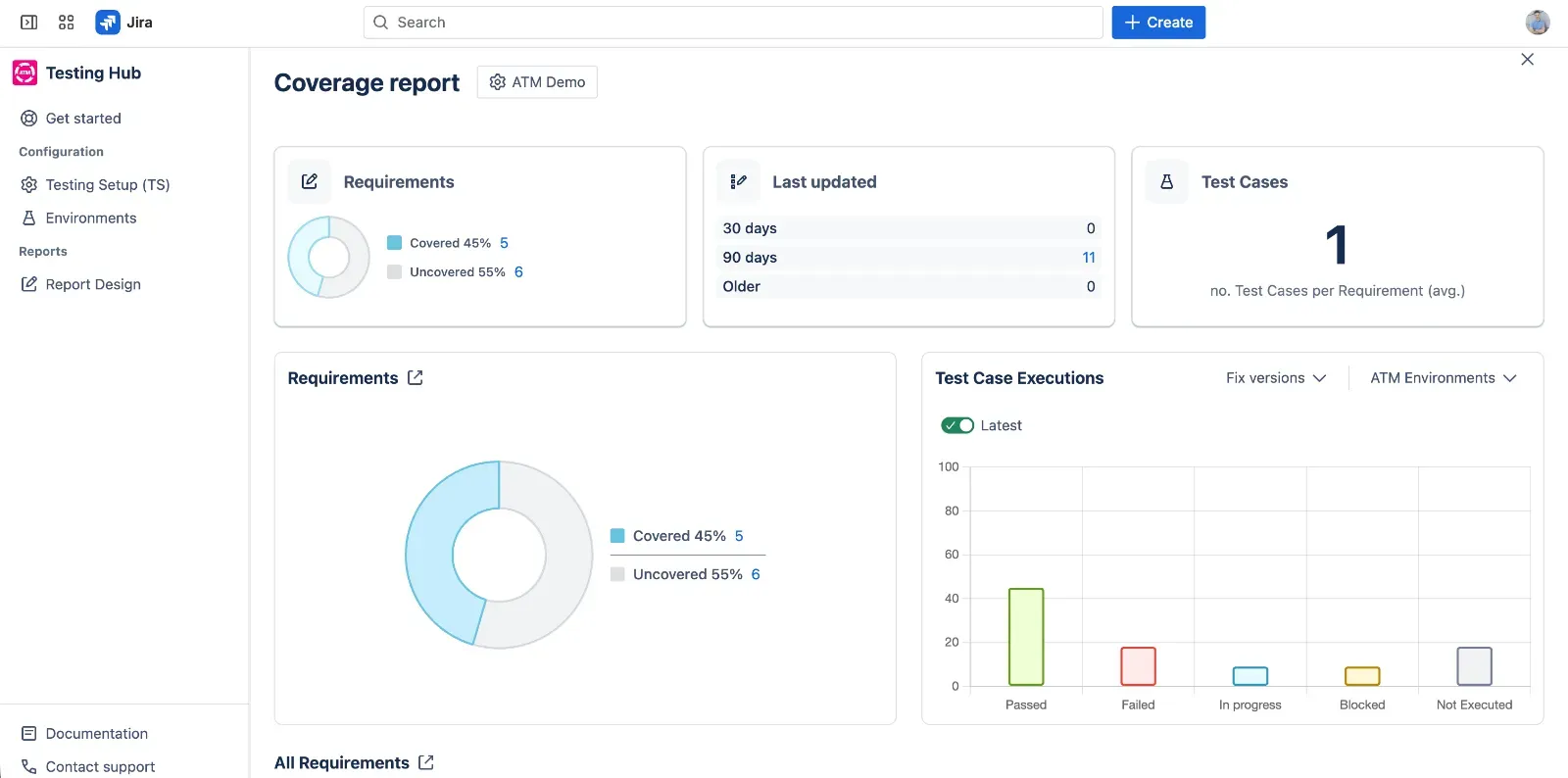
With those links in place, the Coverage report shows:
- how many requirements are covered and uncovered, with a drill-down list for each group,
- Test Case Execution results by status: Passed, Failed, In progress, Blocked and Not Executed,
- the average number of Test Cases per requirement, how recently they were updated, and their test types,
- filters for fix version and environment. You can also see coverage on the requirement itself: the Test Management panel shows a coverage badge, the linked Test Cases and a link to the Coverage report.
For example, a QA manager can narrow the requirements scope to Critical and High priority with JQL and see in one view which of them still have no tests and how their Test Case Executions went. The Traceability report then shows each requirement’s executions and defects, without exporting anything to a spreadsheet.
Before You Ship: A Coverage Checklist
Before a release, your coverage report should answer one question in under a minute: is any critical requirement untested or failing? Check that:
- every Critical and High requirement has at least one linked test,
- every linked test for those requirements has been executed in this release,
- no Critical requirement has a failed test without an accepted defect,
- every uncovered requirement has a written reason,
- the report is shared with the people who sign off the release.
Check your release coverage
See which requirements are still untested before release, built from the links you already have in Jira.
Try it freeThis article was updated on October 14, 2026.
Related posts

Dariusz Jaroń
•Oct 2, 2026

Dariusz Jaroń
•Sep 23, 2026