
Release Readiness in Jira: One Test Progress Number for the Whole Release
Are you ready to release? See one test progress number for a whole release in Jira, across components, test plans and environments.

In a big release, test progress lives in dozens of test plans and hundreds of test executions. Appsvio Test Management (ATM) adds Test Campaign on top of them and shows one progress number for the whole release. No other test management tool for Jira has this level, Xray included.
Release readiness usually comes down to one meeting and one question: where are we with testing? With twenty components, each tested on several environments, that answer arrives as twenty separate percentages.
Below, we follow that question through one example morning: from the release manager’s single number, down to a tester’s run on pre-prod, and back up to a decision.
Key Takeaways
- Too many numbers: In a big release, test progress is spread across dozens of test plans and hundreds of test executions. Each of them shows its own percentage.
- One number for the release: Test Campaign groups every test plan in the release and shows a single test progress percentage, with each plan’s progress and all defects from the plans in tabs below it.
- Three levels, three audiences: The campaign is for organization leaders, the test plan for the lead of one component and the test execution for test managers and testers. Each level opens into the one below, so a low number leads straight to its cause.
- A progress threshold: The release readiness checklist at the end starts here: before the go/no-go meeting, agree on how much campaign progress the release needs, then check the campaign against that number.
- No open critical defects: The checklist also asks whether any critical defects are still open. The campaign’s Defects tab collects defects from every plan and shows each one’s priority and status.
- Only in ATM: None of our competitors, Xray included, offers a level above the test plan.
Why Test Progress Is Hard to Track in a Big Release
Imagine your company is preparing a big release. It’s Tuesday, 9 a.m., the go/no-go meeting the day before deployment, and someone asks where testing stands. Each component lead replies with the progress of their own test plan.
The numbers add up fast. To make this concrete, picture an example release, and keep its numbers in mind, because the rest of this article uses them. It has twenty components, from the web and mobile apps to payments, and each component has its own test plan: twenty test plans with around 3,000 test cases between them. Each plan is tested on QA, staging and pre-prod, and each environment gets about five builds before the release, which gives roughly 300 test executions. Every one of those plans and executions has its own progress percentage and test metrics.
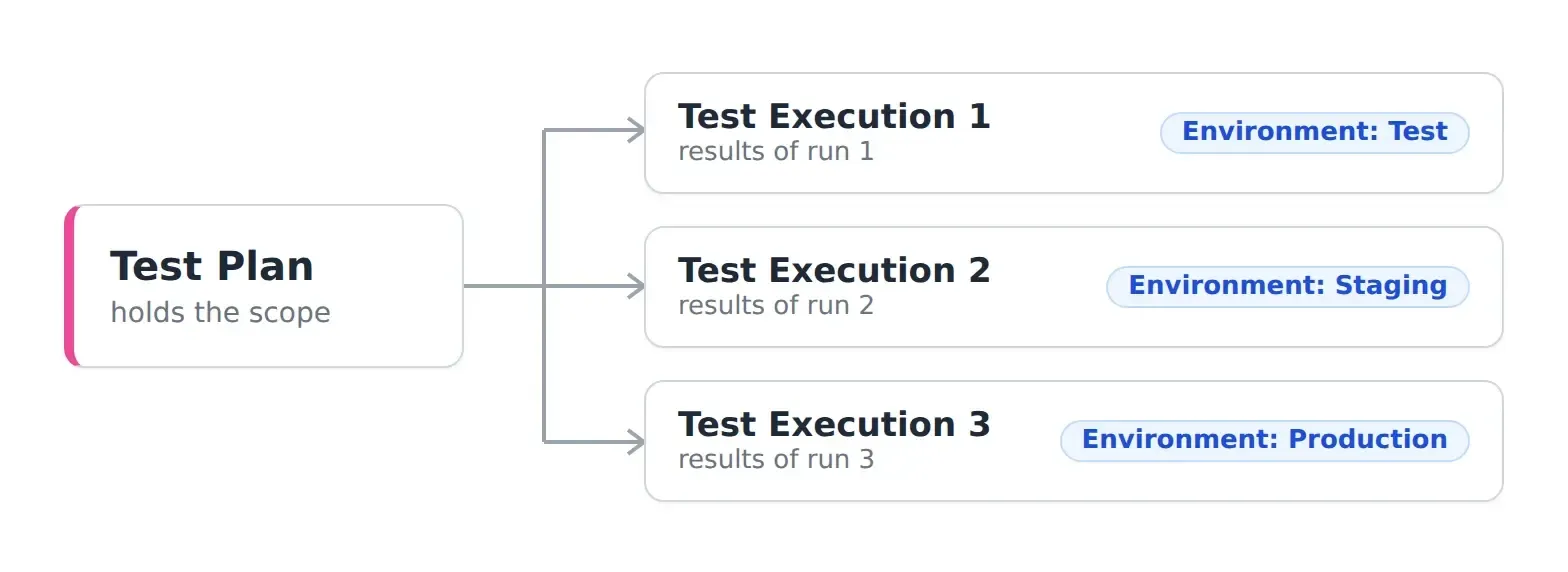
One test plan holds the scope. Each run on a different environment is a separate test execution with its own results.
Each percentage is correct for its scope: one component, one environment or one run. To see where the whole release stands, someone has to combine them.
In most companies, that someone does it by hand. A test manager copies plan statuses into a spreadsheet before the meeting, a data team maintains a BI report on top of Jira, or the release manager calls another status meeting. Each option costs someone’s time, and the result is out of date as soon as a tester sets the next result.
Three Levels of Test Progress in Jira: Test Campaign, Test Plan and Test Execution
Appsvio Test Management shows test progress in Jira at three levels: test campaigns, test plans and test executions. All three use the same test results, and each one is built for a different person in the release.
| Test Campaign | Test Plan | Test Execution | |
|---|---|---|---|
| Who looks at it | Organization leaders, business stakeholders, release manager | Team lead or test manager of one component | Test manager, tester |
| Question it answers | Where is the whole release, and can we ship? | How far along is my part of the application? | What’s left in this run, and what failed? |
| Decisions it supports | Go/no-go, moving the release date, adding people to a component | Team priorities, which environment needs work, whether the component is ready | What to test next, what to report as a defect, what to retest |
Three levels of test progress in Appsvio Test Management and who uses each one.
Test Campaign: Test Progress for the Whole Release
At 9:00 in our example, the release manager opens the test campaign for the release. One progress bar covers all twenty test plans and shows 93%, below the 95% the team agreed on for this release. Below it, a table lists every plan with its own progress and number of test cases. Every plan except one is at 95% or higher. The payments plan, with 150 of the 3,000 test cases, is at 40%. Next to the plans, the Defects tab lists every defect raised across all twenty plans, each tagged with the plan it came from. The tab also shows each defect’s priority and status, and none of the open ones is critical.
This is the view for organization leaders and the release manager, and it supports decisions about the release as a whole: go or no-go, a new date, more people for a component that’s behind.
When the business needs to know where testing stands for the whole release, they open the test campaign. They get one number for all of it.
 Krzysztof Skoropada, CEO, Appsvio
TIP
Tip: Progress Includes Failed Tests.** The progress bar counts every test that has a result, failed ones included. Its legend shows how many tests passed, failed, are in progress, are blocked or haven’t been executed, so a high percentage with many failures is easy to spot.
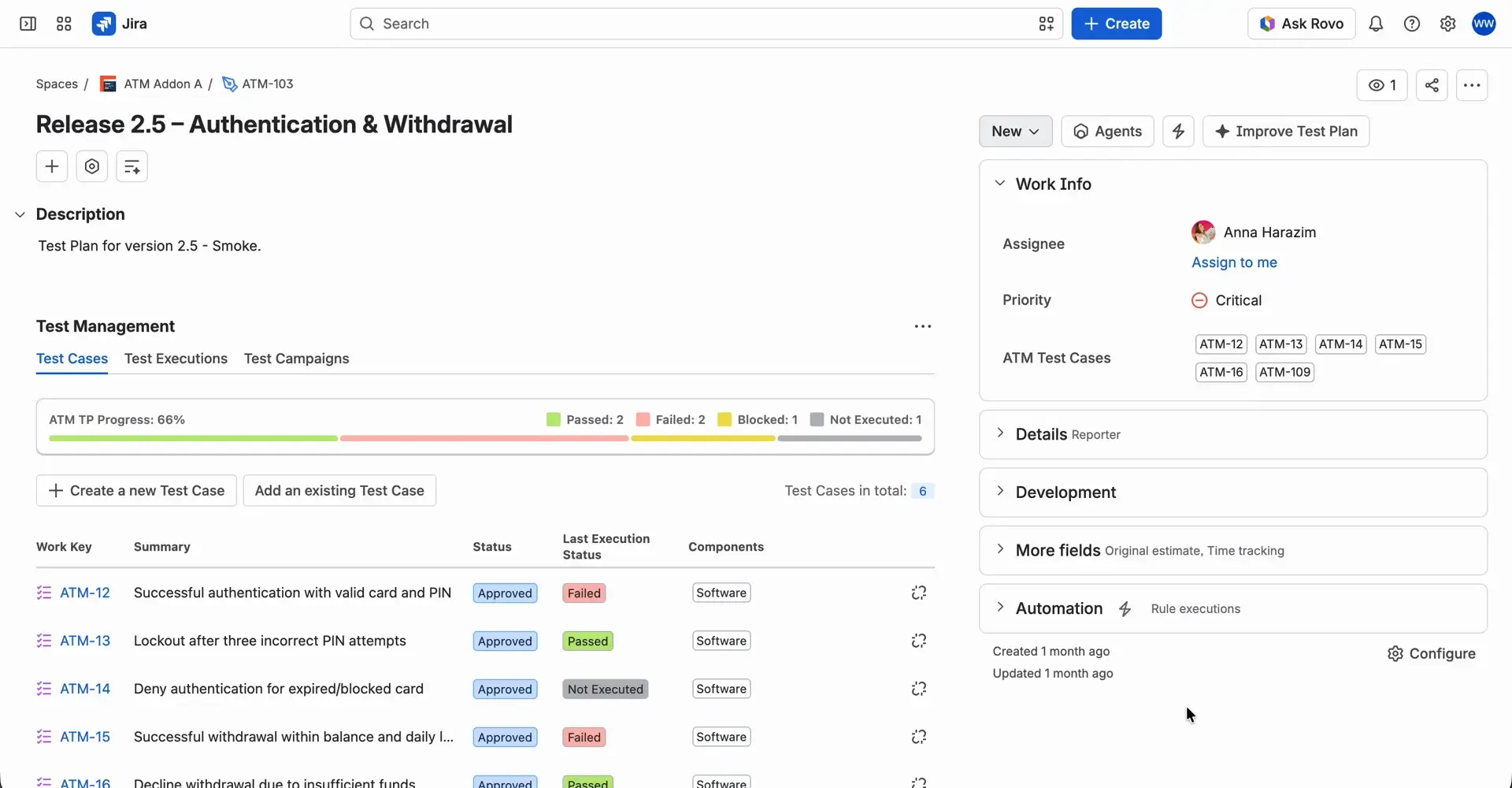
The same rule applies to test plans: 66% here includes two failed tests, and the legend shows them next to the passed ones.
Test Plan: One Component Across All Environments
At 9:05, the payments lead opens the payments test plan. Its progress bar shows the state of the whole component, and the table below lists its test executions, each with its environment, status, progress and number of defects. The QA and staging runs for the latest build are finished. The pre-prod run has barely moved.
The test plan is the team lead’s view, used to set priorities within the team and decide when the component is ready.
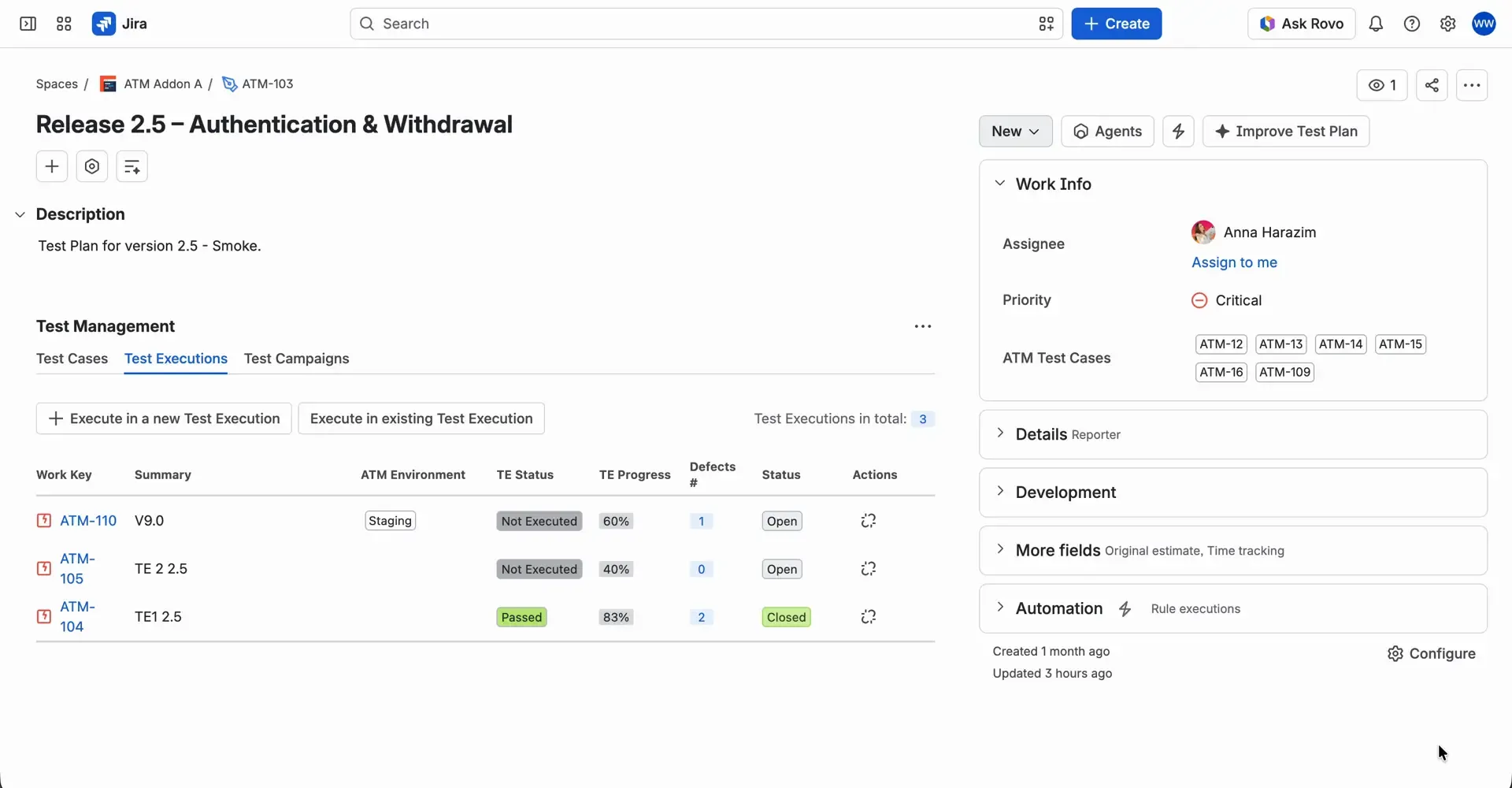
The Test Executions tab of a test plan lists each run with its environment, TE Status, TE Progress and number of defects.
Test Execution: One Run on One Environment
At 9:10, a tester on the payments team opens the pre-prod test execution. It shows the progress of that single run and the status of each test case in it. Most tests are marked Blocked, because the pre-prod environment has been unavailable since yesterday evening. Two tests did run and failed, and their defects are already linked.
Testers and test managers use it to decide what to run next, what to report as a defect and what to retest after a fix.
Example: A Go/No-Go Decision in 20 Minutes
By 9:20, the answer has traveled back up. The release manager knows that 93% reflects one blocked environment in one component, with every other component at 95% or higher. The meeting moves the release by two days, until the pre-prod environment is back and the payments tests can run. Each person worked from their own level, and nobody had to prepare a spreadsheet.
Why Xray and Other Jira Test Management Tools Stop at the Test Plan
Without a campaign level, the same Tuesday morning goes differently. The release manager asks twenty component leads for a status, someone opens a spreadsheet to add the numbers up, and the go/no-go decision moves to the afternoon or the next day.
Test management apps for Jira, Xray included, stop at the test plan. Teams that want progress for a whole release build it themselves, in spreadsheets or in BI tools such as eazyBI. Test Campaign adds that level directly in Jira, using the results testers already record.
| Without Test Campaign | With Test Campaign | |
|---|---|---|
| Where the release number comes from | A spreadsheet or BI report built from test plans | A test campaign work item in Jira |
| Who puts it together | A test manager, release manager or data team | ATM calculates it from test results |
| When it’s available | Before the meeting, once someone has prepared it | At any time |
| How current it is | As of the last manual update | Shows the latest test results |
Release-level test progress with and without Test Campaign.
We've shown Test Campaign to a number of companies, and it does what they need. None of our competitors have it, Xray included.
Krzysztof Skoropada, CEO, AppsvioRelease Readiness Checklist for Your Go/No-Go Meeting
A full release readiness checklist covers more than testing, and the five questions below cover the testing part. They’re the checks the release manager made on Tuesday morning, and each one points to the place in ATM where you’ll find the answer. Go through them before your next go/no-go meeting.
- Has the release reached its progress threshold? Agree before the meeting on how much campaign progress the release needs, then compare that number with the progress bar on the test campaign. The gap shows how much is left to test.
- How many tests failed? Look at the legend of the same bar. Failed tests count as executed, so the percentage alone doesn’t tell you this.
- Which component is holding up the release? Compare the plans in the campaign’s test plans table and open the one with the lowest progress.
- Are there open critical defects? Open the Defects tab on the campaign. It lists every defect from all plans, with the plan and test execution each one came from, its priority and its status.
- Is every component in the campaign? Check the test plans table. A component without a plan in the campaign isn’t counted in the release number.
Summary: Release Readiness With One Number
When you assess release readiness for a big release, the question “where are we with testing?” has one place to look: the test campaign. In the example above, it took twenty minutes to get from one number to a blocked environment and back to a decision. Organization leaders see one number for the release, component leads see their test plan, and testers see their runs.
Test Campaign is built for larger organizations whose releases span many teams, components and environments. With one team and one test plan, the test plan’s progress already answers the question.
Try Test Campaign in Appsvio Test Management
Start a free trial on the Atlassian Marketplace, or book a demo with our team. Setup details are in the Test Campaign documentation.
See Test Campaign in Action
Book a demo and we'll show you one test progress number for your whole release.
Book a demoFAQs
Related posts

Dariusz Jaroń
•Oct 2, 2026


Dariusz Jaroń
•Sep 23, 2026