
Mastering Jira Automation, Issue Templates & Time Tracking
Scale your workflow using Jira automation and issue templates. Combine Jira tickets with automated time tracking to improve accuracy and team capacity.


What do managers want more than anything else? Time and control. It shouldn’t come as a surprise - even for the most seasoned professionals, the role of a project manager is one of the hardest to master. Between coordinating team members, avoiding expensive mistakes, and hitting deadlines, a PM needs to see everything at once. In a high-stakes environment, there is simply no margin for error.
Navigating Through Your Jira Tickets
A project’s lifecycle generally consists of two distinct phases: planning and execution. During the initial stage, you build the foundation. Managers must look ahead to set goals, curate tasks, and allocate workloads, ideally leading to a flawless delivery. Once planning is complete, it’s time to put the theory into practice. This is when the true capacity of the team is tested, and the manager’s job shifts to ensuring everyone can deliver.
The robust functionality of the platform makes it clear why it’s the go-to tool for managing complex Jira tickets. In the middle of project chaos, Jira acts as a reliable compass. The introduction of Jira automation further enhanced this, allowing managers to stop wasting hours on mundane, repetitive tasks and focus on higher-level strategy.
Solving Bottlenecks with Jira Project Automation
But what happens when the very phases mentioned above become bottlenecks that even standard Jira project automation can’t solve? Planning involves creating not just the project itself, but also countless individual Jira tickets - a process that is often incredibly time-consuming.
Once the project is underway, Jira time tracking becomes the next hurdle. Every team strives for efficiency, and accurate worklogs are the only way to see how much time is actually needed for specific tasks. This data allows managers to set realistic deadlines and delegate responsibilities based on real-time capacity management. While Atlassian’s ecosystem is powerful, there is always room for improvement. Marketplace apps like Issue Templates Agent and ActivityTimeline refine these areas, turning Jira into an even more powerful tool for saving time.
Building a Solid Base with Jira Issue Templates
While there are some native templates in Jira for project types, they only scratch the surface. Managers often face the monotony of creating Jira tickets in large quantities. This constant duplication isn’t just boring - it increases the risk of human error, miscommunication, and general disorganization. This is where Jira issue templates make a difference. Issue Templates Agent, a top-rated app on the Marketplace, brings consistency to your fingertips. By using issue templates for Jira, you can standardize your workflows and ensure no detail is missed.
Kicking off Faster with Jira Automation Templates
Even the best managers can’t predict every variable. However, most projects share essential, repetitive tasks. By using Jira automation templates, you can stay several steps ahead.
For example, you can set a trigger so that whenever a new project is created, a set of Jira ticket templates (like ‘Defining Project Objectives’ or ‘Risk Assessment’) is applied instantly. This results in comprehensive, well-described Jira tickets without the manual effort. You plan once and reap the rewards every time you start a new project. 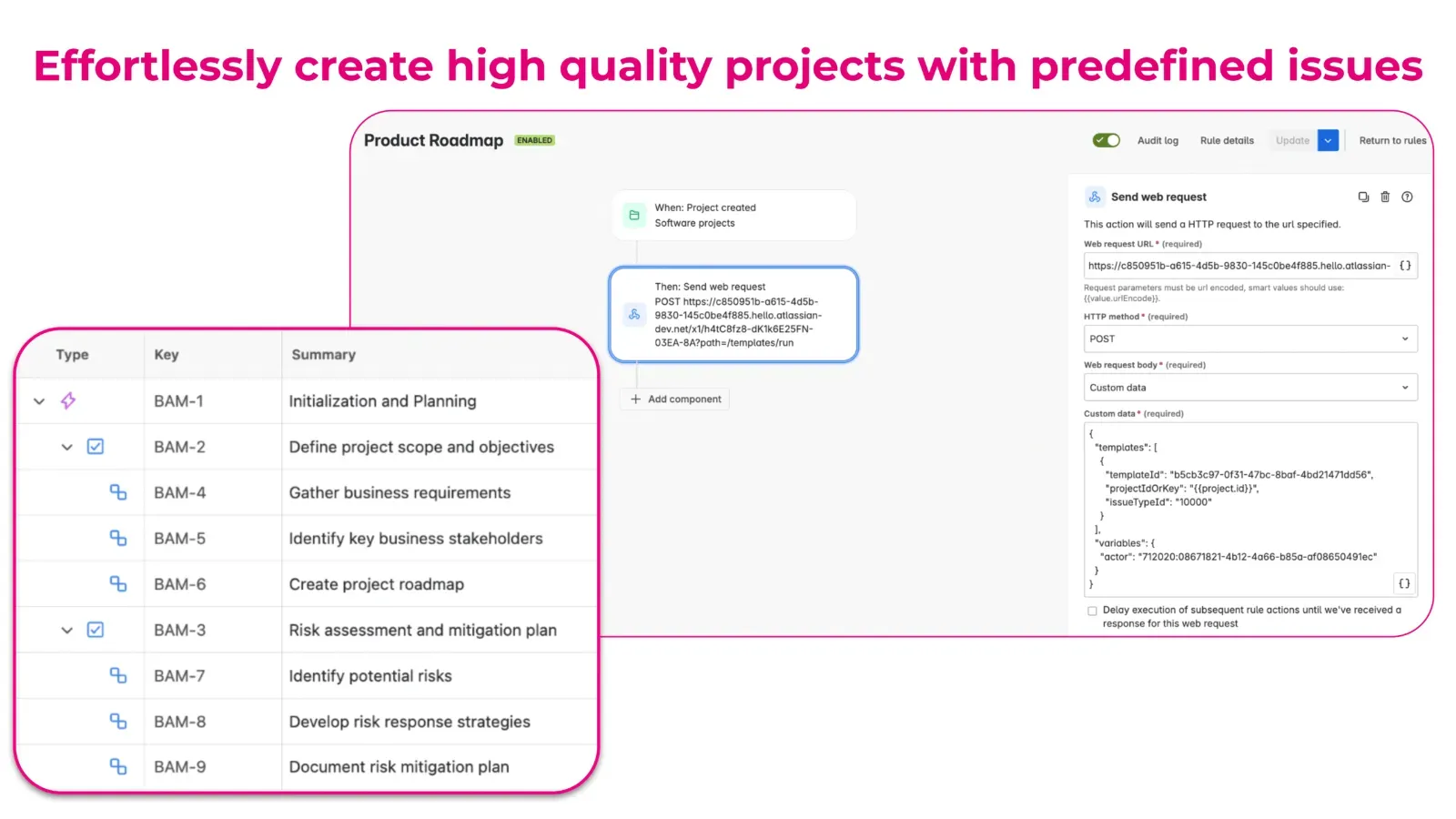
Automating Complex Hierarchies with Jira Ticket Templates
Templates aren’t just for single tasks. You can predefine advanced structures using Jira epic templates. To minimize mistakes and keep the flow moving, users can create a solid base of epics, tasks, and subtasks. Whether you are using a specific task template or a broad project template, automation ensures that your Jira ticket templates maintain a high standard across the board. 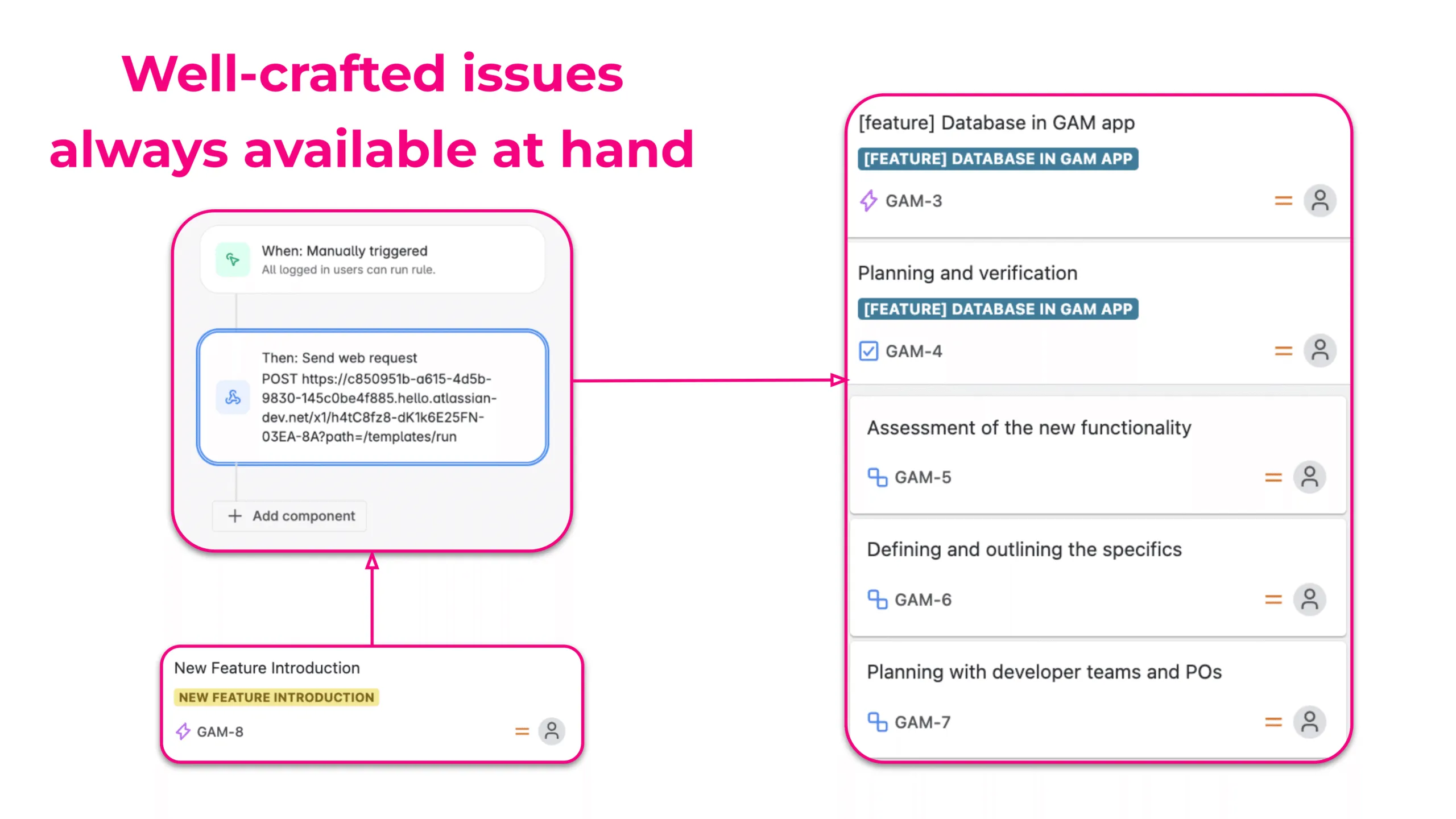
Scheduling Recurring Jira Tickets with Automation
Systematic tasks are inevitable, but they are also easy to forget. Jira automation can handle these periodic chores by creating issues from Jira issue templates with fields already filled out. This removes the administrative weight from the manager’s shoulders, allowing them to focus on the team’s actual progress. 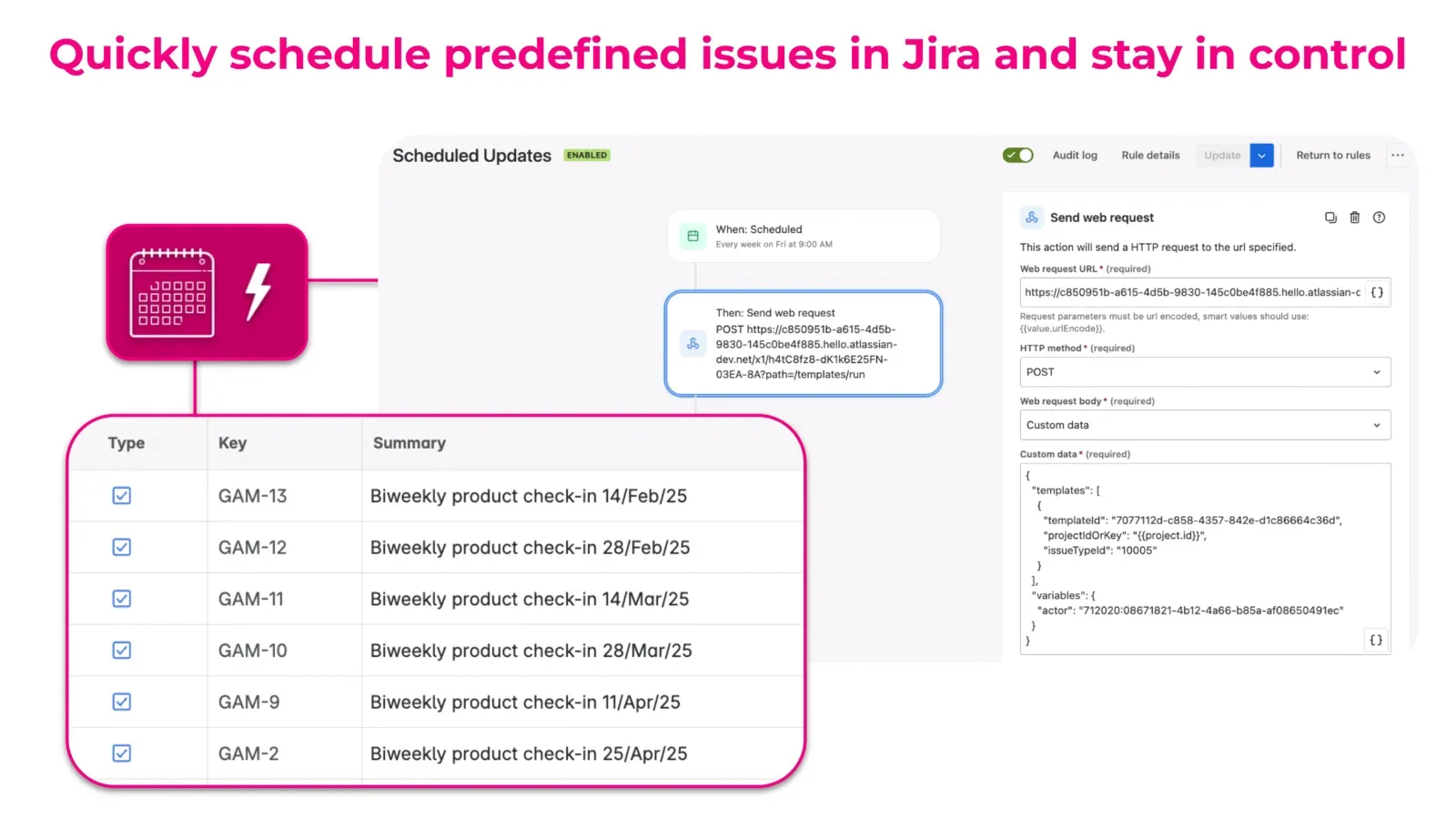
Automating Capacity Management and Time Tracking
Once projects are in motion, managers must stay vigilant. This is the phase where delays often hide. Jira time tracking plays a vital role here, though it sounds simpler than it actually is. Often, teams get so immersed in their work that they forget to log hours, leaving managers to struggle with incomplete data. This is how resource planning turns into a guessing game. ActivityTimeline solves this by handling time tracking automation and capacity management with precision.
No One Has Time to Babysit Worklogs
Ask any project manager: getting consistent worklogs is an uphill battle. When people forget to log time, you’re left with vague estimates and missing hours. Without accurate data, you’re forced to make resource forecasting decisions in the dark. This leads to overbooked teams and slipping deadlines.
Fixing Time Tracking Chaos
ActivityTimeline changes the game by automating time tracking in Jira. Instead of guesstimating, the system uses Jira’s start and due dates to calculate workloads automatically. It spreads the work across available days, factoring in weekends and holidays to prevent team overbooking. This is a superior manual time blocking alternative. 
For teams with strict rules, closing time tracking periods is a lifesaver. Once a period ends, worklogs are locked to ensure airtight compliance reporting. If a correction is needed, a grace period for worklogs (up to 30 days) provides the perfect balance between structure and flexibility. 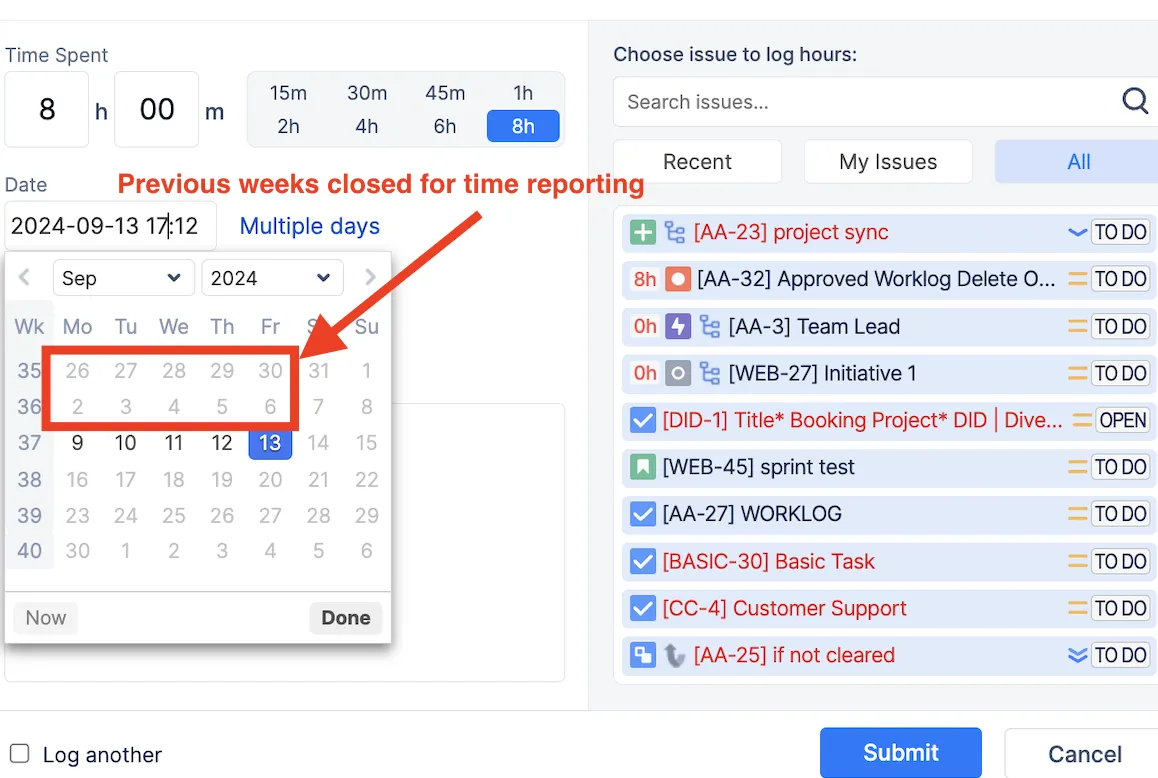
Still, life happens. That’s why ActivityTimeline introduces a grace period – an extra buffer of up to 30 days for those last-minute corrections. It’s a balance between structure and flexibility. Set it for a few days if you want a bit of leeway, or shut it down immediately for airtight compliance.
Smart Forecasting Instead of Guesstimates
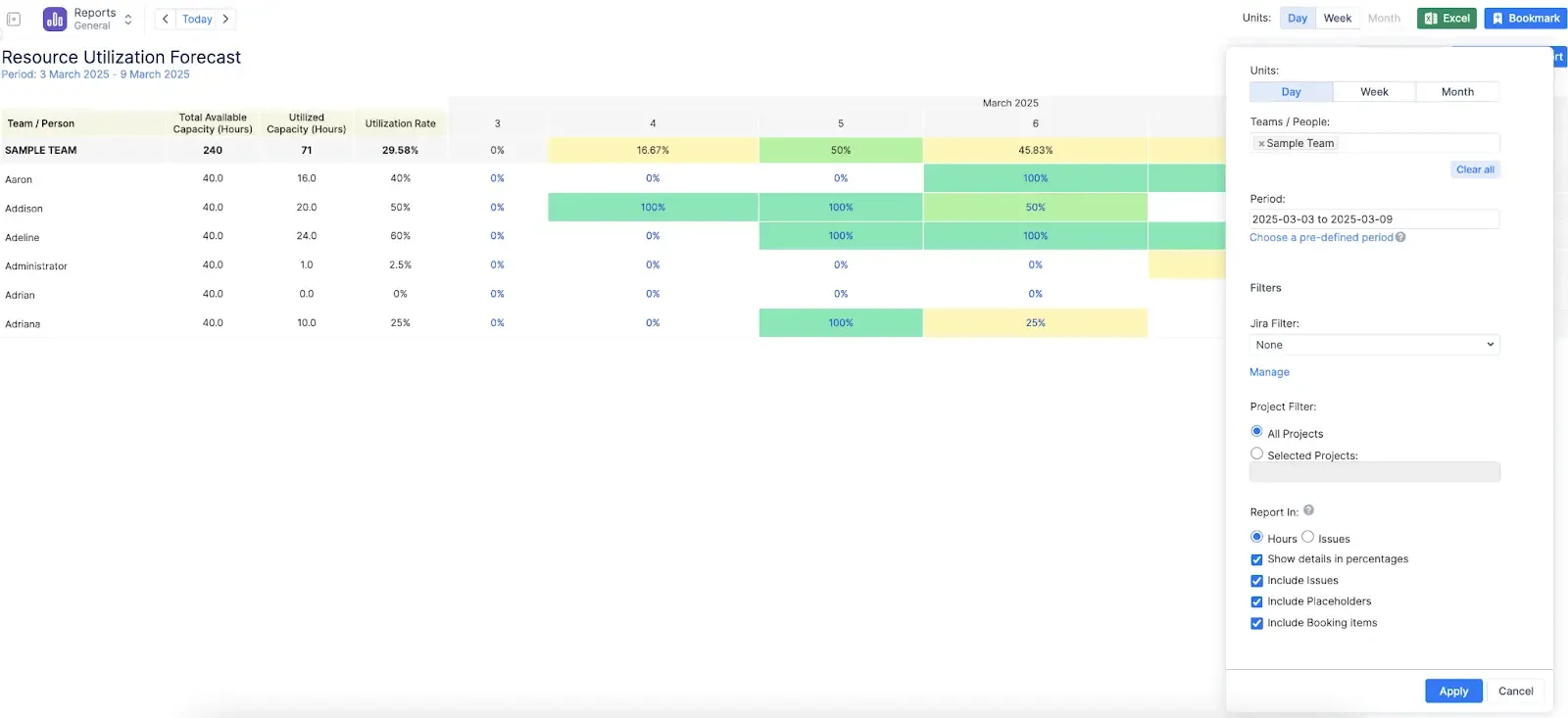
It’s time to move past spreadsheets and embrace project forecasting. ActivityTimeline uses historical data to predict future availability, making it easier to visualize the workload management of the entire team. It factors in everything - from calendar events to placeholders - to give you real-time capacity snapshots. 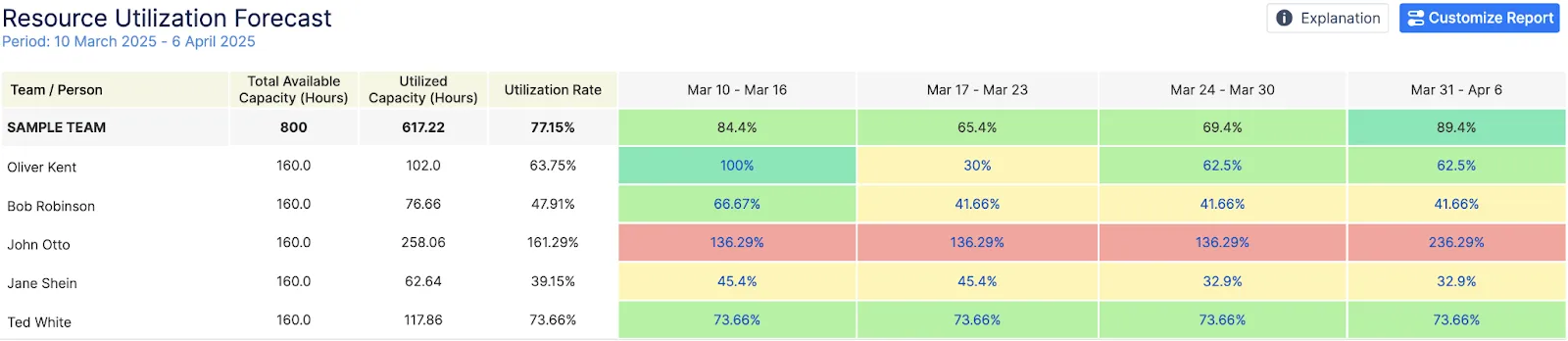
The result is a clear breakdown of who is underutilized and where a project bottleneck identification might occur. These accurate resource reporting tools are color-coded for quick insights, allowing managers to fix problems before they escalate. You can even adjust team capacity planning tools on the fly, switching between daily or monthly views to maintain a clear visualizing team workload and better resource allocation and management.
Conclusions
Manual issue handling and administrative chores were never built to scale. The faster you acknowledge that, the faster you’ll realize that Jira automation isn’t just a convenience. In reality, it’s the key to accuracy and efficiency. By combining Appsvio’s Issue Templates Agent with ActivityTimeline you can transform your workflow. When you automate the “administrative grind” with Jira automation templates and Jira issue templates, your team can finally focus on the work that actually moves the needle. Worklogs get completed on time, planning becomes a science, and your Jira tickets no longer require constant manual oversight.
Try Appsvio’s Issue Templates Agent (free for 30 days) or use it free for up to 10 users. Check out the documentation for more details about the functionalities.
Try ActivityTimeline for Jira for free during a 30-day trial period.
Related posts

Katarzyna Pawlak
•Mar 20, 2026

Magdalena Skoropada
•Feb 6, 2026