
The Unified Workflow Playbook: 5-Team Guide to HubSpot & Jira
Read our guide on The Unified Workflow Playbook: 5-Team Guide to HubSpot & Jira on the Appsvio blog.


In today’s business landscape, two platforms stand out: HubSpot is the command center for customer-facing teams—Sales, Marketing and Service— allowing to manage the entire customer lifecycle. Jira, on the other hand, is the gold standard for technical teams—Product and Development—to plan, track and release world-class software. While both are powerful, they often operate in isolation, holding different pieces of the same customer story.
This way, a wall between business and technical teams is created, leading to lost context, manual data entry and a frustrating experience for both your employees and your customers. What if you could replace that wall with a seamless, automated bridge?
The solution for this issue is a powerful HubSpot CRM integration that acts as a true Jira-HubSpot connector and creates a single, unified workflow. This guide will walk you through a 5-step playbook showing how to sync customer information between tools and empower every team with the context they need.
The Unified Workflow in Action: A 5-Step Guide
Step 1: Empower Your Service Desk with CRM Data in Jira
For your support team, the challenge is always context. When a ticket arrives, is it from a free-trial user or a high-value client? Instead of guessing, the solution is to display live HubSpot data directly on the ticket.
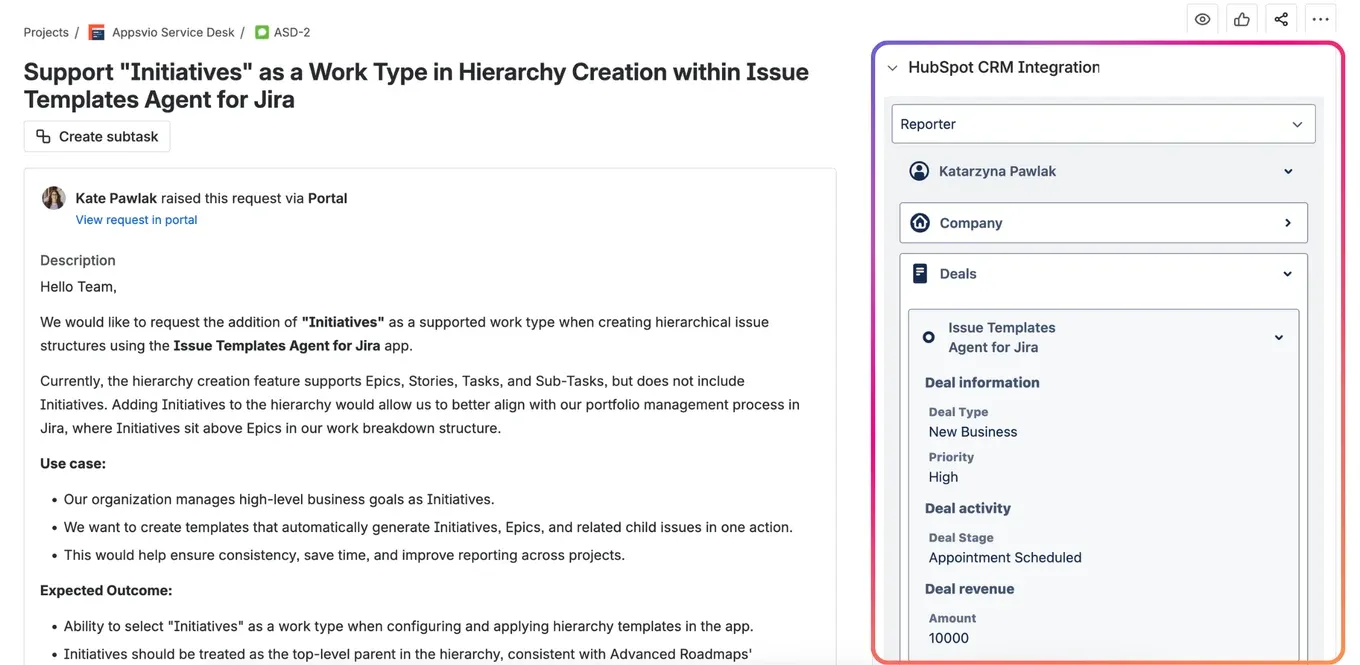
This seamless connection between Jira Service Management and HubSpot gives your agents a full view of the customer’s company, contact and deal information, allowing them to prioritize effectively without ever leaving Jira.
For a detailed guide on this setup, read our full article on empowering your Service Desk.
Step 2: Align Your Product Team with Real Customer Value
Once a valuable idea is identified, the challenge shifts to the Product Team: how to prioritize it against dozens of other requests? The solution is to use Jira workflow automation. By connecting Jira Service Management, Jira Product Discovery and HubSpot, an automation rule can create a new “Idea” enriched with the customer’s company name and a link to their HubSpot profile, ensuring prioritization is based on data, not just gut feeling.
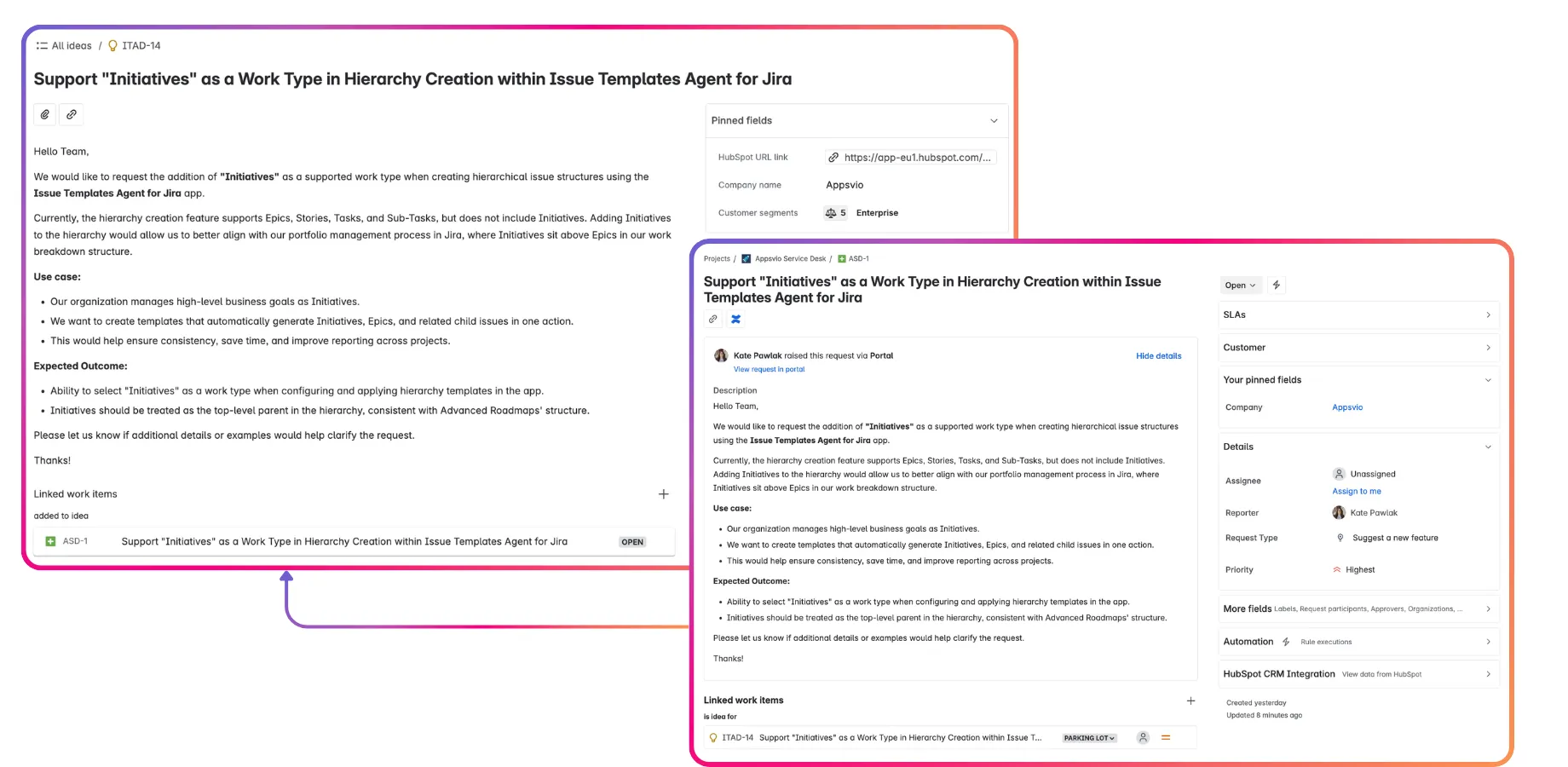
Learn how this transforms prioritization in our article on aligning your Product Team.
Step 3: Give Your Development Team the “Why” Behind the Work
Next, the challenge is ensuring developers understand the “why” behind their work. To truly integrate your CRM with the development workflow, the customer context must follow the task. This workflow connects HubSpot directly to Jira Software, ensuring that whether it’s a planned feature or an urgent bug, a dedicated “Affected companies” field is populated with customer data and can even track multiple affected customers on a single work item.
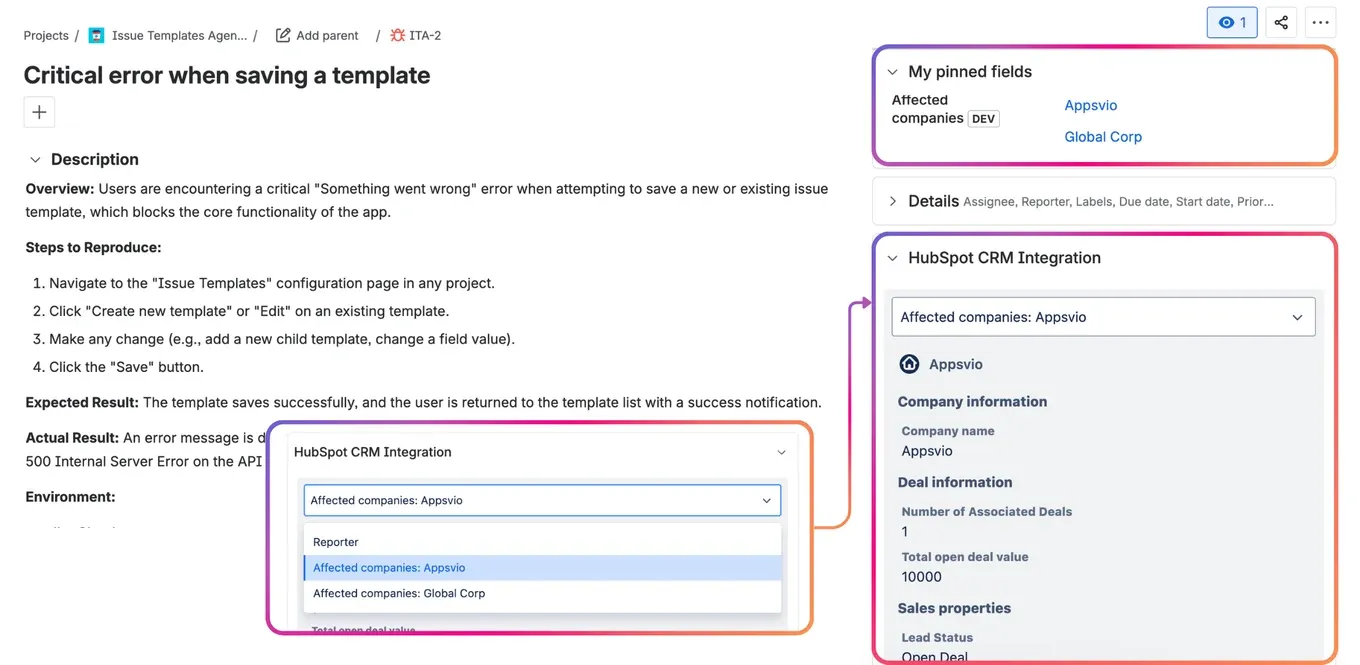
See both workflows in our deep-dive on the Development Team.
Step 4: Provide Your Sales Team with Real-Time Visibility
While the technical teams are aligned, the sales team often faces the challenge of having no visibility into that progress. The solution is to enable a bi-directional sync that brings Jira status updates into HubSpot.
This essential link between HubSpot and Jira adds a panel to your HubSpot objects, showing a live feed of all linked Jira work items and their current statuses, which is a game-changer for client communication.
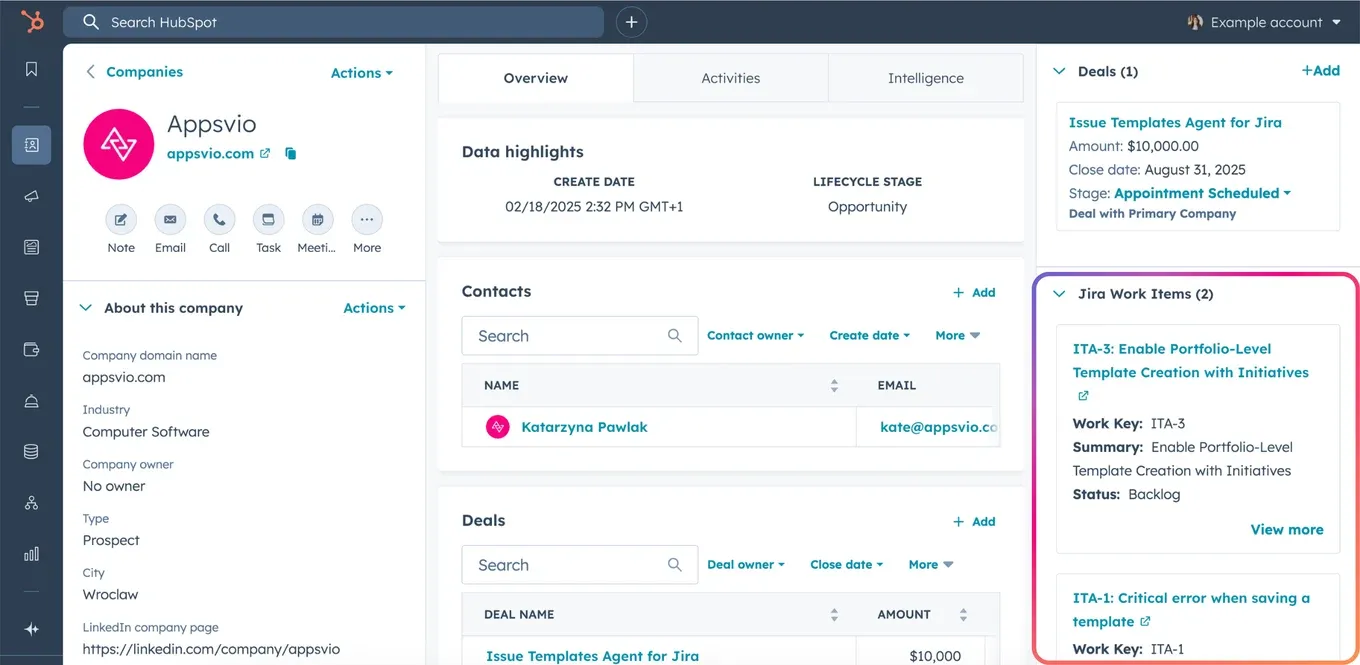
Discover how this empowers sales conversations in our article on the Sales Team.
Step 5: Turn Customer Success into Marketing Wins
Finally, the marketing team faces the challenge of capturing success stories while they’re still fresh. The best way to close the loop is to make the handoff seamless. By connecting Jira Software, Confluence and HubSpot, a product owner can create a “Case Study” task and link it directly to the customer’s HubSpot object, giving the marketing team instant access to all the information they need.
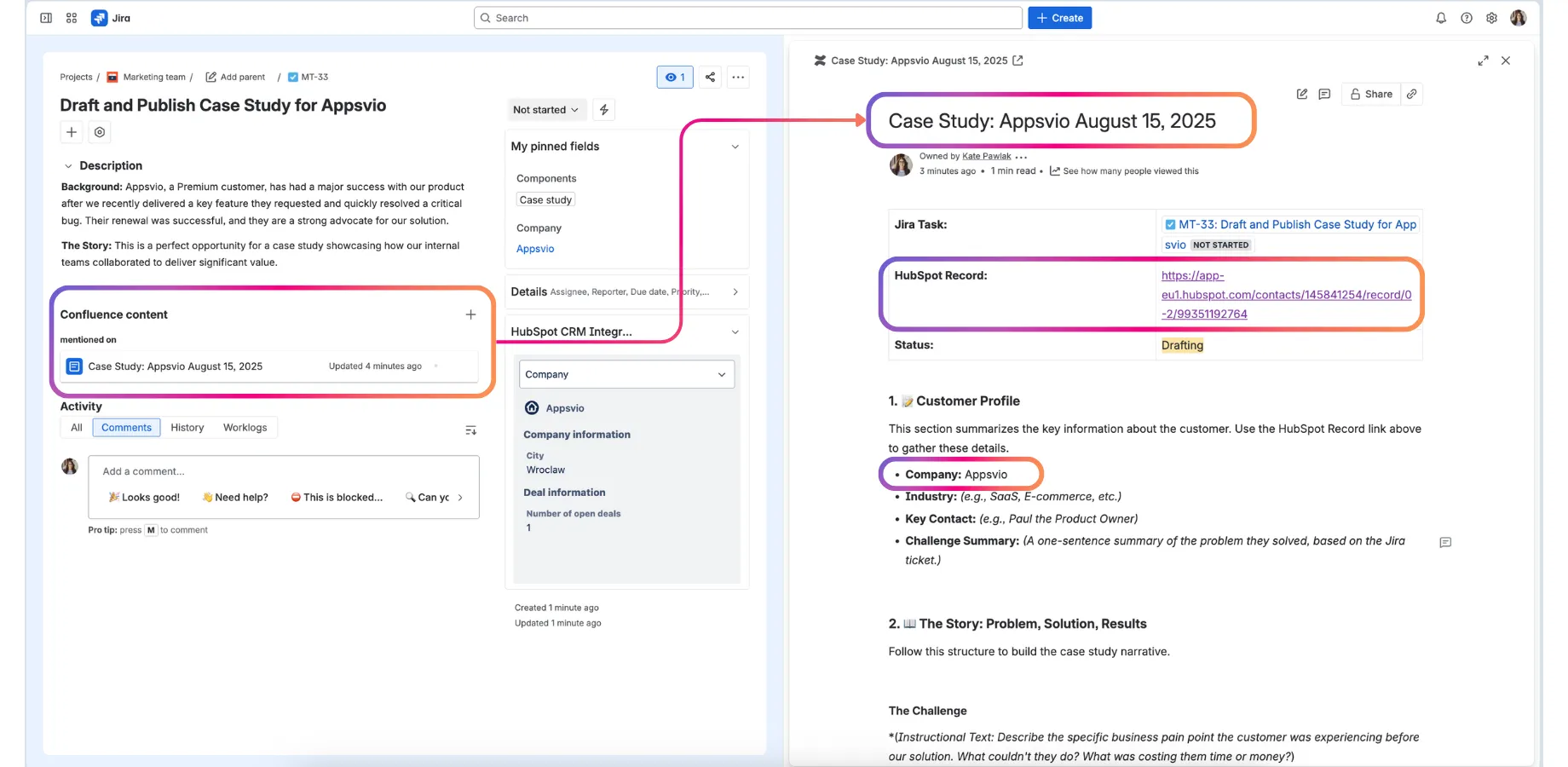
Read about this final, crucial handoff in our article on the Marketing Team.
Watch the Full Workflow in Action
Reading about it is one thing, but seeing it live is another. We demonstrated this entire 5-team, end-to-end process in our recent webinar. Watch the on-demand recording to see how each step connects and how the data flows seamlessly between HubSpot and the Atlassian stack.
Watch the On-Demand Webinar Recording on YouTube
From Silos to a Single Source of Truth
By implementing this unified workflow, you transform your operations. Disconnected, manual handoffs are replaced by a seamless, automated flow of information. Everything thanks to one app: HubSpot CRM Integration for Jira from Appsvio. This complete customer data integration ensures that every team—from Service and Sales to Product, Development, and Marketing—is aligned and working from a single source of truth. The result is a more efficient organization, a more strategic product, and most importantly, a superior customer experience.
- Book a Free Demo to discuss your specific workflow.
- Our Trust Center has our full security and compliance details.
- Partner Inquiries are always welcome.
Related posts
Katarzyna Pawlak
•Sep 24, 2026
Dariusz Jaroń
•Aug 12, 2026