
How to Write and Manage Requirements in Jira: Examples & Best Practices
How to write testable requirements in Jira, with a bad vs good example and acceptance criteria, plus best practices for traceability and test coverage.


Every high-quality software product starts with a fundamental question: What exactly are we building?. In the Software Development Life Cycle (SDLC), the answer lives within your requirements.
For testers and QA professionals, requirements are the source of truth: you can only verify what has been clearly described. In this guide, you’ll see what makes a requirement testable, a bad and a good example, and best practices for managing requirements in Jira with Appsvio Test Management (ATM).
What is a Requirement and Why Does it Matter?
At its heart, a requirement is a description of what a system should do or a specific quality it must have. In other words, requirements are the set of ideas that together define what quality means for a product.
In the SDLC, requirements act as the bridge between a customer’s needs and the developer’s code. For a QA Engineer, they provide the “source of truth.” You cannot effectively verify a feature if you don’t know exactly how it’s supposed to behave. Without clear requirements, Jira testing becomes a guessing game. This leads to missed bugs, frustrated stakeholders, and expensive “rework” that drains your team’s energy.
The Consequences of Bad Requirements
A “bad” requirement is usually vague. A “good” requirement is specific and, most importantly, testable:
- Bad: The search should be fast.
- Good: Search results load in under 2 seconds for 95% of queries, with up to 10,000 products in the catalog.
- Acceptance criteria: Given a catalog of 10,000 products, when a user searches for “jacket”, then results appear in under 2 seconds.
The good version names a measurable threshold, the conditions, and a way to verify it. A tester can turn it into a test case without asking a single question. When requirements are poorly defined, the consequences are immediate:
- Scope Creep: Vague goals lead to “extra” features that blow the budget.
- Wasted Effort: Developers build the wrong thing, and testers verify the wrong logic.
- Quality Gaps: If a requirement isn’t clear, it won’t be covered by a test case, letting critical bugs reach production.
Can Jira be the Home for Requirements?
When teams begin to scale, they often face a dilemma: do we move our requirements into a specialized, standalone management tool, or do we keep them in Jira? Standalone tools often promise deep features, but they come with a hidden cost: the information silos.
When requirements live in a separate tool, developers and testers have to jump between platforms. Context gets lost and communication slows down. Jira has become the global standard for the SDLC because it brings everyone - Product Owners, Developers, and QA - into one room.
Jira works well for requirements when your team is agile, requirements change often, and you want them next to development work. It gets harder when you need document-style specifications, formal sign-offs, or a clear view of which requirements have been tested. At that point, teams usually add Confluence for long-form specs or a Jira app such as ATM, which adds test cases, traceability, and coverage reports without moving the work out of Jira.
Requirement Management: Best Practices
Requirements management should be a continuous dialogue between “What do we want?” and “What can we build?” To make this dialogue productive, follow these best practices, and see how Appsvio Test Management (ATM) and Atlassian Rovo help you put them into practice.
1. Standardize Your Starting Point
A requirement needs structure to be useful. If every analyst writes requirements differently, the QA team will struggle to find the information they need to create their tests.
TIP
The Appsvio Solution:
While you can follow our guide on how to create a good user story template in Jira, you can also automate the process with Issue Templates Agent. It allows you to pre-fill descriptions, outline acceptance criteria, ensuring every requirement is “dev-ready” and “test-ready” before it even reaches the backlog.
Standardize Your Requirements
Automate with Issue Templates Agent to ensure every Jira issue is testable from day one.
Try it free2. Use AI to Refine and Clarify
One of the hardest parts of testing is the transition from a rough requirement to a structured test suite. Often, testers spend hours just trying to interpret a draft. You can solve this by using a two-step AI-augmented workflow.
- Clarifying the Intent: Instead of struggling with a vague one-liner from a stakeholder, use native Atlassian Rovo features in the Jira issue editor to draft the full requirement description. Rovo can take a rough concept and expand it into a professional, easy-to-read requirement with logical acceptance criteria.
- Architecting the Verification: Once the requirement is clear, the “Blank Page” shifts to the test cases. This is where the Test Case Architect (Rovo Agent in ATM) acts as a solution. It analyzes the refined requirement, proposes test cases with preconditions and test steps, and creates the ones you choose, linked to the requirement.
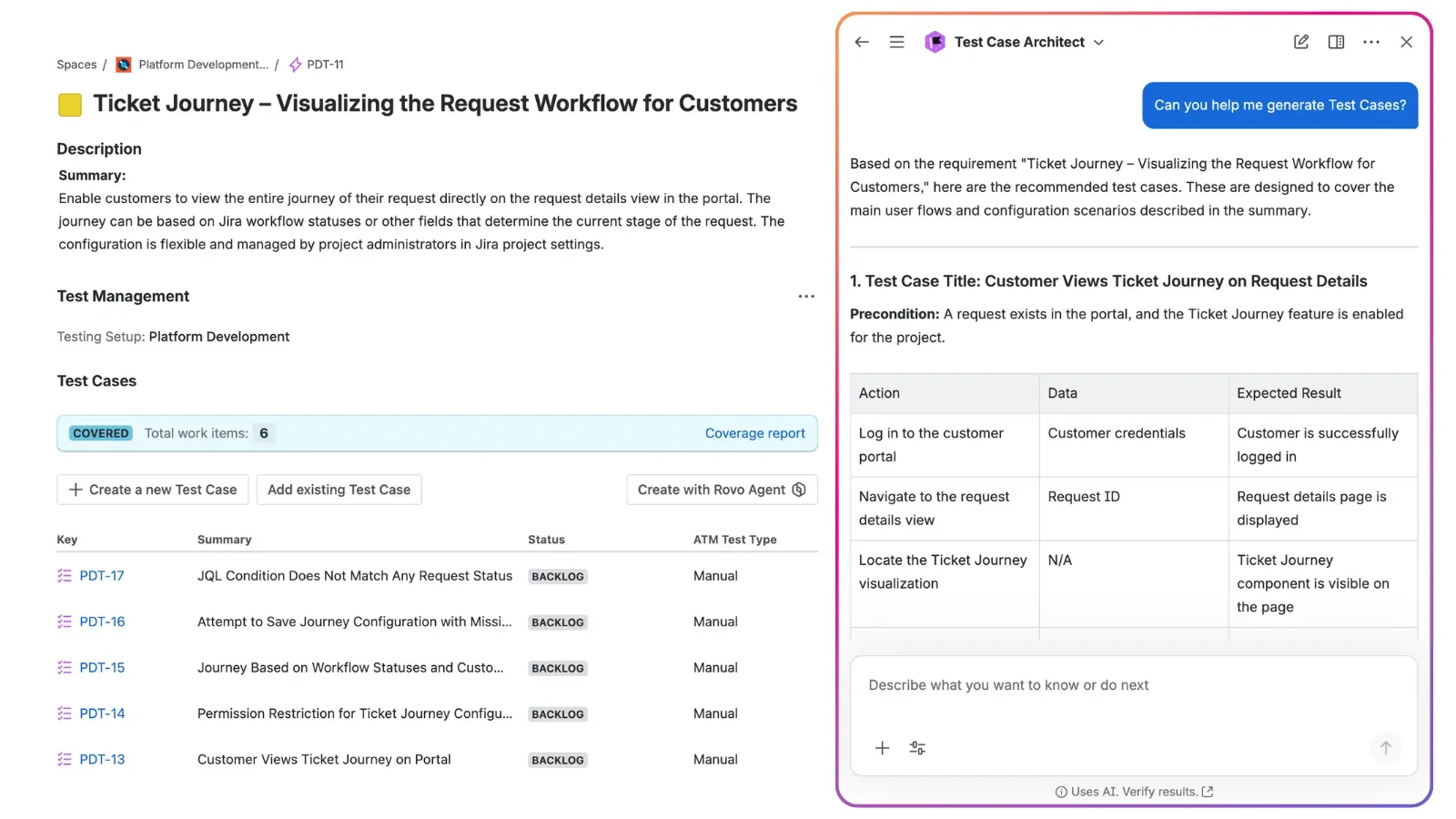
This way, you remove the grunt work. By letting AI handle the initial drafting of steps, testers can use their expertise to focus on edge cases, risk analysis, and overall strategy. We explored this streamlined workflow in our webinar on how AI and Rovo redefine the SDLC, and you can read the full breakdown in our article on how Atlassian Rovo and AI redefine the software lifecycle in Jira.
3. Centralize the Testing Cycle
Managing requirements in one tool and testing in another creates friction. When your requirements live where the code lives, the process becomes transparent for everyone.
TIP
The ATM Advantage:
Requirements in ATM are native Jira work items. This allows you to manage the entire testing cycle in the same space as the rest of the SDLC. Because ATM enhances Jira’s native functionalities, your testing process is visible to developers, making agile test management a natural part of your daily workflow.
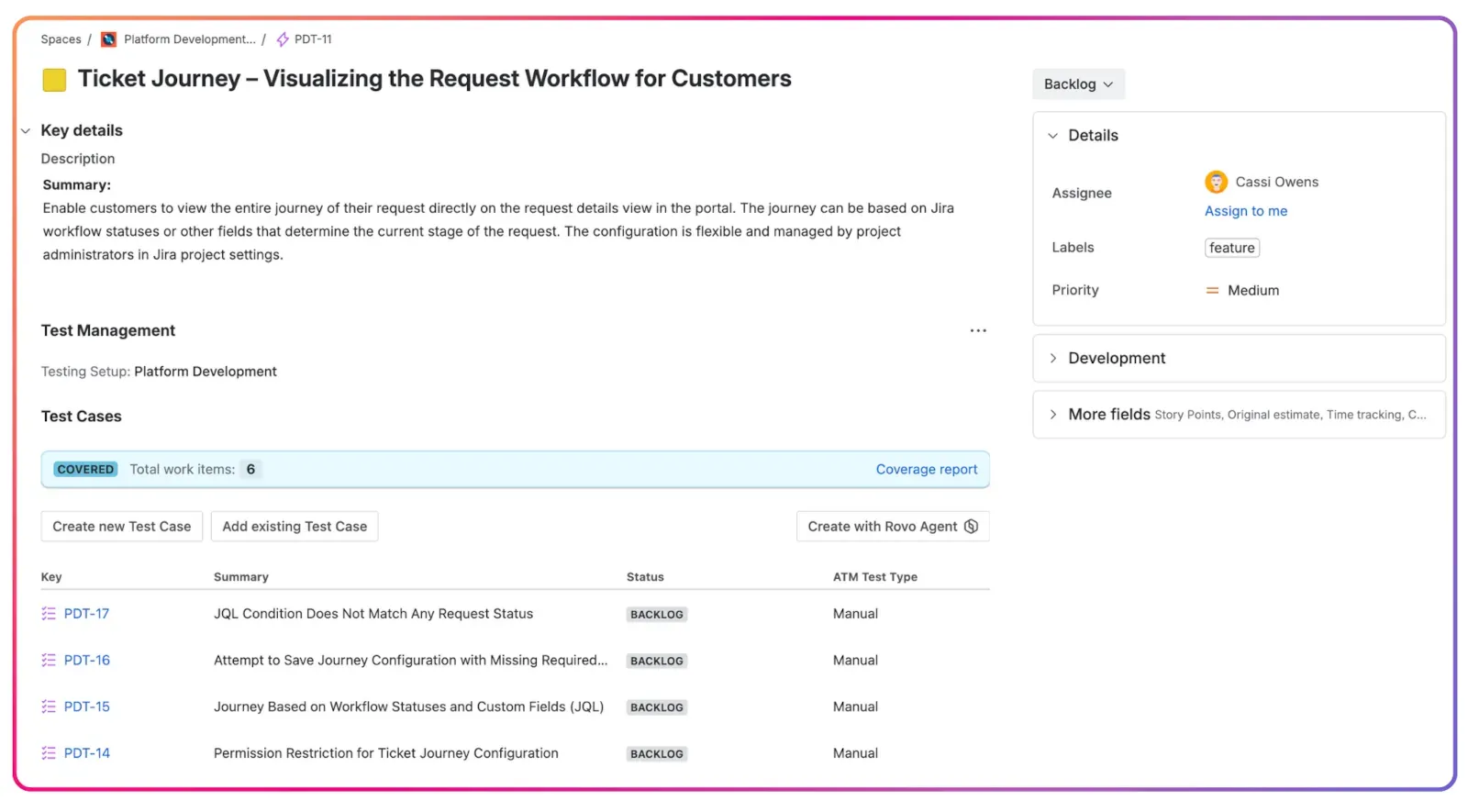
4. Tailor the View for Every Stakeholder
Outside stakeholders often want the big picture without the technical weeds.
TIP
The ATM Advantage:
ATM allows for flexible testing process organization. You can allocate requirements to a separate Jira project or board, allowing stakeholders to collaborate easily while keeping the detailed testing in its own space. Learn more about how to organize tests in Jira for maximum clarity.
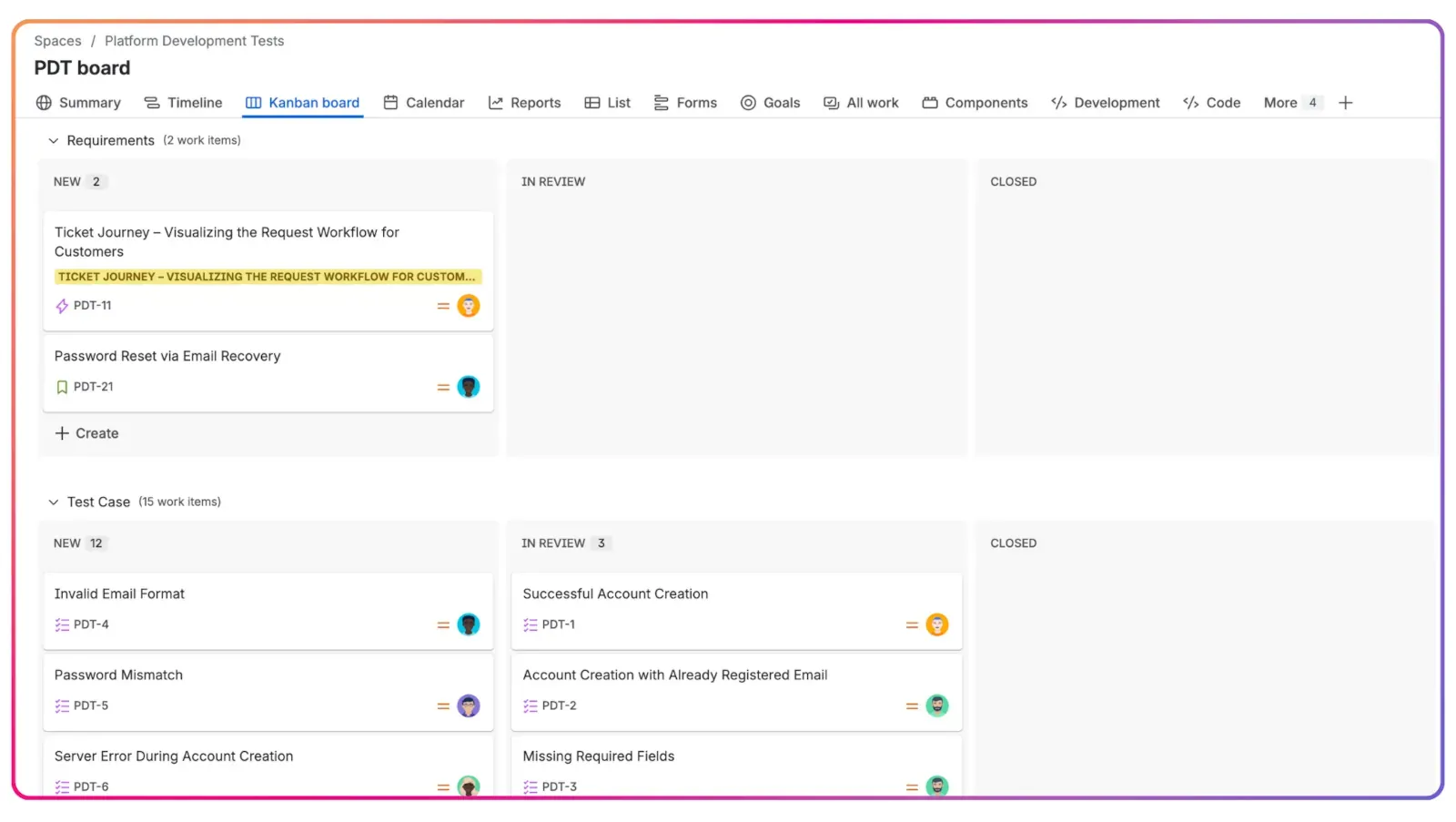
Watch four common ways to structure testing projects in Jira (4 min):
Four patterns for structuring testing projects in Jira with Appsvio Test Management.
5. Establish Visibility through Native Linking
A requirement is only as good as the testing that validates it. You need to see a direct line from a requirement to the test cases that verify it.
TIP
The ATM Advantage:
ATM uses native Jira linking to connect Requirements to Test Cases. This provides instant visibility on the issue view. When a developer opens a requirement, the Test Management panel shows whether it’s covered, the linked test cases with their status, and a link to the Coverage report. This is essential for understanding your test coverage and overall traceability in test management.
6. Use Checklists for Internal Verification
Even a well-written requirement can have small details that are easy to overlook. Before a requirement is signed off, use a checklist to ensure every edge case is considered.
TIP
The ATM Advantage:
In ATM, you can use action items in the description of your requirements as a built-in checklist. Testers can use this to verify that every detail is accounted for before they even start learning how to write a good test case.
Verifying Quality with a Requirements Traceability Matrix
How do you prove that you’ve covered every requirement? In the past, QA leads had to build reports manually in spreadsheets, which was a nightmare to maintain.
Identifying Gaps with Traceability Reports
A requirements traceability matrix connects the “why” to the “how.” It ensures no requirement is left “orphaned” without a test. In ATM, this report is a living document that updates automatically via Jira links. You can identify gaps instantly, ensuring every feature is fully verified before release. You can also export the report to PDF or CSV.
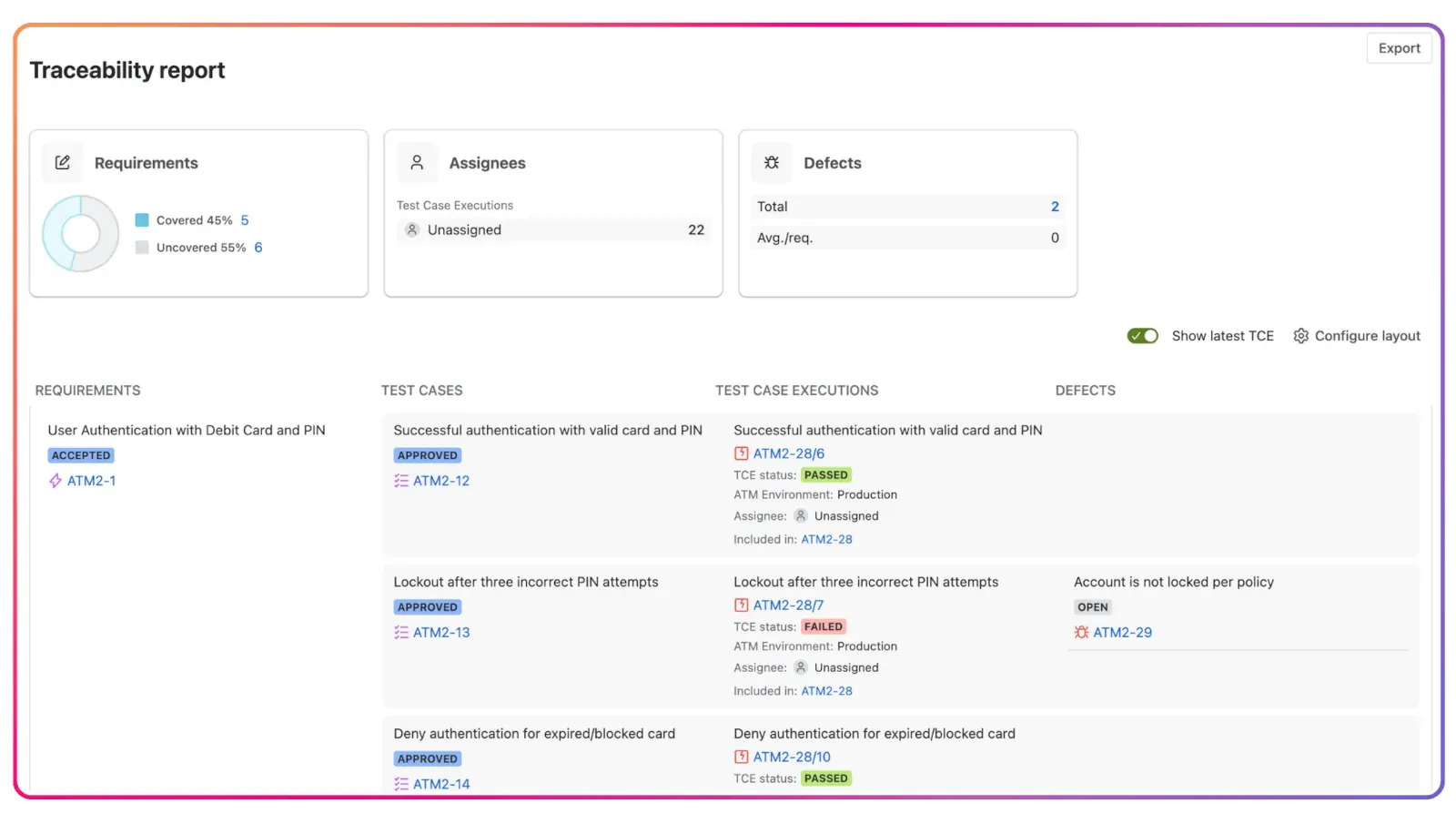
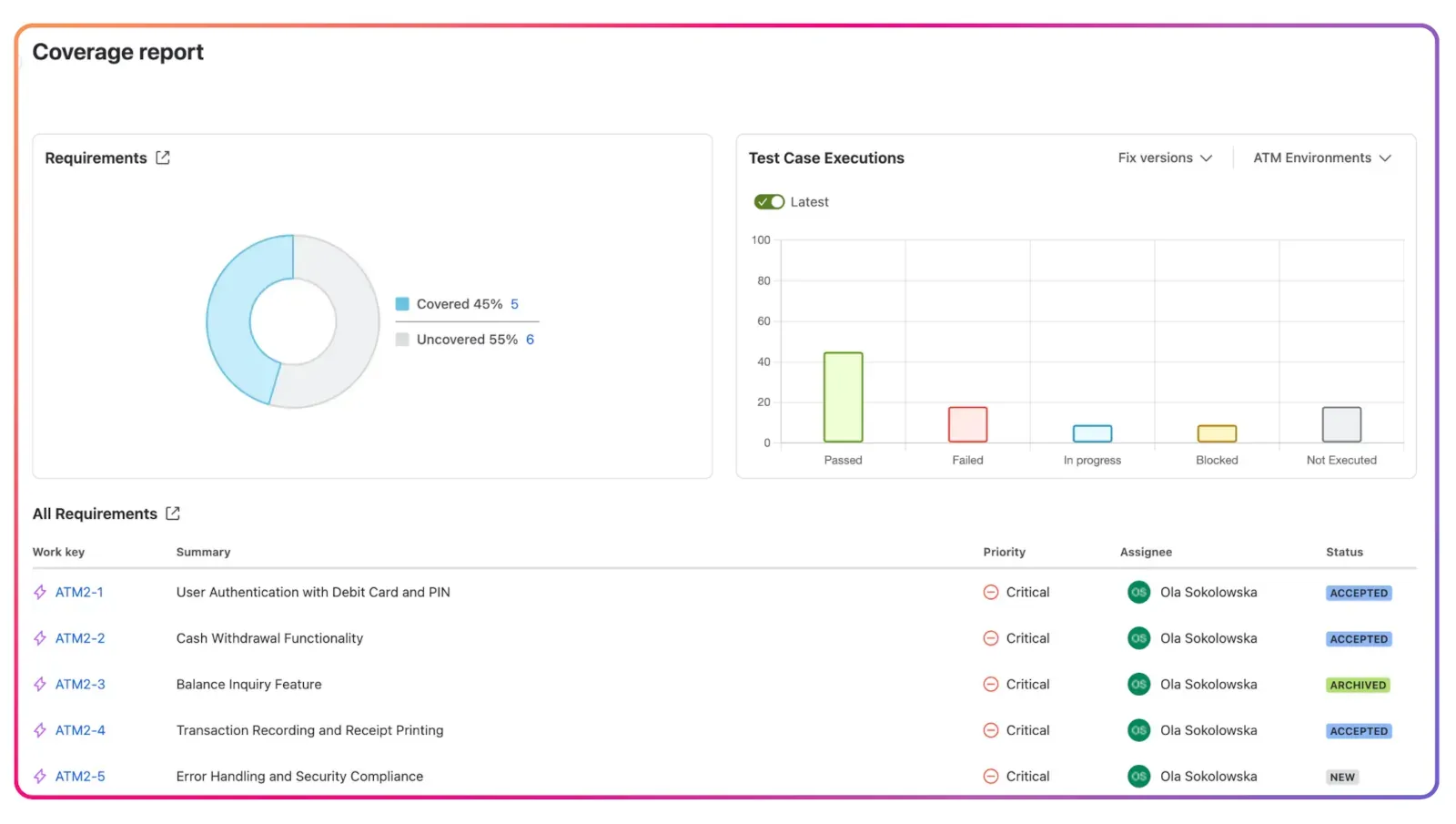
Measuring Readiness with Coverage Reports
While traceability shows the connection, coverage shows which requirements are still untested. It helps answer: “Are we safe to deploy?” ATM shows coverage directly on the requirement, and the Coverage report shows which requirements have test cases and how their executions went. This is the fastest way to track themetrics that define product quality and provides a transparent health check for the whole team. For more details, check out what is a test coverage report.
Quality is a Team Sport
Mastering Jira requirements management is primarily about communication. By standardizing your templates with Issue Templates Agent, refining your text with Atlassian Rovo, and linking everything natively with Appsvio Test Management, you create a culture where quality is everyone’s responsibility.
Before a requirement goes into a sprint, check: Is it testable? Does it have acceptance criteria? Is it linked to at least one test case? Would a new tester understand it without asking?
Want to see how AI and native Jira integration can transform your workflow? Explore Appsvio Test Management for Jira on the Atlassian Marketplace and start building your traceability matrix in Jira today.
Combine Requirements & Results
Gain real-time traceability and coverage reports that keep your teams perfectly aligned.
Try it freeThis article was updated on October 15, 2026.
FAQs
Related posts

Dariusz Jaroń
•Oct 2, 2026


Dariusz Jaroń
•Sep 23, 2026