How to Write Requirements in Jira? 2026 Guide
Learn how to write requirements effectively. Explore best practices for traceability and test coverage to bridge the gap between requirements and quality software.


Every high-quality software product starts with a fundamental question: What exactly are we building? In the Software Development Life Cycle (SDLC), the answer lives within your requirements.
For testers and QA professionals, requirements are the “source of truth.” If your requirements are shaky, your entire testing process will be built on a foundation of sand. In this guide, we’ll explore how to master Jira requirements management and why using a specialized Jira testing tool like Appsvio Test Management (ATM) is the key to turning vague ideas into verified features.
What is a Requirement and Why Does it Matter?
At its heart, a requirement is a description of what a system should do or a specific quality it must have. As industry expert James Bach suggests, requirements are the “set of ideas that collectively define quality” for a product. In the SDLC, requirements act as the bridge between a customer’s needs and the developer’s code. For a QA Engineer, they provide the “source of truth.” You cannot effectively verify a feature if you don’t know exactly how it’s supposed to behave. Without clear requirements, Jira testing becomes a guessing game. This leads to missed bugs, frustrated stakeholders, and expensive “rework” that drains your team’s energy.
The Consequences of Bad Requirements
A “bad” requirement is usually vague, such as: “The system should be fast.” On the other hand, a “good” requirement is specific and, most importantly, testable. When requirements are poorly defined, the consequences are immediate:
- Scope Creep: Vague goals lead to “extra” features that blow the budget.
- Wasted Effort: Developers build the wrong thing, and testers verify the wrong logic.
- Quality Gaps: If a requirement isn’t clear, it won’t be covered by a test case, letting critical bugs reach production.
Can Jira be the Home for Requirements?
When teams begin to scale, they often face a dilemma: do we move our requirements into a specialized, standalone management tool, or do we keep them in Jira? Standalone tools often promise deep features, but they come with a hidden cost: the information silos.
When requirements live in a separate tool, developers and testers have to jump between platforms. Context gets lost and communication slows down. Jira has become the global standard for the SDLC because it brings everyone - Product Owners, Developers, and QA - into one room.
However, native Jira often needs a slight quality boost to handle complex testing workflows. This is where the Appsvio ecosystem comes in. Instead of leaving Jira for external test case management tools, you can enhance it with add-ons that turn your project board into a high-powered quality engine. By choosing a Jira test management tool like ATM, you get the best of both worlds: specialized testing power within the familiar Jira interface the rest of your team already uses.
Requirement Management: Best Practices
Requirements management should be a continuous dialogue between “What do we want?” and “What can we build?” To make this dialogue productive, follow these best practices, and see how Appsvio Test Management (ATM) and Atlassian Rovo help you put them into practice.
1. Standardize Your Starting Point
A requirement needs structure to be useful. If every analyst writes requirements differently, the QA team will struggle to find the information they need to create their tests.
TIP
The Appsvio Solution:
While you can follow our guide on how to create a good user story template in Jira, you can also automate the process with Issue Templates Agent. It allows you to pre-fill descriptions, outline acceptance criteria, ensuring every requirement is “dev-ready” and “test-ready” before it even reaches the backlog.
Standardize Your Requirements
Automate with Issue Templates Agent to ensure every Jira issue is testable from day one.
Try it free2. Use AI to Refine and Clarify
One of the hardest parts of testing is the transition from a rough requirement to a structured test suite. Often, testers spend hours just trying to interpret a draft. You can solve this by using a two-step AI-augmented workflow.
- Clarifying the Intent: Instead of struggling with a vague one-liner from a stakeholder, use native Atlassian Rovo features in the Jira issue editor to draft the full requirement description. Rovo can take a rough concept and expand it into a professional, easy-to-read requirement with logical acceptance criteria.
- Architecting the Verification: Once the requirement is clear, the “Blank Page” shifts to the test cases. This is where the Test Case Architect (Rovo Agent in ATM) acts as a solution. It analyzes the newly refined requirement and automatically designs the corresponding Test Cases.
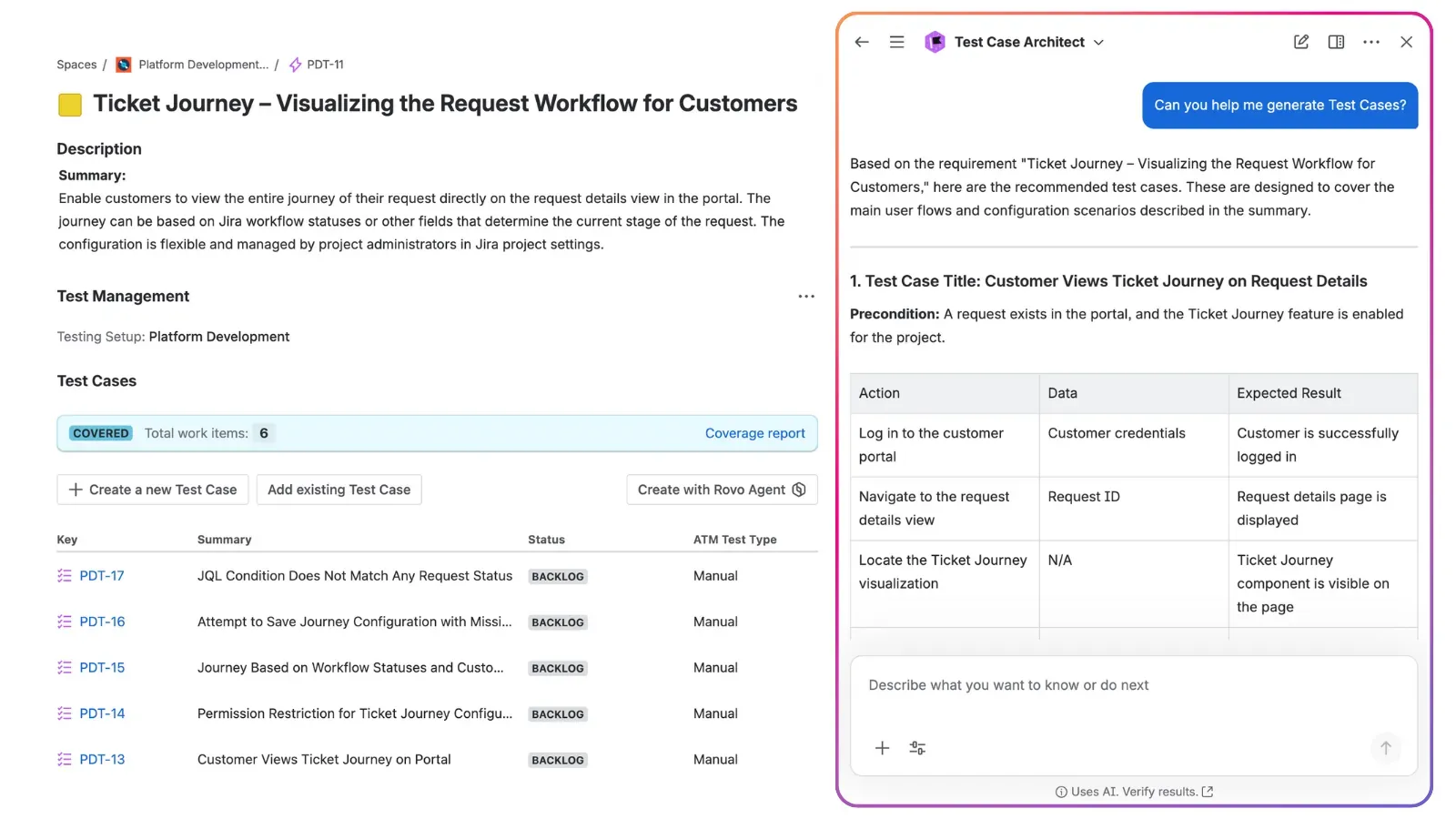
This way, you remove the grunt work. By letting AI handle the initial drafting of steps, testers can use their expertise to focus on edge cases, risk analysis, and overall strategy. We explored this streamlined workflow in our webinar on how AI and Rovo redefine the SDLC, and you can read the full breakdown in our article on how Atlassian Rovo and AI redefine the software lifecycle in Jira.
3. Centralize the Testing Cycle
Managing requirements in one tool and testing in another creates friction. When your requirements live where the code lives, the process becomes transparent for everyone.
TIP
The ATM Advantage:
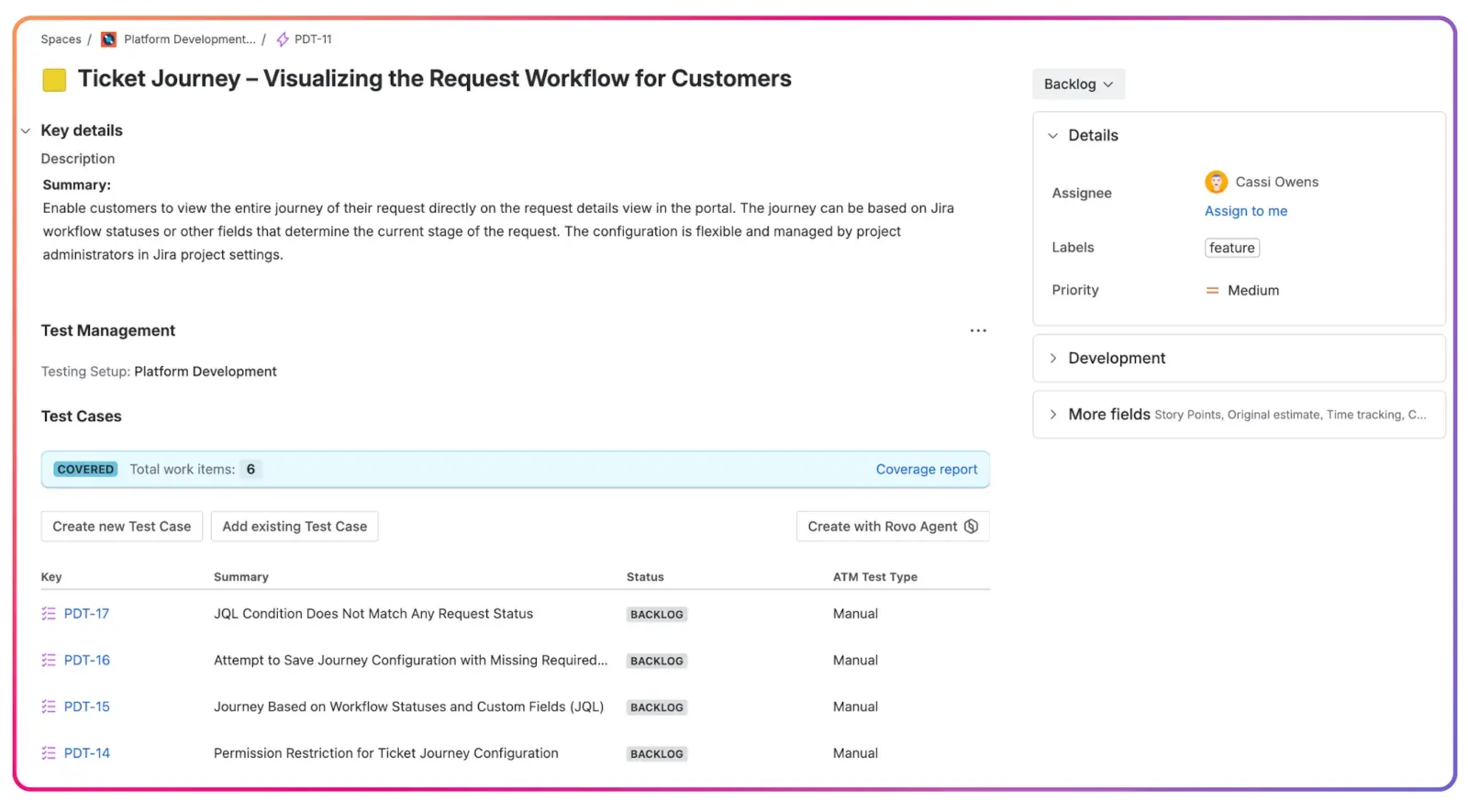
Requirements in ATM are native Jira work items. This allows you to manage the entire testing cycle in the same space as the rest of the SDLC. Because ATM enhances Jira’s native functionalities, your testing process is visible to developers, making agile test management a natural part of your daily workflow.
4. Tailor the View for Every Stakeholder
Outside stakeholders often want the big picture without the technical weeds.
TIP
The ATM Advantage:
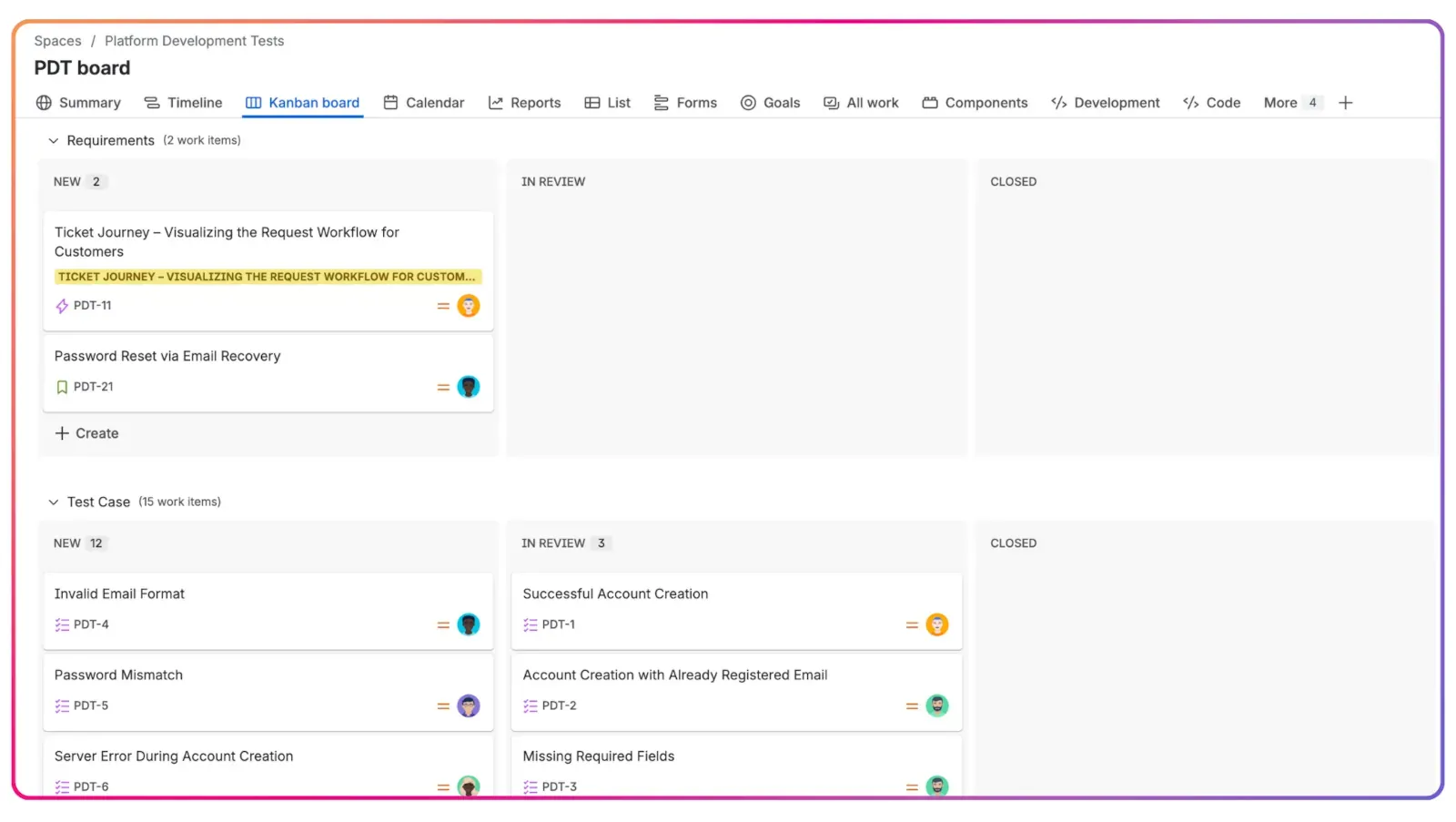
ATM allows for flexible testing process organization. You can allocate requirements to a separate Jira project or board, allowing stakeholders to collaborate easily while keeping the detailed testing in its own space. Learn more about how to organize tests in Jira for maximum clarity.
5. Establish Visibility through Native Linking
A requirement is only as good as the testing that validates it. You need to see a direct line from a requirement to the test cases that verify it.
TIP
The ATM Advantage:
ATM uses native Jira linking to connect Requirements to Test Cases. This provides instant visibility on the issue view. When a developer opens a Requirement, they see the linked test cases and their status immediately. This is essential for understanding your test coverage and overall traceability in test management.
6. Use Checklists for Internal Verification
Even a well-written requirement can have small details that are easy to overlook. Before a requirement is signed off, use a checklist to ensure every edge case is considered.
TIP
The ATM Advantage:
In ATM, you can use action items in the description of your requirements as a built-in checklist. Testers can use this to verify that every detail is accounted for before they even start learning how to write a good test case.
Verifying Quality with a Requirements Traceability Matrix
How do you prove that you’ve covered every requirement? In the past, QA leads had to build reports manually in spreadsheets, which was a nightmare to maintain.
Identifying Gaps with Traceability Reports
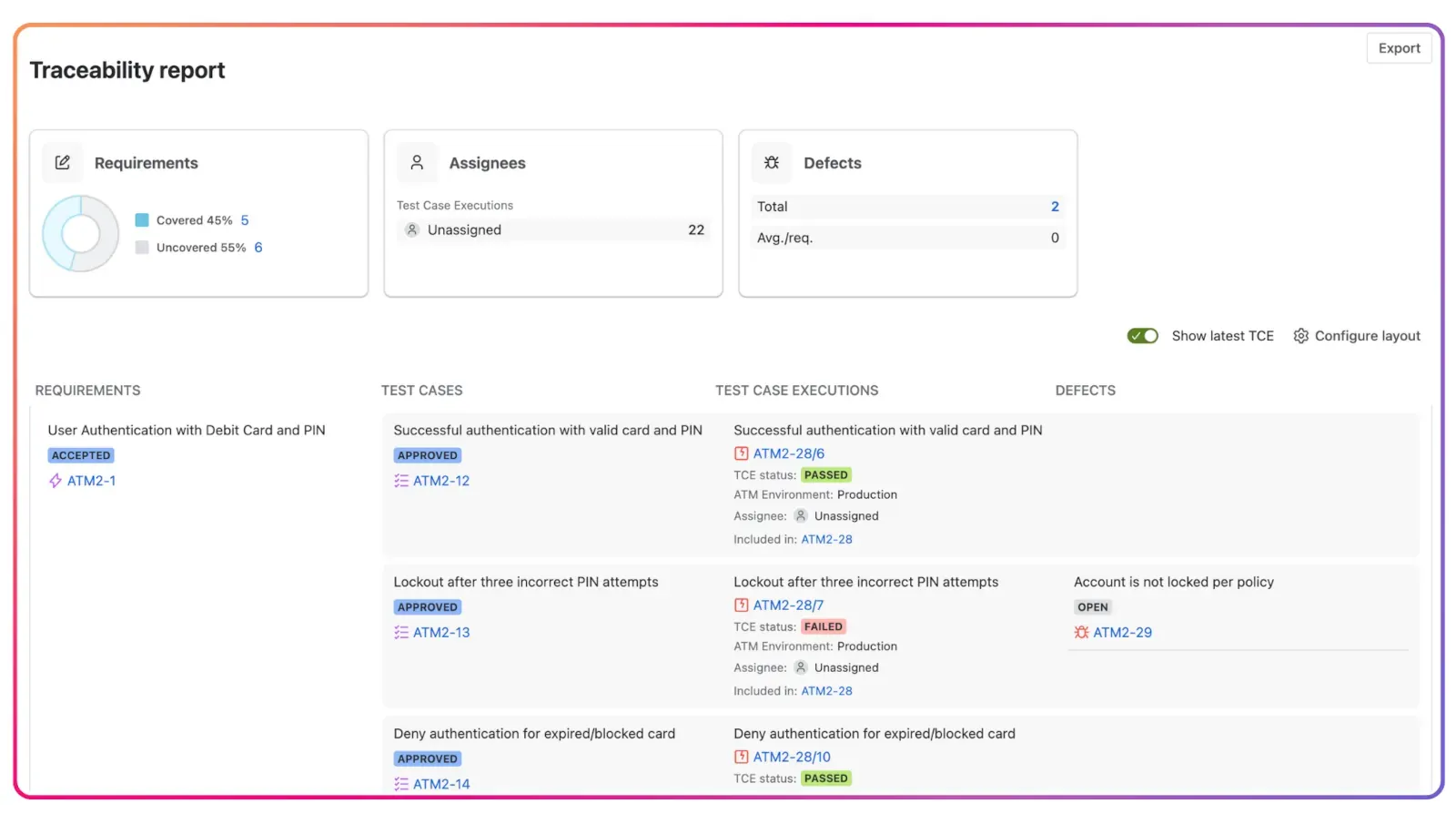
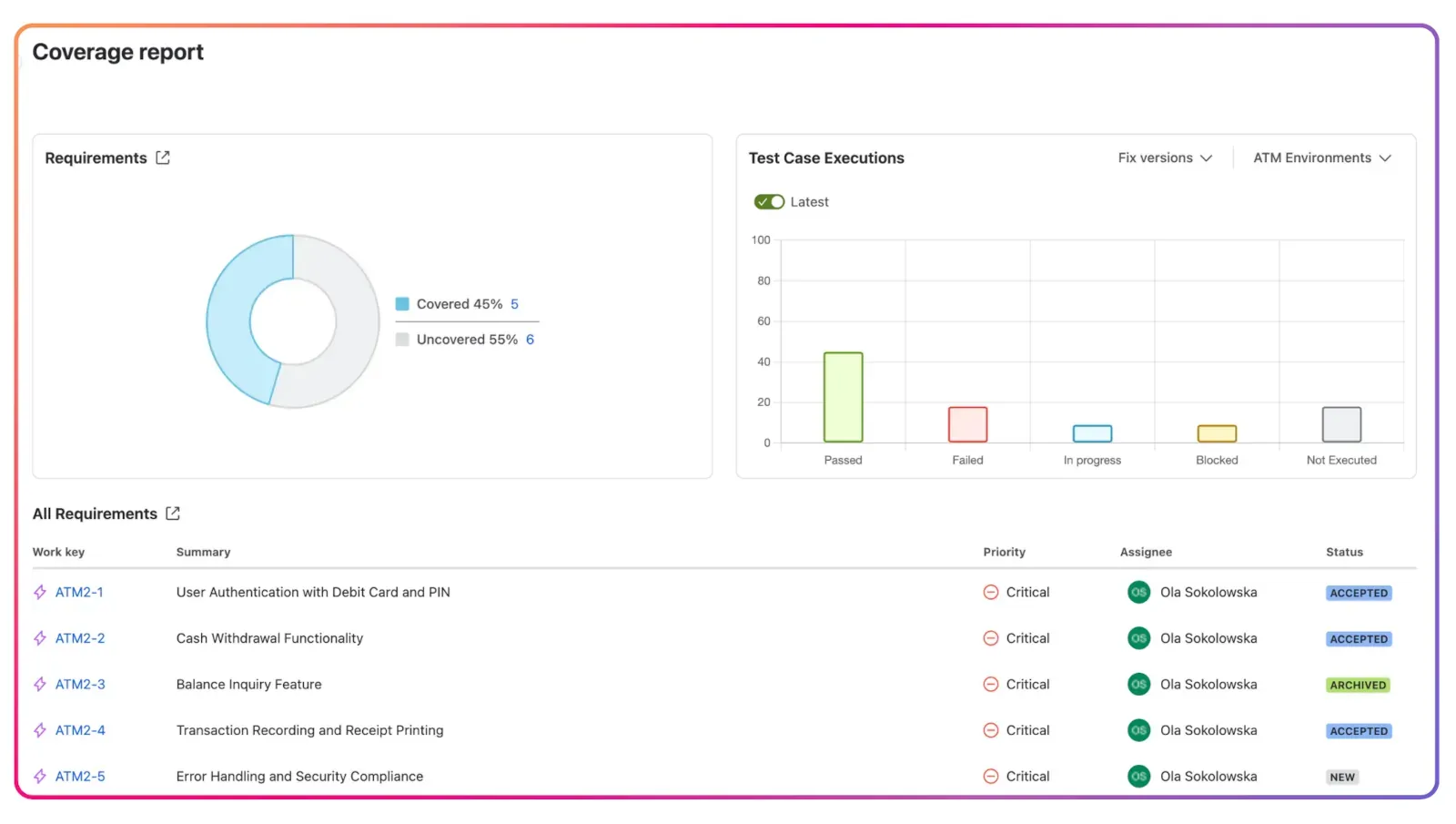
A requirements traceability matrix connects the “why” to the “how.” It ensures no requirement is left “orphaned” without a test. In ATM, this report is a living document that updates automatically via Jira links. You can identify gaps instantly, ensuring every feature is fully verified before release.
Measuring Readiness with Coverage Reports
While traceability shows the connection, test coverage tells you if the feature actually works. It answers: “Are we safe to deploy?” ATM provides real-time coverage data directly on the Requirement item, flagging “At Risk” features due to failing tests. This is the fastest way to track themetrics that define product quality and provides a transparent health check for the whole team. For more details, check out what is a test coverage report.
Quality is a Team Sport
Mastering Jira requirements management is primarily about communication. By standardizing your templates with Issue Templates Agent, refining your text with Atlassian Rovo, and linking everything natively with Appsvio Test Management, you create a culture where quality is everyone’s responsibility.
Want to see how AI and native Jira integration can transform your workflow? Explore Appsvio Test Management for Jira on the Atlassian Marketplace and start building your traceability matrix in Jira today.
Combine Requirements & Results
Gain real-time traceability and coverage reports that keep your teams perfectly aligned.
Try it freeFrequently Asked Questions
Related posts

Ola Sokolowska
•Jan 16, 2026