
How to Write Effective Preconditions for Test Cases in Jira in 2026?
Learn how to write clear preconditions for test cases in Jira and see how test management tools like Appsvio Test Management support better test execution.

Writing good test cases in Jira is not only about clear steps and expected results. One often overlooked element is the precondition. Preconditions define the state of the system before test execution begins. Without them, even a well-written test case can fail for reasons unrelated to the functionality under test.
In Jira-based projects, where teams rely on shared test case templates and test management tools, clearly defined preconditions bring structure and consistency. This article explains what preconditions are, how to write them effectively, and how Jira-native tools like Appsvio Test Management help teams apply best practices in daily testing work.
What Is a Precondition in Software Testing?
A precondition describes everything that must be true before a test case can be executed. This may include user roles, system configuration, test data, or the application state. In simple terms, it answers the question: “What must already exist for this test to be valid?”
Preconditions are often confused with postconditions. The difference is important:
- Preconditions define the starting point of a test.
- Postconditions describe the expected state after the test is completed.
The focus here is on preconditions, because unclear or missing ones are a frequent cause of unreliable test results.
A good precondition is:
- Clear and specific
- Easy to verify
- Directly related to the test case
A poorly written precondition is:
- Too generic
- Duplicated in test steps
- Missing critical setup information
Example of a weak precondition:
“User is logged in.”
Example of a strong precondition:
“User is logged in as an Admin and has access to the ‘Project Settings’ page.”
Well-written preconditions help testers understand the test context immediately. This is especially valuable for QA engineers at the beginning of their careers or for teams onboarding new members.
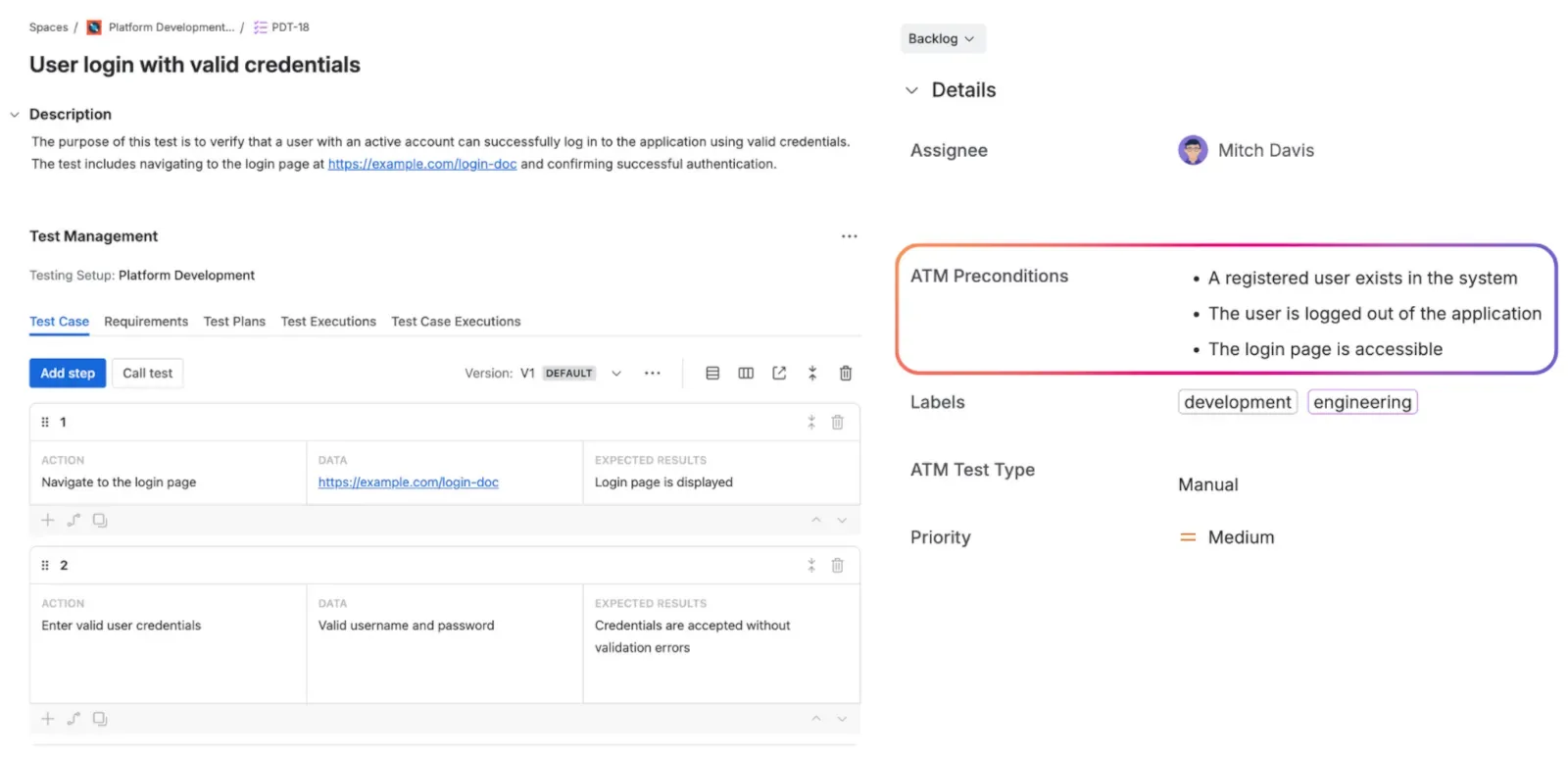
Preconditions shown as a dedicated field in a Jira test case using Appsvio Test Management.
Rules for Writing Useful Preconditions
To write effective preconditions, a few simple rules can make a significant difference:
Describe the state, not the actions: Preconditions should define what already exists. Actions belong in test steps.
Avoid duplication: Do not repeat information already covered elsewhere in the test case.
Be concise but complete: Keep preconditions short, but do not omit details that are required for correct execution.
Aim for reuse where possible: Well-structured preconditions can apply to multiple test cases within the same test plan.
Use a consistent format: Consistency improves readability and helps teams maintain quality across test cases.
Following these rules makes it easier to track test execution in Jira and reduces misunderstandings during testing.
From Theory to Practice: Managing Preconditions in Jira
Writing good preconditions becomes much easier when your test management tool supports the process instead of complicating it. A Jira-native solution improves transparency, collaboration, and consistency, especially in teams where multiple testers work on the same test cases.
Appsvio Test Management (ATM) is built directly into Jira and supports preconditions as a dedicated custom field with a rich text editor. This field is available on the Create Test Case screen, encouraging testers to define the test context early.
Key benefits of managing preconditions in ATM include:
- A dedicated Preconditions field visible directly in the Test Case details
- Rich text formatting for structured and readable content
- Full editability at the Test Case level
- Clear visibility of preconditions during Test Case Execution, displayed above the steps panel
During execution, the Preconditions field is shown as a snapshot of the Test Case. While Test Case Execution supports iterations, changes made to preconditions in the Test Case require a new execution iteration to reflect the updated content. This helps teams keep execution aligned with the current version of the test case and avoids changing context during an active run.
In addition to manual test design, Appsvio Test Management also offers Test Case Architect, an AI-powered Rovo Agent that can analyze Jira Requirements and suggest Test Cases together with Preconditions. This is an optional capability and does not replace manual creation, but can support teams in defining consistent test context when needed.
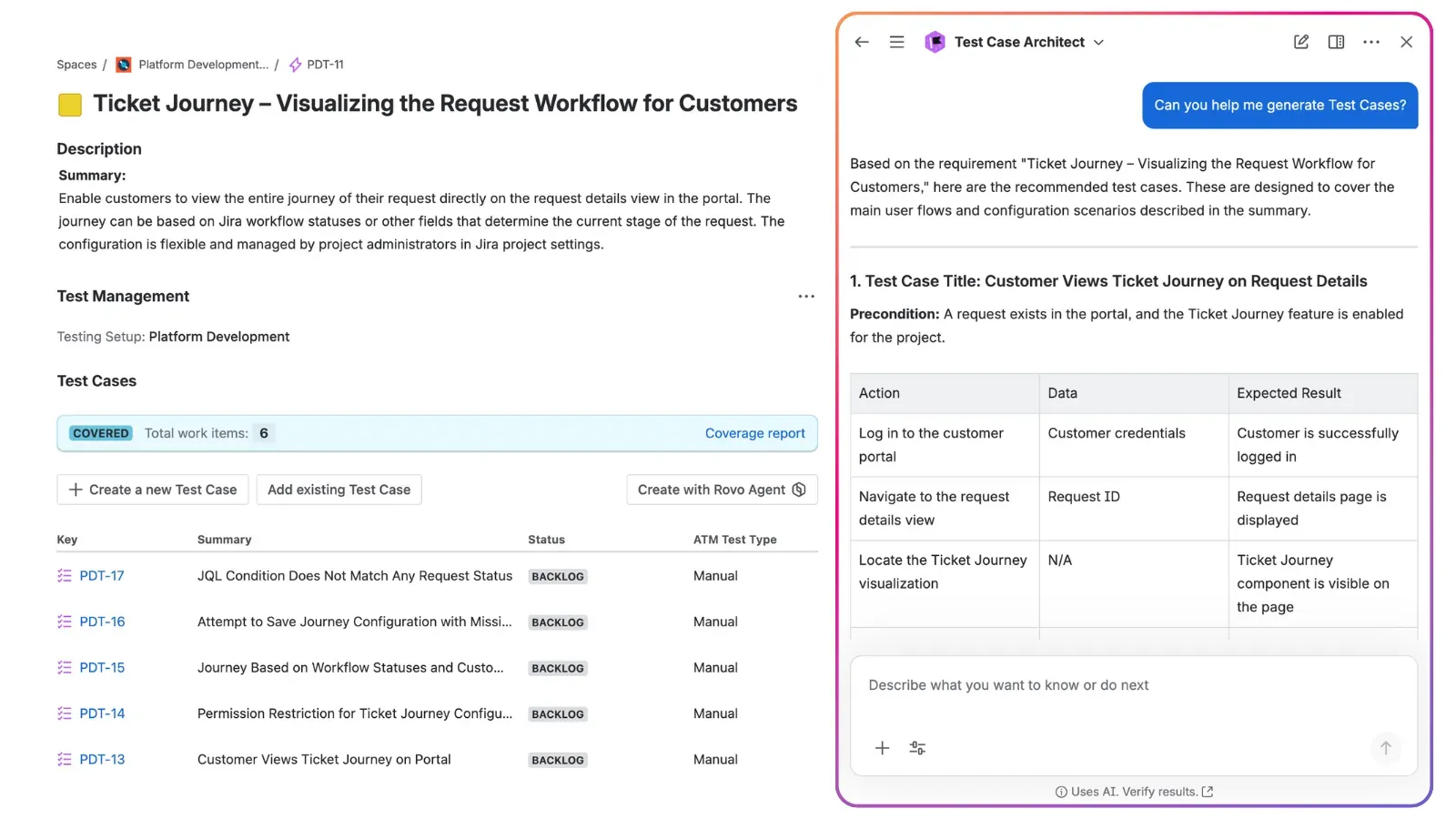
Test Case Architect suggesting test cases with preconditions based on a Jira requirement.
How ATM Compares to XRay and Zephyr
Popular Jira test management tools like XRay and Zephyr also support preconditions, but each takes a different approach.
In XRay, preconditions are created as separate work types. This allows reuse across multiple tests, which can be helpful in terms of reusability. However, working with linked work items can interrupt the testing flow. Navigating between Tests and Preconditions may feel less intuitive, and at scale, Preconditions appearing on boards can reduce clarity.
Another challenge is that Preconditions must be edited in a specific panel. Changes made directly in Jira descriptions are not always reflected during execution, which can be confusing for testers.
Zephyr uses a simpler model. Preconditions are stored as a rich text field within the Test Case. This makes them easy to read and edit. However, any change made to Preconditions in the Test Case is automatically reflected in Test Cycles. Additionally, they aren’t reusable, as they are defined individually for each Test Case. All of this can make it harder to control when changes should apply and to keep execution context stable.
It is also worth noting that some Jira testing apps, such as QAlityPlus, do not offer dedicated support for managing preconditions at all. In these cases, testers often need to include setup information directly in test steps or descriptions, which can reduce clarity and make test cases harder to maintain over time.
Appsvio Test Management balances clarity and control. With this tool, preconditions are:
- Embedded directly in the Test Case
- Clearly visible during execution
- Editable where appropriate and stable once execution begins
- Reusable for multiple Test Cases
This approach helps teams keep test cases readable, structured, and reliable without adding unnecessary complexity to Jira.
Better Preconditions, Faster Testing
Preconditions may seem like a small detail, but they play a key role in reliable testing. Clear preconditions improve test quality, support collaboration, and help teams avoid false failures.
With Appsvio Test Management, teams can define, manage, and execute test case preconditions directly in Jira, following best practices without extra overhead. If you want to improve how your team designs test cases and tracks test execution in Jira, explore Appsvio Test Management on the Atlassian Marketplace and see how it fits into your testing workflow.
Make Best Practices an Easy Habit
Explore Appsvio Test Management and see how it improves your testing process.
Try it freeFAQs
Related posts

Dariusz Jaroń
•Oct 2, 2026

Dariusz Jaroń
•Sep 23, 2026
Dariusz Jaroń
•Jul 29, 2026