
How to Write a Test Plan: Steps, Example & How to Run It in Jira
Learn how to write a test plan step by step, see a worked example, and turn your plan into test cases and executions in Jira.

A test plan is a document that defines what you’ll test, how, by whom, and when testing is done. In agile teams it usually takes one or two pages per release. Below you’ll find how to write one step by step, a worked example, and how to turn the plan into something your team can execute in Jira.
What a Test Plan Is For
The ISTQB glossary describes a test plan as documentation of the test objectives and of the means and schedule for achieving them. In practice, its job is alignment: QA, developers, and the product owner agree on what “done” means before testing starts, not at release time.
It’s usually written by the test manager or QA lead, with input from the product owner on scope and from developers on technical risks and environments.
A test plan is often confused with a test strategy. The strategy sets the rules for a whole product or organization and rarely changes. The plan applies those rules to one release:
| Test strategy | Test plan | |
|---|---|---|
| Covers | A product, program, or organization | One release or sprint |
| Answers | How do we test in general? | What, when, and by whom do we test this release? |
| Changes | Rarely | Every release |
| Owner | Head of QA | Test manager, QA lead |
If your team has no written strategy, put the few rules that matter, such as what gets automated, into the plan itself.
How to Write a Test Plan in 7 Steps
A test plan covers nine things: objectives, scope, approach, environments, entry and exit criteria, schedule, roles, risks, and deliverables. Here’s how to put them together:
- Start from the requirements. List the user stories, epics, or requirements in the release. If you can’t name them, you’re not ready to plan testing.
- Define scope. Mark each feature as in scope or out of scope, and write down why something is out. If you don’t, people will assume it was tested.
- Choose the approach. Decide which features get manual, automated, or exploratory testing, and which need performance, security, or accessibility checks.
- Set entry and exit criteria. For example: testing starts when the build is on staging and test data is loaded; it ends when the latest run of every Critical test case has passed and no Critical bugs remain open.
- Plan environments and data. Name exact browsers, devices, and data sets. Write “Chrome, Safari, and Edge, latest two versions” rather than “major browsers”.
- Assign people and dates. Who writes test cases, who executes them, who signs off, and by when.
- List risks. For each one, write the trigger and the fallback: “If the payment sandbox is unavailable, we test against mocks and retest before release.” Review the result with the product owner and the lead developer before execution starts. In agile teams, repeat steps 2 and 7 at every sprint planning: when a story is added or dropped, scope and risks change with it.
Test Plan Example
Here’s what those decisions look like for a single feature release:
| Section | Example |
|---|---|
| Objectives | Verify that users can save a payment card and pay with it at checkout |
| In scope | Add card, delete card, pay with saved card, expired card handling |
| Out of scope | Apple Pay and Google Pay (next release) |
| Approach | Manual functional tests, automated regression of checkout, security review of card storage |
| Environments | Web (Chrome, Safari, Edge, latest two versions), iOS app, Android app |
| Entry criteria | Build on staging, payment sandbox available, test cards loaded |
| Exit criteria | Latest run of every Critical and High test case passed, no open Critical bugs |
| Schedule | Test design Mar 2–4, execution Mar 5–10, sign-off Mar 11 |
| Roles | Anna (QA lead, sign-off), Tom and Mia (execution), Leo (security review) |
| Risks | Payment sandbox downtime → test against mocks, retest on sandbox before sign-off |
| Deliverables | Traceability report, sign-off recorded in the plan’s workflow |
From Document to Jira: Test Plans in ATM
A plan written in a document goes out of date the moment testing starts. In Appsvio Test Management (ATM), a Test Plan is a Jira work item, so the plan and the testing it describes live in the same place. Its data sits in Jira fields, which means JQL, filters, dashboards, and automation work on test plans the same way they work on the rest of your Jira work.
Here’s where each part of the plan ends up, using the example above:
| Plan section | Where it lives in ATM | In the example |
|---|---|---|
| Objectives, approach, criteria, risks | The Test Plan’s description, or your own Jira fields | Description of the “Release 2.4 – Saved cards” plan |
| Scope | Test Cases added to the plan, linked to the requirements they verify | Test Cases for adding, deleting, and paying with a saved card |
| Environments | One Test Execution per environment, run from the plan | Three executions: web, iOS, Android |
| Roles | Assignees of the plan and its executions | Anna owns the plan |
| Sign-off | A workflow status such as Approved | Anna moves the plan to Approved |
| Deliverables | The Traceability report, exported to PDF or CSV | Report attached to the release |
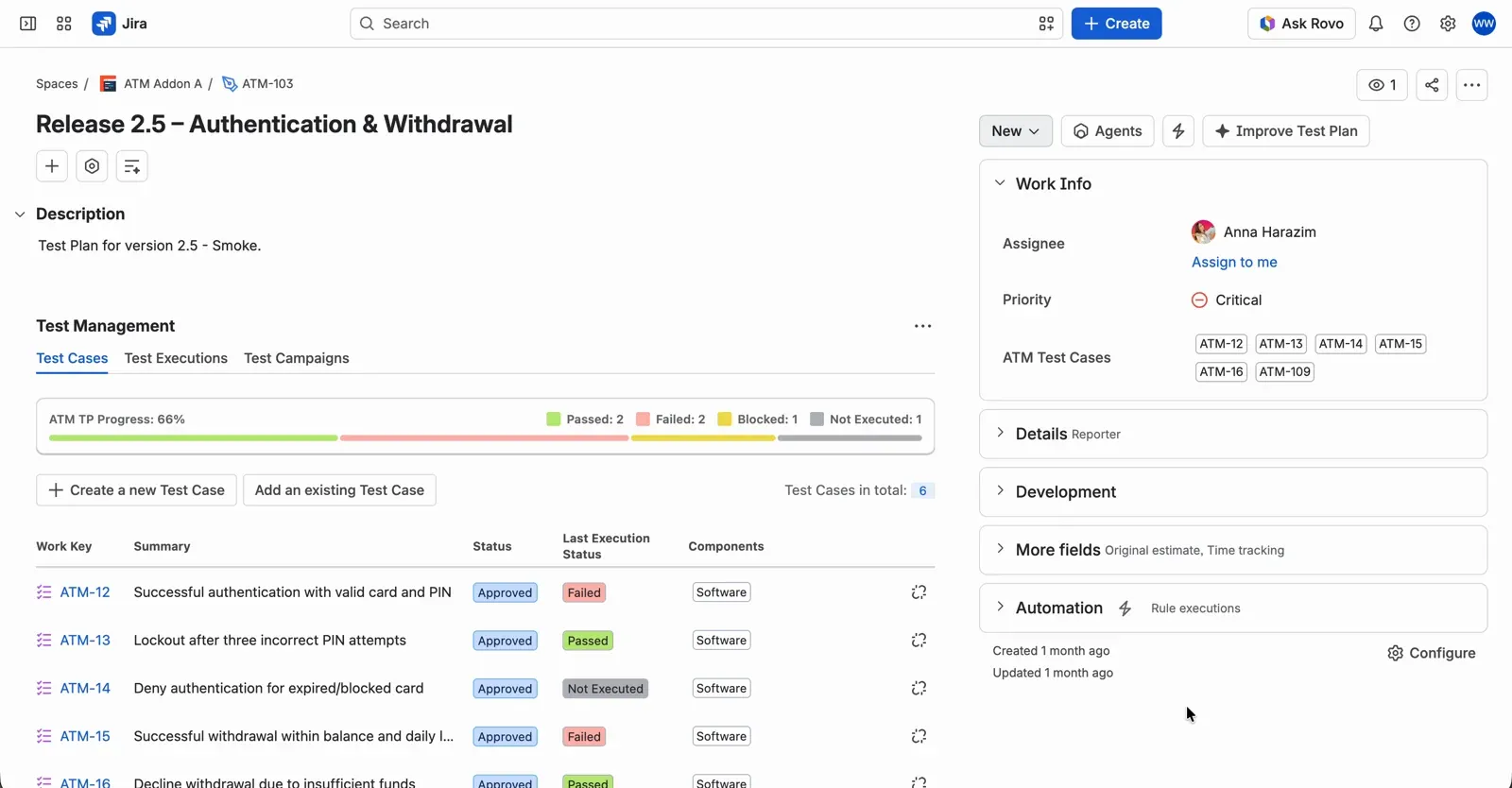
A Test Plan as a Jira work item, with its Test Cases and progress bar in the Test Management panel.
Running the plan
Each new Test Execution created from the plan includes all of its Test Cases, in the plan’s order. Within each Test Execution, only the latest iteration of a Test Case counts toward progress, so a retest replaces the earlier failure instead of being added to it. With one execution per environment, you can check the exit criterion “latest run of every Critical test case passed” for each environment separately.
Defects raised during execution link back to the plan through its Test Executions, and Steps Versioning keeps every result tied to the version of the steps that was actually run, even if the Test Case changes later.
Reporting and sign-off
The plan’s Test Executions tab shows status, progress, and defect count for every run. Before sign-off, the Traceability report follows each requirement through its Test Cases and executions to defects, and the Coverage report shows which requirements still have no Test Cases at all.
If several teams test parts of one product, a single ATM Testing Project can span multiple Jira spaces, so requirements stay with the product teams while testing lives in one place. More on that in how to organize tests in Jira.
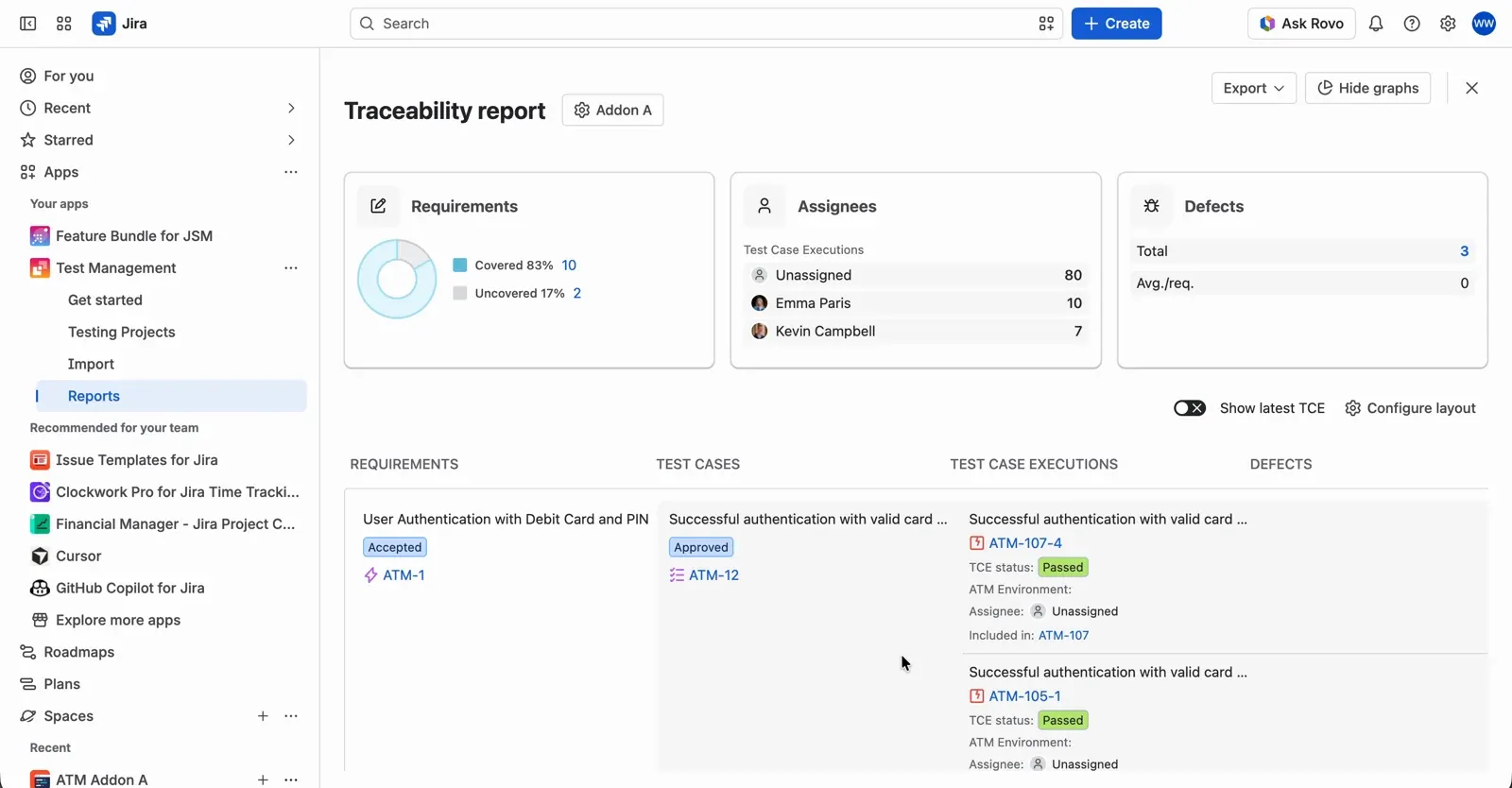
The Traceability report with requirements, Test Cases, executions and defects in columns.
Before You Share Your Test Plan
A plan nobody reads after approval is too long or in the wrong place. Before you share yours, check that a reader can answer these questions in five minutes:
- What is in scope, and what is explicitly out?
- When does testing start, and what counts as done?
- Who executes, who reviews, who signs off?
- Are performance, security, and accessibility covered or consciously skipped?
- What are the top three risks, and what’s the fallback for each?
- Is anything copied from the last release that no longer applies?
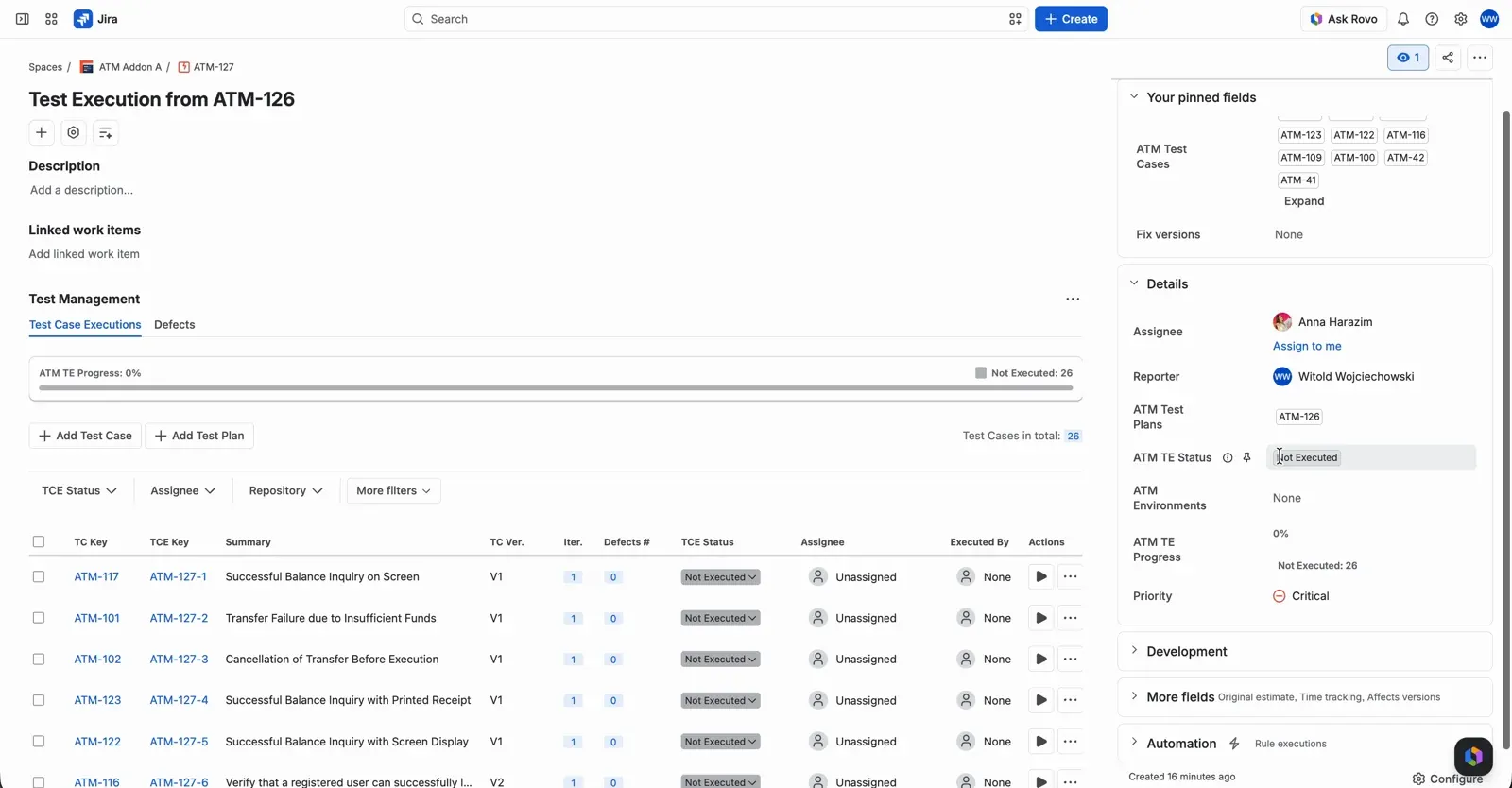
A Test Execution created from a Test Plan, listing the plan’s Test Cases with their execution status.
If any answer is “it depends”, the plan isn’t finished yet.
Plan your tests in Jira
Create test plans as Jira work items, run them on every environment and trace results back to requirements.
Try it freeThis article was updated on October 14, 2026.
Related posts

Dariusz Jaroń
•Oct 2, 2026


Dariusz Jaroń
•Sep 23, 2026