
How to Write a Good Test Case: Format, Examples & Tips for Jira
Learn the standard test case format, see a good test case example and the red flags of a bad one, and get tips for clear, traceable test cases in Jira.

A test case is a set of preconditions, steps, and expected results that tells a tester how to verify one specific behavior of your product. A good one is like a well-written recipe: anyone on the team can follow it without hesitation and get the same result. This guide shows the standard test case format, a good example, the red flags of a bad one, and how to write test cases in Jira.
What Makes a Good Test Case Actually Good?
Most test cases follow the same basic format. To be effective, yours should give clear answers to these components:
- Objective: Defines what you are verifying and why it matters to the business. Mastering this is the first step toward traceability from requirements to verification.
- Preconditions: The necessary setup (user roles, data, or configurations) required to prevent “false fails” caused by an unready environment.
- Test Steps: Clear, numbered actions that any team member can follow to ensure the test is executed consistently every time.
- Expected Result: Specific, measurable benchmarks for success, such as a specific URL redirect, rather than vague outcomes like “it works.”
- Pass/Fail Criteria: The defined boundaries that help a tester distinguish between a minor UI glitch and a functional defect.
However, a good test case is more than a completed form. It’s a communication tool between the tester and the developer, so it should also follow these principles:
- Independent: It can be run on its own without relying on other tests.
- Traceable: It links directly back to a specific requirement or user story.
- Clear: It avoids ambiguity and leaves no room for guesswork.
- Appropriate: It has just enough detail to be effective, but not so much that it’s a maintenance burden.
- Covers both paths: It checks what should happen when things go right, and separate test cases check what happens when they go wrong, such as invalid input or an expired session.
- Uses concrete data: It names the exact values to use, instead of “valid data”.
Example of a Good Test Case
Here’s what these components look like in practice:
- Title: Password reset link lets the user set a new password
- Objective: Verify that a registered user can reset a forgotten password via the email link. Linked requirement: user story “Reset forgotten password”.
- Preconditions: User test.user@example.com exists and is active, the user is logged out, and the test inbox is accessible.
| # | Action | Test data | Expected result |
|---|---|---|---|
| 1 | Open the login page and click “Forgot password?” | – | The password reset form is displayed |
| 2 | Enter the email address and click “Send link” | test.user@example.com | The message “Check your inbox” is displayed |
| 3 | Open the reset email and click the link | – | The “Set new password” page opens |
| 4 | Enter and confirm a new password, then click “Save” | NewPass!2026 | The user is redirected to the dashboard and logged in |
| 5 | Log out and log in with the new password | test.user@example.com / NewPass!2026 | Login succeeds |
- Pass/Fail Criteria: The test passes if every step matches its expected result. Any mismatch is a fail and should be reported as a defect.
Keeping every test case at this level by hand takes effort, which is where the right Jira test case management tool helps.
Why Your Tool Matters for Test Case Design
A modern test management tool enables QA specialists to actively collaborate on software quality with the entire team, rather than functioning as a separate gatekeeper - Konrad Koralewski, QA Specialist at Appsvio
You can keep test cases in a spreadsheet next to Jira, but then they drift away from the stories and bugs they belong to. A Jira agile test management tool like Appsvio Test Management (ATM) is built directly into Jira. This way, it aligns testing with the rest of your development workflow.
The tools we use influence our habits. If a tool makes traceability difficult, testers often skip it. If it makes updating steps tedious, documentation falls behind. ATM serves as an example of a tool that helps testers create good habits by making the “right” way to test also the easiest way.
How ATM Helps You Apply These Rules
Writing a high-quality test case is a skill, but even the most experienced testers can be slowed down by rigid or disconnected tools. To bridge the gap between theoretical “best practices” and daily execution, you need an environment that actively supports your workflow.
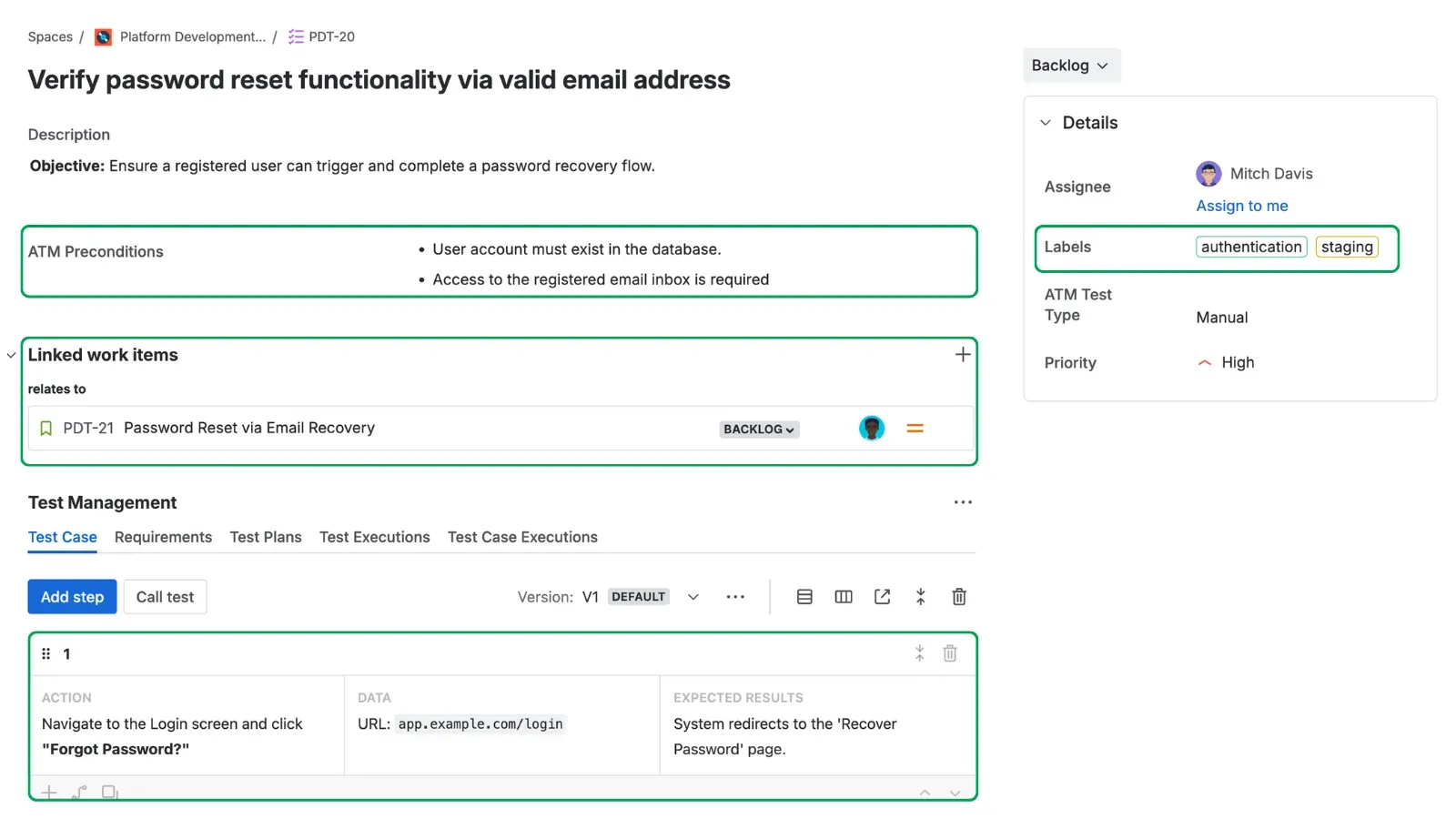
A visual breakdown of essential components that compose a good test case in Jira.
To create test cases in Jira that truly elevate your software quality, you can leverage several key features within ATM that turn complex principles into simple, repeatable actions:
- Maintain Contextual Clarity
A test case is only as good as the requirement it’s testing. Because ATM is native to Jira, testers can see the full history of a user story (comments, attachments, transitions) without leaving Jira. This ensures the test case is designed with the most up-to-date business logic and eliminates the “sync lag” found in external tools.
- Build Auditability and Trust
A “good” test case must be reliable. Steps Versioning lets you keep several versions of a test case’s steps and choose which one is the default. New Test Executions use the default version, while existing ones keep the version they were run with, so if a test starts failing, you can see which version of the steps each execution used. For beginners, this provides a “Safety to Iterate”: you can refine steps in a new version and set the earlier one as default again if needed.
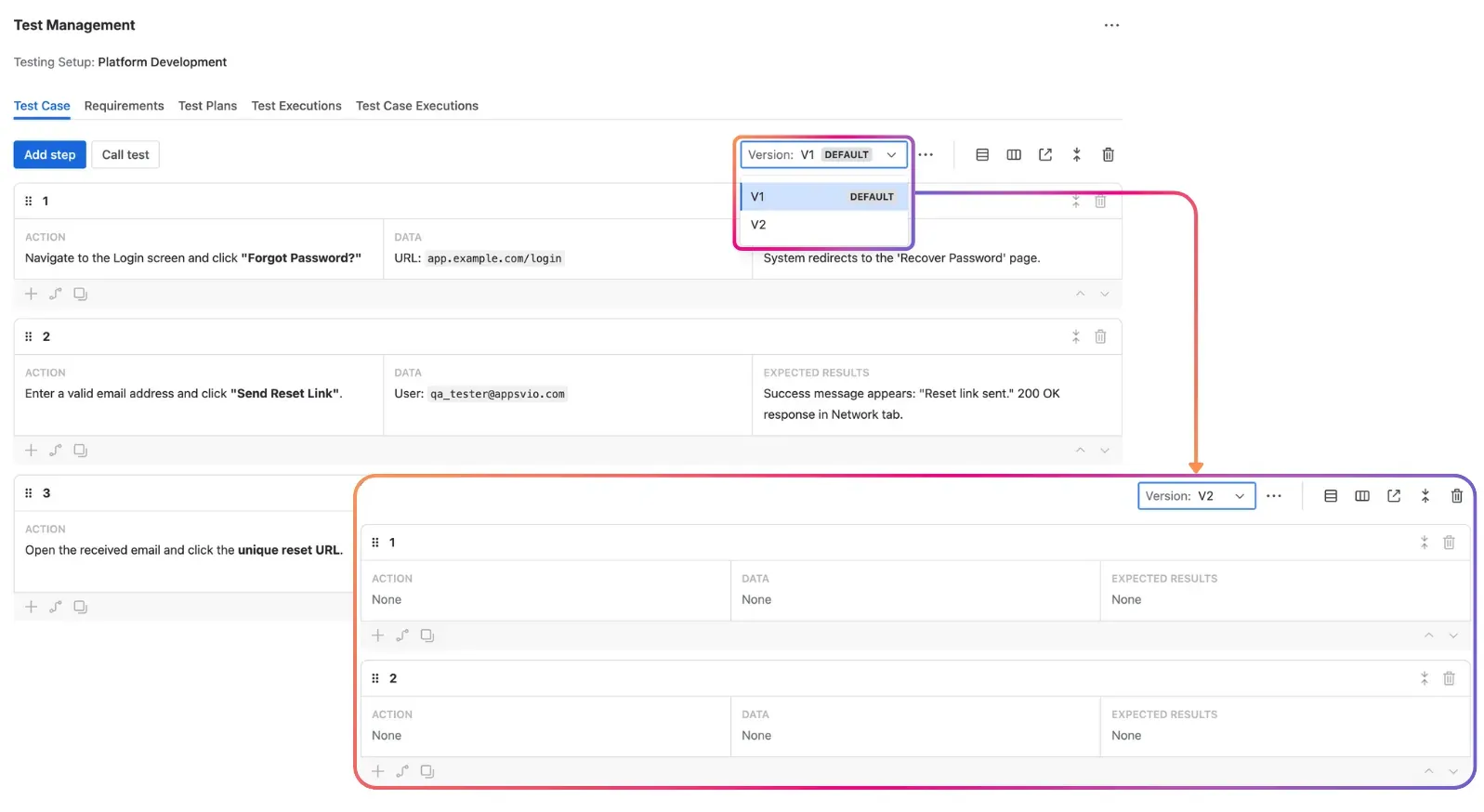
Managing versions of test steps in ATM.
- Optimize for Maintainability
ATM’s Call Test feature lets you call one test case from another as a single step. This promotes the “DRY” (Don’t Repeat Yourself) principle: update the called test case once, and every test case that calls it uses the new steps in new executions.
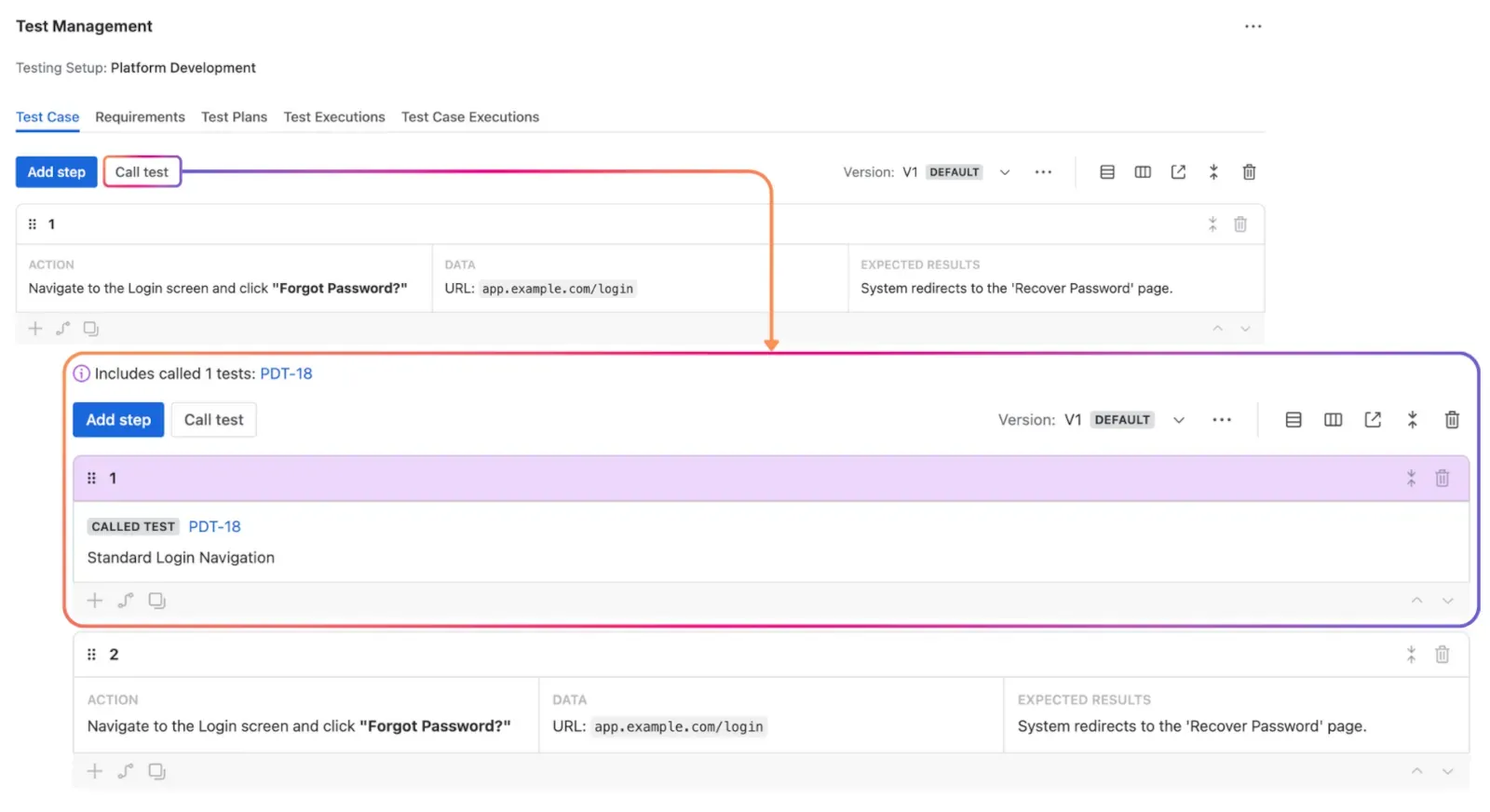
Modular testing: using Call Test to reuse a common flow, such as login, across test cases.
- Ensure Standardized Structure
Many beginners struggle with how to write a step. The Test Case Architect, a Rovo agent, analyzes a requirement, proposes test cases with Action, Data, and Expected Result, and creates the ones you choose, linked to the requirement. This shows beginners what a good step looks like by example.
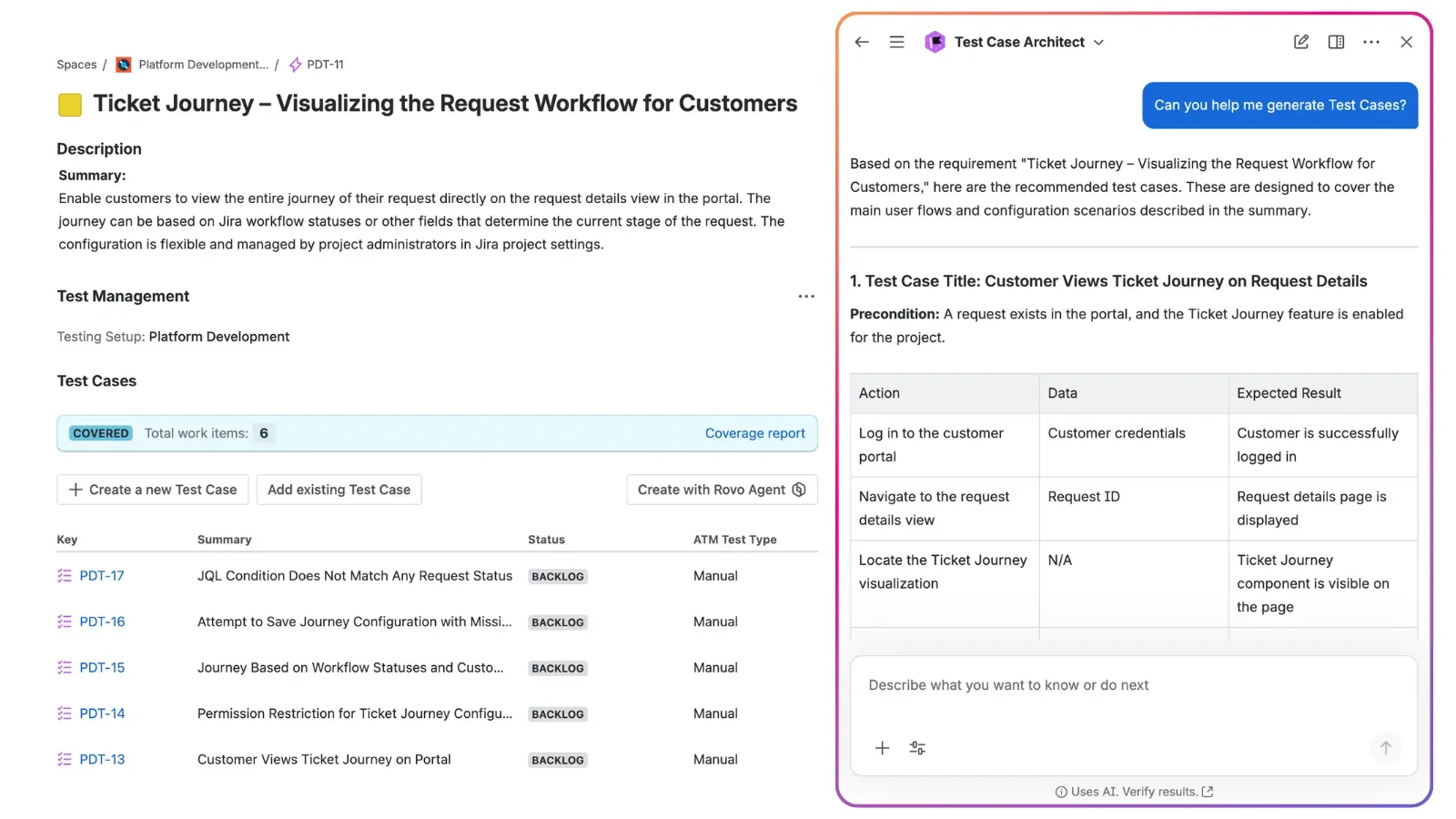
Test Case Architect proposing structured test cases with Actions, Data, and Expected Results.
- Practice Purpose-Driven Testing
A test case is only “good” if it serves a purpose. Traceability and Coverage Reports show the relationship between requirements and results. This validates the necessity of your work, ensuring you aren’t writing “orphaned” cases, but rather focusing your energy where the business needs it most.
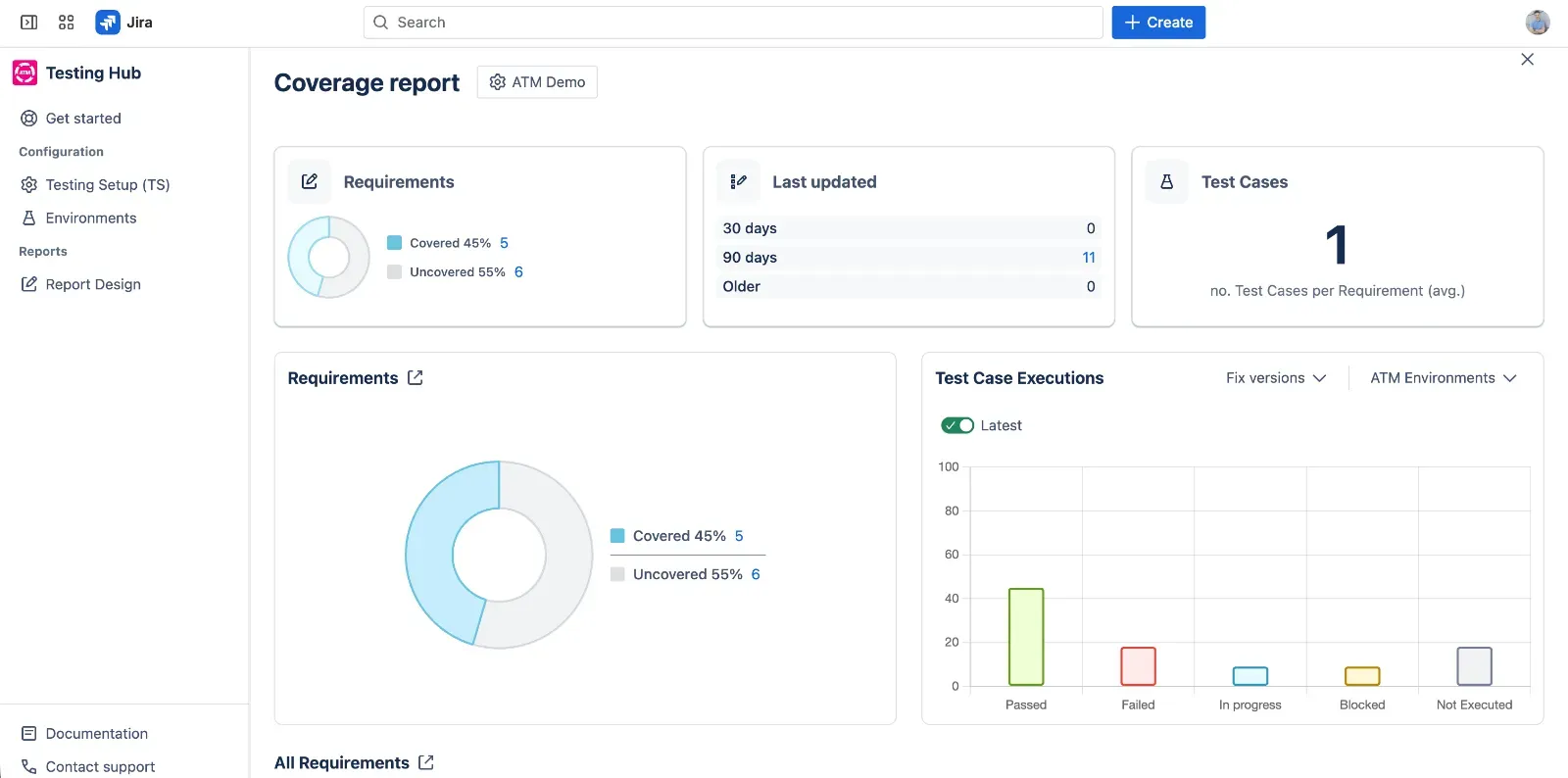
Tracking execution status and identifying untested requirements at a glance to ensure full project quality with Coverage reports.
What Does a Bad Test Case Look Like?
To understand the “good,” we must recognize the “bad.” A poorly designed test case often suffers from being “just a list” rather than a strategic document.
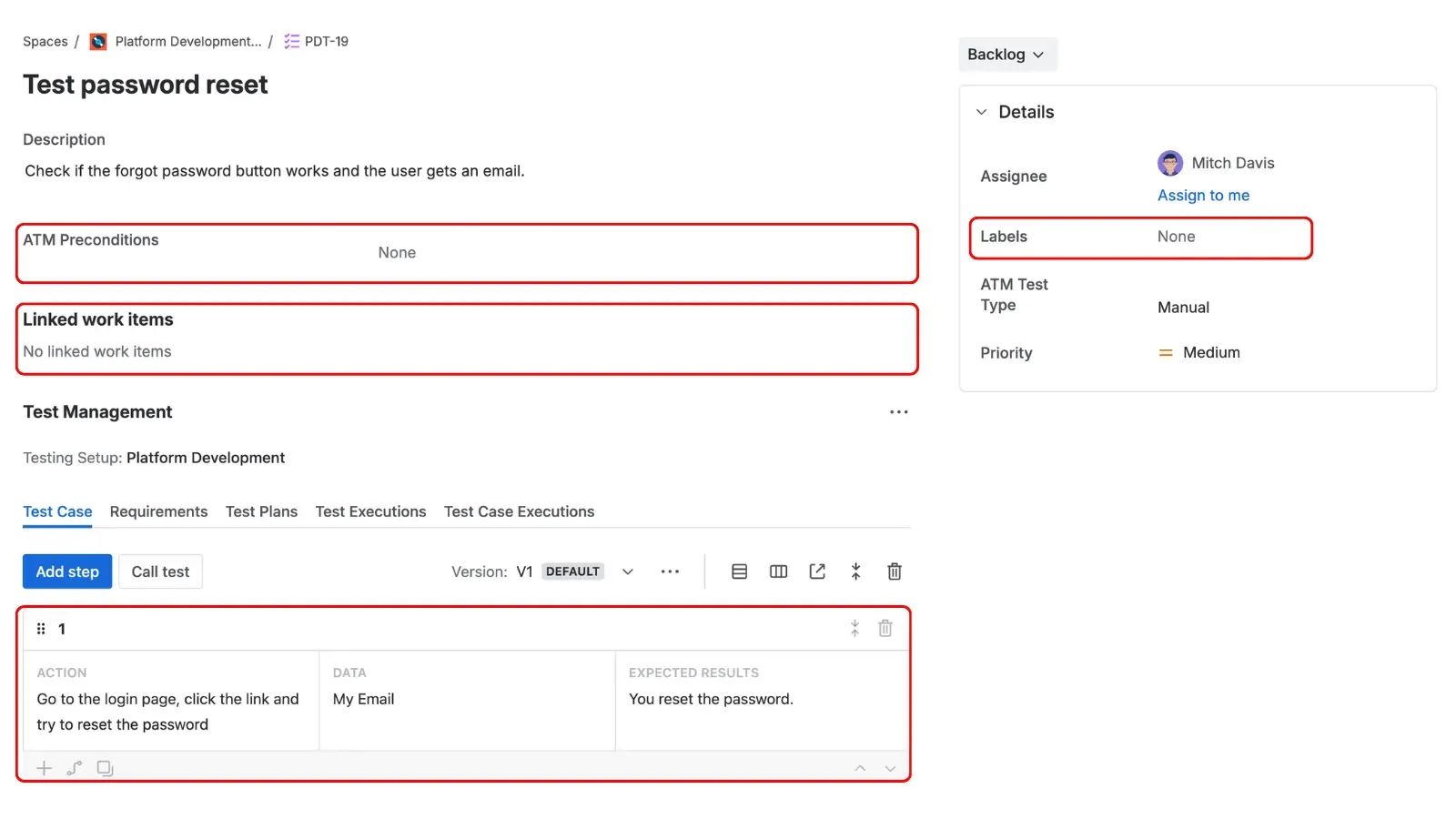
Example of a bad test case.
You’ll recognize a bad test case by these red flags:
- Vague Descriptions: Using phrases like “Check if the button works” instead of “Verify that clicking the ‘Submit’ button triggers a 200 OK response and redirects to the dashboard.”
- Missing Expected Results: Without a clearly defined outcome for every action, the tester is left to guess whether the behavior they see is a feature or a bug.
- Isolation: The test case exists in a vacuum. It isn’t linked to a requirement, making it impossible to tell if the test is even relevant to the current sprint.
- Complexity Overload: Steps that are too long or contain multiple different actions. This makes it impossible to pinpoint exactly where a failure occurred.
When writing test cases in Jira, avoiding these pitfalls is much easier when your tool prompts you for the right information at the right time.
Conclusion: Habits Define Quality
Writing good test cases is a skill that grows with every sprint. By focusing on clarity, independence, and traceability, you can create a test suite that not only identifies bugs but also serves as a reliable guide for your entire team.
However, the quality of your work is often a reflection of the environment you work in. The tools we choose play a crucial role in shaping our daily habits; a tool should make it easy to follow the rules of good design, not harder. Appsvio Test Management (ATM) is designed to ensure that these professional standards - like automated traceability and modular design - become second nature rather than a chore.
Remember to keep your test cases up-to-date and leverage the right tools to streamline your process. Check out Appsvio Test Management (ATM) on the Atlassian Marketplace and start building a test suite that works for you.
Ready to Build a Better Test Suite?
Stop fighting spreadsheets and start testing smarter with ATM.
Try it freeThis article was updated on October 15, 2026.
FAQs
Related posts

Dariusz Jaroń
•Oct 2, 2026


Dariusz Jaroń
•Sep 23, 2026