How to Track Azure DevOps Work Items Inside Your JSM Customer Portal
Tired of "When will this be fixed?" emails? Show live Azure DevOps tasks right inside your JSM portal - no extra licenses, no sync risk.

When engineering teams work in Azure DevOps (ADO) but business users and support staff operate in Jira Service Management (JSM, formerly Jira Service Desk), a communication barrier arises. Customers and internal stakeholders who submit feature requests or report software bugs in JSM often face an information blackout. From their perspective, a ticket simply sits in a static In Progress status for weeks, while the actual development, sprint planning, and deployment are actively moving forward inside Azure DevOps.
To check on progress, users are forced to flood your support queue with follow-up emails asking: When will this be fixed?. Alternatively, organizations end up buying expensive, unnecessary Azure DevOps licenses for non-technical managers just so they can log in and view development boards. Using UniPortal, you can securely display Azure DevOps tasks directly inside your Jira Service Management portal. It creates a single pane of glass where users track live development progress without adding technical debt or writing custom scripts.
Meet UniPortal
UniPortal upgrades the standard customer portal table by unlocking live visibility into Azure DevOps sprints and work items, right alongside your existing custom Jira columns. Whether your stakeholders need to track bug fixes, software requests, or delivery timelines, they get a single, transparent view of active development progress without leaving JSM.
- This Use Case: No-code integration of Azure DevOps work items inside your Jira help desk.
- Key Benefit: Total development visibility that cuts down on “status update” follow-up tickets.
See other ways to use the app:
- How to Build a Branded Jira Help Center with Live Announcements
- How to Display Custom Columns (SLAs & Assets) in Jira Customer Portal
Key Takeaways
- The Dev-Business Bridge: Display live Azure DevOps work items alongside Jira Service Management tickets in one unified dashboard.
- Massive License Cost Savings: Avoid purchasing expensive Azure DevOps licenses for business stakeholders who only need to track task progress.
- Asynchronous Performance: Use a dedicated, fast-loading tab layout to query external ADO data without slowing down your primary Jira portal.
- Secure Presentation Layer: Authenticate connections locally using secure Personal Access Tokens (PAT) and enforce read-only visibility to protect development databases.
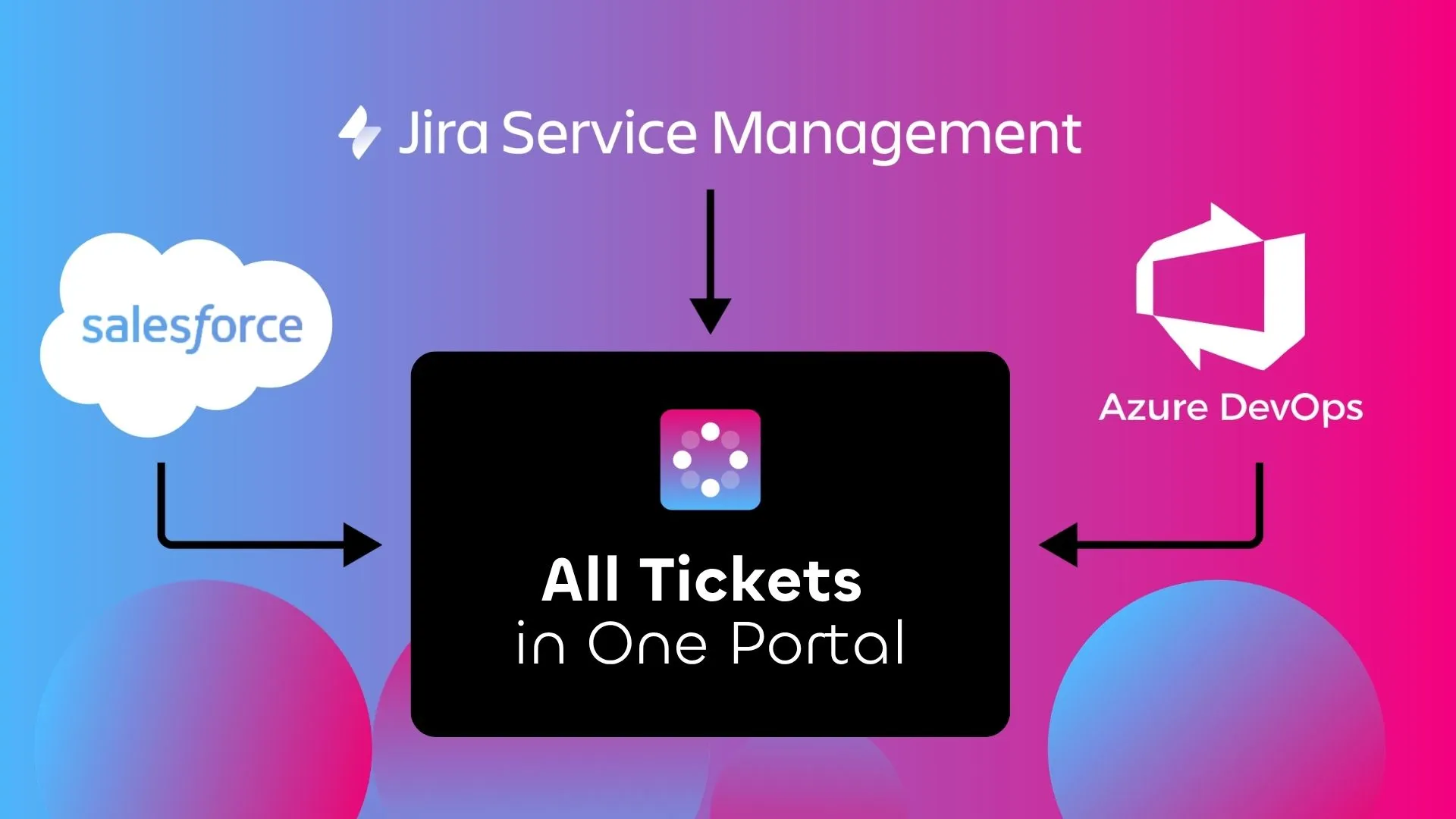
Use UniPortal to display all tickets in one place.
Why Standard Jira Portals Lock Dev Data in a Black Box
A default configuration of the Jira customer portal is built as a static table. When it comes to displaying actual software development cycles to end-users, support leaders face three distinct challenges described below.
Atlassian’s own State of Developer Experience Report 2025 puts real numbers on this: developers cite context switching between tools and collaboration with other teams among their top reported time-wasters, and 90% say they lose six or more hours a week to this kind of organizational friction.
1. The Development Black Box
Your developers are actively closing tasks, assigning pull requests, and pushing updates through sprints in Azure DevOps. However, the end-user on the JSM portal sees nothing but the native Status: In Progress field. They remain completely blind to which sprint or release cycle their request is assigned to.
2. The Manual Status-Sync Trap
Without an automated way to display development progress, support agents waste hours acting as messengers. They have to manually look up work items in Azure DevOps, copy the status, and write manual comments in the JSM ticket just to keep the customer updated.
3. License Inflation
To bypass the visibility gap, IT managers often buy extra Azure DevOps accounts for project managers, product owners, or key business stakeholders. This is an inefficient use of budget, as these users do not write code; they only need to view the status of active tasks.
You might already know that Azure DevOps offers a free Stakeholder license for exactly this scenario. In practice, it still means creating and managing external ADO accounts for every business user, exposing your entire project backlog rather than just the one work item a customer cares about, and asking non-technical stakeholders to learn a second tool.
UniPortal keeps every user inside the JSM identity they already have, and shows only the specific task tied to their request.
Unlocking Azure DevOps Data in JSM via UniPortal (The No-Code Route)
To connect Jira and Azure DevOps, administrators often resort to heavy, complex backend workarounds. They build automated workflows using jira automation custom fields or write custom scripts using external APIs.
While these steps can organize data on the backend, they do not change the customer’s actual portal layout. Traditional integration apps on the marketplace solve this by forcing you to deploy entirely separate, external web pages hosted on third-party servers. It introduces security headaches, data residency issues, and a fragmented user experience.
This technical bottleneck is why we built UniPortal. Rather than taking users away from your secure ecosystem or relying on heavy bi-directional sync tools, our app acts as an embedded, secure presentation layer. While UniPortal integrates external developer platforms like Azure DevOps, it also serves as a native portal customization tool to display dynamic metrics like Jira Service Desk SLAs and Assets - right inside the primary ‘My Requests’ view.
Instead of merging completely different database structures into one slow, massive table, UniPortal organizes your connections into clean, dedicated tabs.
| Tab 1: Jira Requests | Tab 2: Azure DevOps Tasks |
|---|---|
| (Native JSM tickets) | (Live, Read-Only ADO Data via Personal Access Token) |
How Our App Transforms Your JSM Interface Into a Unified Development Tracker:
- Select Specific ADO Projects: During setup, administrators choose the specific Azure DevOps organization and project they want to display on the portal.
- Zero-Code Column Customization: You decide exactly which development details are visible to portal users. You can map essential columns like Task ID, Title, State, Assignee, Area Path, and Tags.
- Read-Only Integrity: UniPortal acts strictly as a secure presentation layer. Portal users cannot modify, transition, or delete Azure DevOps work items from JSM. For users who actually work in both systems, clicking the task ID redirects them directly to the native Azure DevOps screen.
This cross-platform approach is not limited to engineering tools. If your commercial teams use other systems, you can also display active Salesforce cases within the same customer portal to bridge the support-sales divide.
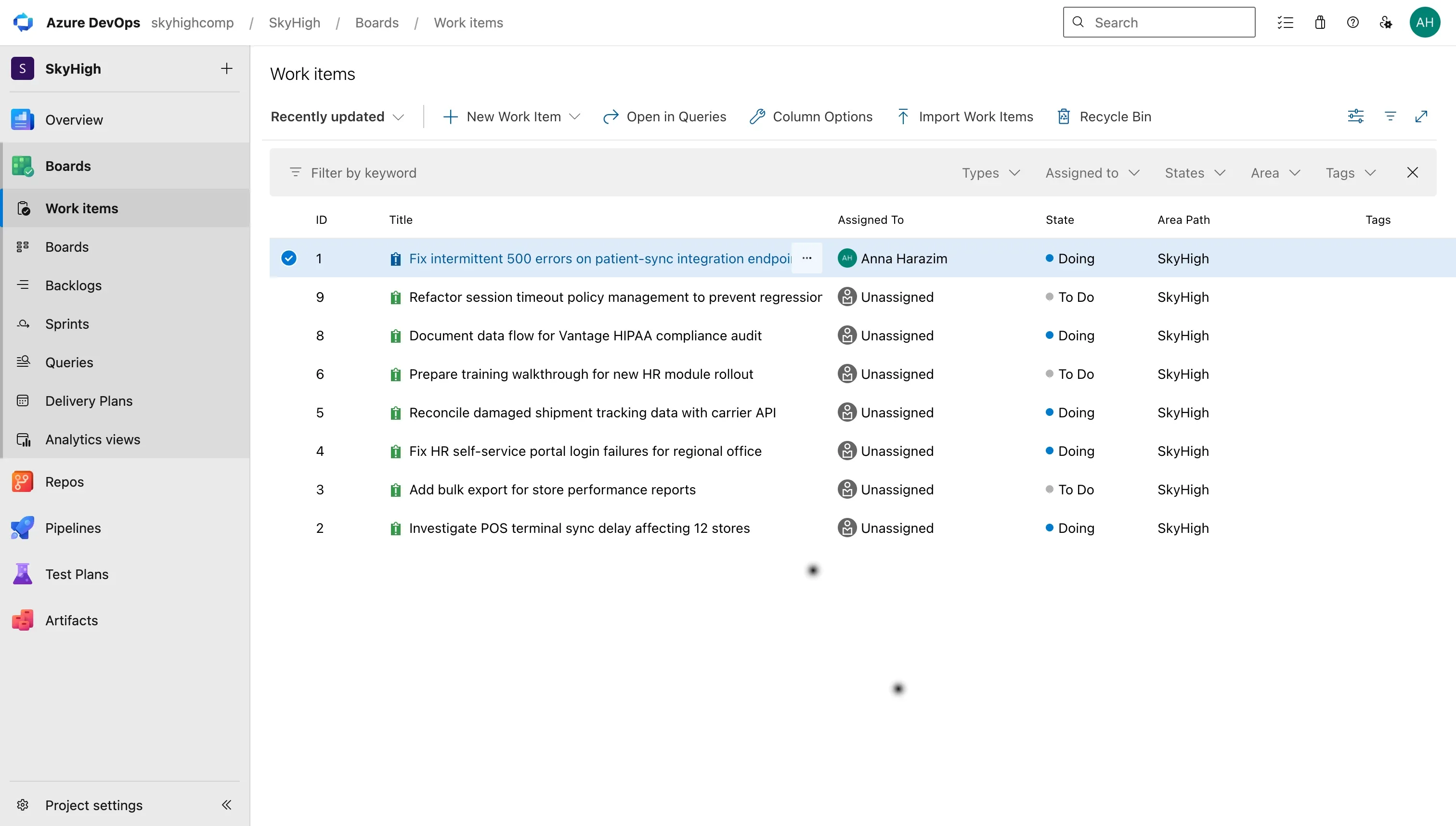
View on Azure DevOps tickets.
Under the Hood: Secure, Forge-Based Dev Visibility
IT security teams are rightfully strict about allowing external connections into development environments. UniPortal resolves these compliance concerns by building directly on Atlassian’s secure, cloud-native Forge platform. Our app has no remote backend or external servers. All data processing and storage occur within Atlassian’s secure infrastructure, ensuring full compliance with your data residency standards.
We call this approach Secure Task Mapping: a strictly read-only link between one JSM ticket and one Azure DevOps work item, authenticated with a narrowly scoped Personal Access Token.
- Direct PAT Authentication: The connection uses standard Personal Access Tokens (PAT) directly from your Azure DevOps organization, giving your admins full control over token expiration and scoped read permissions.
- Organization & Project Mapping: The administrator defines the ADO organization and targets the exact project to render in the portal.
- Asynchronous Loading: To protect portal performance, Azure DevOps data is not loaded when a user opens the main help center. The API is only queried when the user actively clicks on the dedicated Azure DevOps tab, ensuring a lightning-fast portal experience.
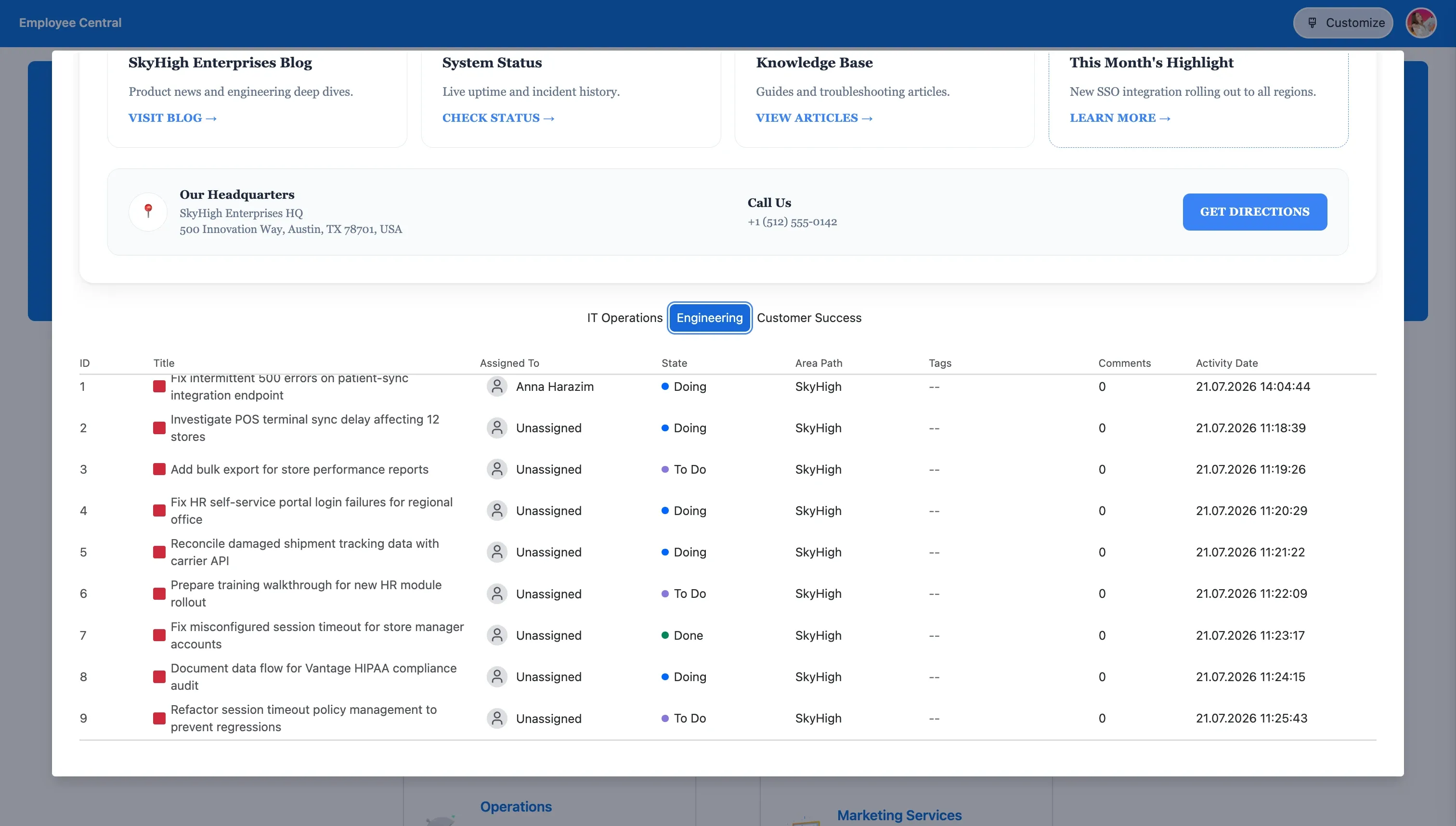
Azure DevOps tickets in UniPortal.
Improving Operational IT Metrics
Opening up development visibility directly influences your core IT service metrics:
- Reduced Ticket Volumes: Providing self-service transparency over active bug fixes directly slashes high-volume, redundant: When will this be fixed? inquiries.
- Faster Resolution Times (MTTR): Support agents stop spending time digging through development boards to answer customer questions, allowing them to focus on active ticket resolution.
- Unified Onboarding: During employee onboarding, instead of giving new team members a long list of separate bookmarks, you can give them a single URL to your JSM hub as their starting point.
Summary: A Smarter Way to Track Development Progress
This app functions as an essential, no-code upgrade for any single-instance or multi-instance environment looking to break down native JSM layout limits and build a transparent, unified help desk. By pulling critical data from Azure DevOps alongside your Jira Service Management tickets into a single, secured view, you eliminate the visibility gaps that trigger customer anxiety and overflow your support queues.
Stop paying for extra Azure DevOps licenses
Try UniPortal for free to give your business users instant development visibility and eliminate redundant: When will this be fixed tickets.
Go to Atlassian MarketplaceFAQs
Related posts
Katarzyna Pawlak
•Sep 24, 2026


Dariusz Jaroń
•Jul 22, 2026