How to Build a Branded Jira Help Center with Live Announcements
Live announcements and custom branding can completely change how users interact with your Help Center. Want to keep everyone informed before they even open a ticket? See how easily you can upgrade your portal experience.

Standard Jira Customer Portal interfaces offer limited layout flexibility and rigid options for corporate branding. For large enterprises, a default service desk template fragments the digital customer journey. When an organization operates multiple support channels, employees and customers are often forced to bookmark dozens of different URLs just to navigate internal services.
Without a centralized entry point, the digital touchpoints customer journey breaks down, turning onboarding and day-to-day support into a confusing administrative hurdle.
Upgrading your portal layout is the most efficient way to eliminate this friction. Transforming a basic request list into a unified help desk hub optimizes corporate communication, protects brand identity, and directly improves user navigation.
Here’s how you can achieve this with UniPortal.
Meet UniPortal
UniPortal replaces strict native dashboard structures with an advanced, fully customizable landing page. It allows administrators to embed rich HTML layouts, configure smart navigation links, and display critical announcements directly within the customer portal view.
This Use Case: No-code customization of the customer request list view.
Key Benefit: Aggregates resource paths into a single landing page, optimizing your primary customer service metric and reducing redundant navigation queries.
See other ways to use the app:
Key Takeaways
- The Scattered Knowledge Trap: Standard setups force teams to split resource links and documentation across separate internal sites. Finding the right process (like a manager requesting a team salary increase) wastes valuable time for employees and complicates onboarding.
- The Code-Free Alternative: Rather than relying on developers to alter frontend styles or write custom scripts, administrators can use UniPortal to build a tailored, accessible central hub embedded directly within their existing Jira Service Management environment.
- Dynamic, Context-Aware Communication: Deploying embedded layout blocks that respect user language and permission profiles ensures that support leaders show users only the relevant announcements and forms.
The Help Center Communication Gap: Top 3 Realities of Portal Layouts
Understanding the root cause of user confusion requires analyzing the layout restrictions built into the native environment. In a default configuration, attempting to deliver corporate updates or clear resource navigation breaks down into three distinct realities:
1. The Onboarding Barrier
When a new employee or client joins the system, they face immediate navigation challenges. Instead of arriving at a clean, intuitive ecosystem, they are often handed a manual list of dozens of support URLs or forced to search through separate service desks to locate a simple form.
2. The Language and Compliance Noise
In a global enterprise, pushing a single alert or link path to everyone creates visual clutter. A standard dashboard cannot dynamically filter elements based on user context. As a result, an employee in Poland is forced to navigate past region-specific workflows or announcement text written strictly for teams in Brazil or Portugal.
3. The Static Interface (The Content Vacuum)
This is where the native Jira Service Management portal customization options reach their technical limits. The primary customer request overview is built as a static table. It lacks the technical framework to hold corporate branding, host operational alert bars, or display dynamic team news.
To clear these hurdles, administrators frequently resort to complex backend workarounds. They often try to force corporate communication into standard issue text areas or rely on heavy automation scripts just to pass basic updates to the frontend.
While these steps organize backend data, they leave the front-end user experience untouched. Support leaders need a stable, direct method to execute thorough jira service management portal customization without adding to their organization’s technical debt.
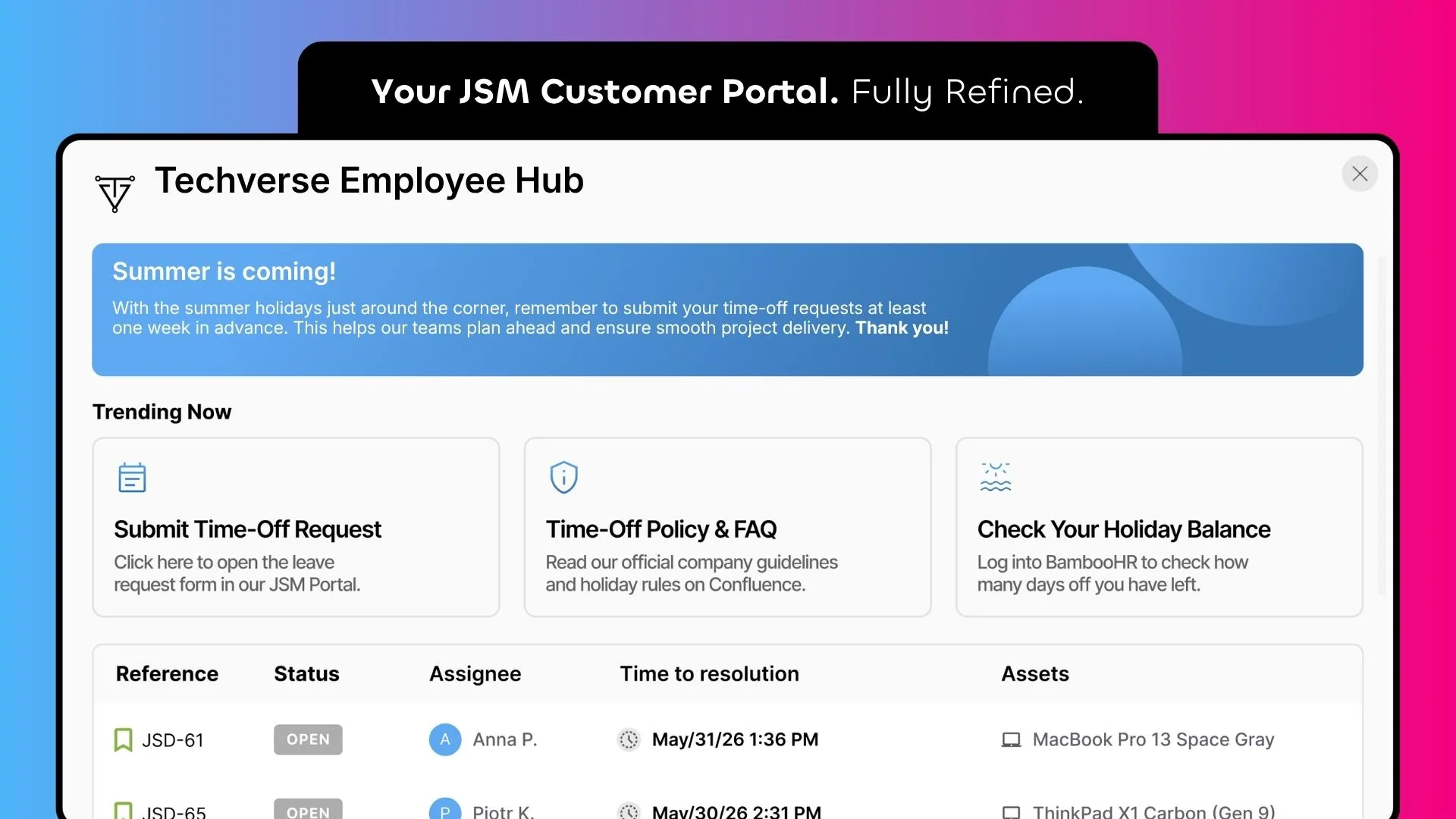
Create a custom employee hub.
Extending the Portal Layout with UniPortal: The Secure, No-Code Alternative
Large corporations managing complex user bases need agile tools to adjust their messaging quickly. Relying on engineering teams to write scripts or deploy standalone web forms introduces compliance risks and data maintenance bottlenecks. UniPortal offers a secure, pure no-code alternative, allowing you to completely restructure your help center natively from an intuitive control panel.
The extension operates as a dedicated, fully integrated dialog screen. Users can launch this customized hub directly from the native Jira portal navigation menu or access it via a unique URL. This structural flexibility allows organizations to distribute a single link that employees can bookmark as their primary corporate starting point.
How UniPortal Transforms Your Custom Portal Layout:
- Embedded HTML Blocks: UniPortal adjusts the layout elements surrounding the main request workspace. Administrators can deploy custom welcome sections, active outage alert bars, or corporate announcements using flexible jira portal html blocks at the very top and bottom of the screen.
- Smart Links with Permission Checks: Rather than presenting users with separate documentation paths, you can add quick, direct links to critical external systems (like Confluence or HR platforms). The system validates individual user profile permissions and browser language settings before rendering the asset, ensuring noise-free, localized navigation.
- Zero Technical Debt: Every visual adjustment, from matching your exact corporate typography to deploying responsive layout sections, is done without editing source code, writing custom scripts, or risking compatibility breaks during Atlassian cloud updates.
Much like how popular tools like advanced tables for Confluence fix page readability without altering core Confluence infrastructure, UniPortal upgrades your portal appearance while keeping your primary support framework intact.
Cross-App Tip: If you need to expand your communication strategy beyond the main landing page, you can manage targeted alerts within specific service desk projects and individual request screens using our Feature Bundle extension.
Connecting Portal Layout to Critical Customer Service KPIs
An optimized portal interface directly improves your core support analytics. When organizations deploy intuitive layout structures, they experience measurable changes across several customer service KPI examples:
- Reduced Volume of Misrouted Tickets: Placing explicit, targeted HTML announcement blocks at the top of the portal immediately alerts users to active outages or system updates. This active communication prevents users from creating duplicate tickets for known incidents.
- Faster Ticket Creation Speed: Strategic link paths and clean structural categories allow employees to find the correct forms within seconds, bypassing native search bottlenecks.
- Lower Operational Support Workload: Providing clear self-service pathways directly reduces the volume of manual navigation inquiries hitting your help desk queue.
Ultimately, execution visibility and layout clarity translate directly into a better overall experience. Shifting from a cluttered layout to an organized, accessible dashboard transforms your portal into an advanced, experience-driven workspace.
Summary: A Consolidated Approach to Jira Customization
Executing a thorough jira customization strategy does not have to involve custom code or detached external interfaces. UniPortal provides a unified, no-code framework to upgrade your jira service desk customer portal, combining strict corporate brand requirements with clear navigation structures. The deployment of responsive announcement bars and secure link components protects user data while driving down ticket volumes.
Tired of confusing portals?
Structure your Help Center with UniPortal into a clear, navigable site your teams can actually use.
Go to Atlassian MarketplaceFAQs
Related posts
Katarzyna Pawlak
•Sep 24, 2026
Dariusz Jaroń
•Aug 12, 2026