
How to Break Down Data Silos: A Practical Use Case for HubSpot and Jira Service Management
Data silos between Sales and Support cost businesses valuable time. What does this gap mean for your workflows, and how can you fix it? Here's a solution you can try.


No company builds data silos on purpose, yet they happen naturally as teams scale. Support teams live in Jira Service Management (JSM), while Sales and Customer Success run on HubSpot. This operational divide creates a costly data gap, forcing employees to lose valuable hours simply searching for information trapped across separate systems.
Implementing a reliable HubSpot Jira integration is the key to bridging this gap and restoring a 360-degree customer view. According to McKinsey & Company, data silos cost businesses trillions annually in lost revenue and productivity. In fact, Forrester estimates that employees waste up to 12 hours a week just searching for information stuck in these functional silos.
In day-to-day operations, this cost is measured in minutes lost every time a support agent has to hunt for customer context. When customer details live in the CRM and support tickets live in Jira, a daily bottleneck is inevitable.
The Problem: How Jira and HubSpot Silos Slow Down Growth
Many companies try to bridge this gap using standard assets or basic connectors to pull data into Jira. However, as teams grow, a basic link between tools rarely solves the root problem. Without a deep integration, support agents work in the dark. To find out if a customer has an overdue invoice, a high churn risk, or an active sales negotiation, agents must jump between tabs and manually check HubSpot.
This manual cross-checking leads to:
- Outdated customer records in Jira.
- Slower resolution times.
- Friction during inter-departmental handoffs.
- A fragmented customer experience where customers have to repeat their history.
To fix this, businesses can skip a massive process overhaul; a reliable connection that allows agents to view HubSpot insights in Jira inside their active workspace is enough.
The Use Case: Connecting JSM and HubSpot in Practice
The HubSpot CRM Integration for Jira by Appsvio addresses this exact challenge. Instead of forcing teams out of their preferred environments, this tool shows you how to connect HubSpot and Jira to display real-time CRM context directly within Jira issues and JSM requests.
Here is how this specific use case works in practice to turn fragmented data into action:
1. Tailored HubSpot Data Right Inside JSM
You can choose exactly which HubSpot fields appear in Jira based on what your support agents need to see. The moment an issue is opened, the agent can instantly verify:
- Who the requester is and their subscription or customer tier.
- Account health scores and potential churn risks.
- Open sales tickets that require cross-departmental coordination.
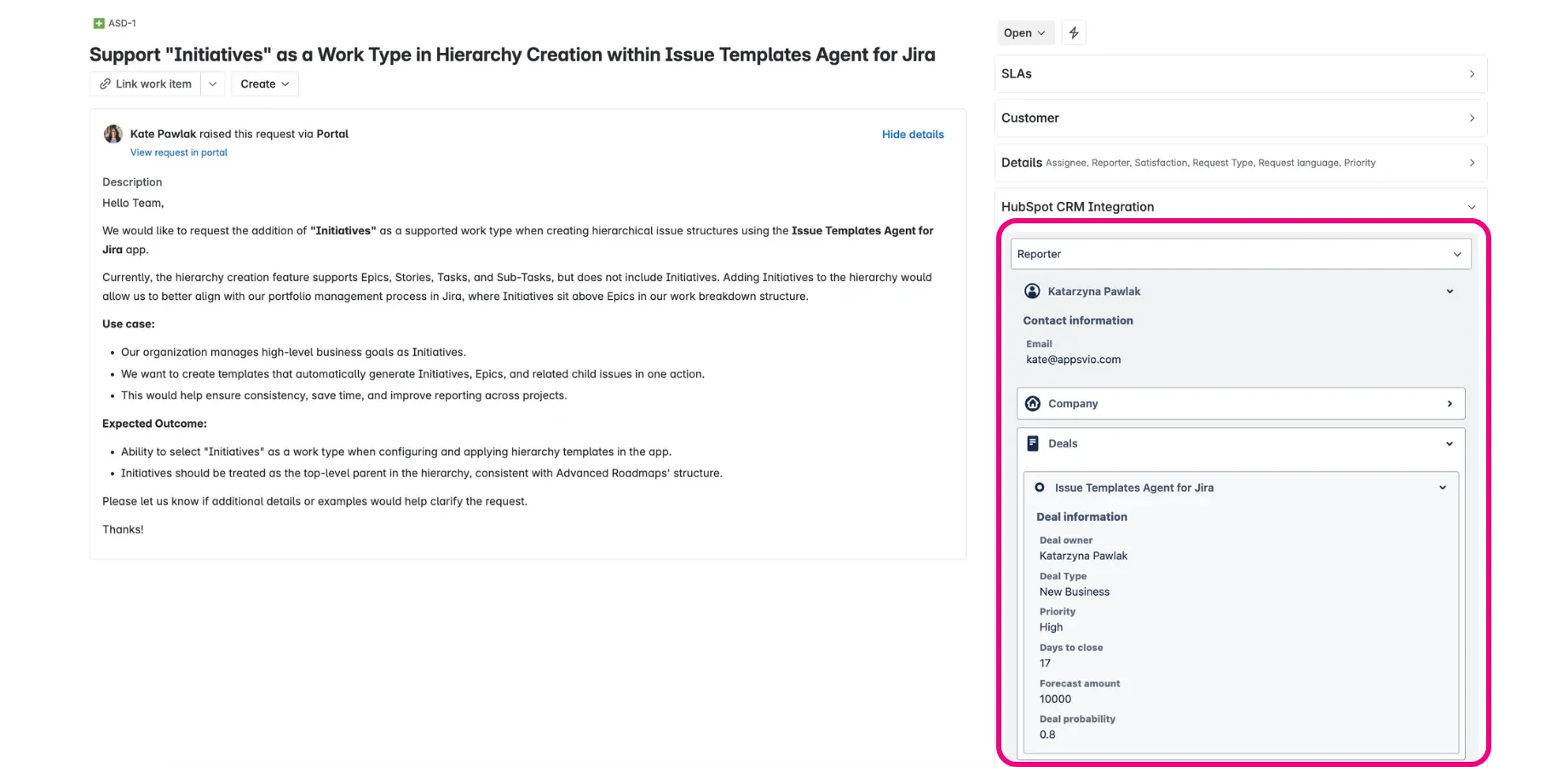
HubSpot CRM Integration inside JSM.
2. Powering Jira Workflows with CRM Metrics (via JQL)
A major advantage of this setup is the ability to use Jira Query Language (JQL) for CRM data. Instead of organizing your support queue based only on basic ticket fields like creation date or default priority, you can build advanced queues and dashboards.
This unlocks powerful options for Jira automation based on HubSpot data. For example, you can automatically prioritize requests from high-value accounts or trigger smart automations based on the customer’s active CRM status.
3. Enabling Two-Way Visibility
While support agents get the insights they need inside JSM, the connection also syncs Jira context back to HubSpot. It allows Customer Success and Sales teams to track ongoing technical issues or delivery milestones without leaving their CRM, eliminating cross-departmental status chasing.
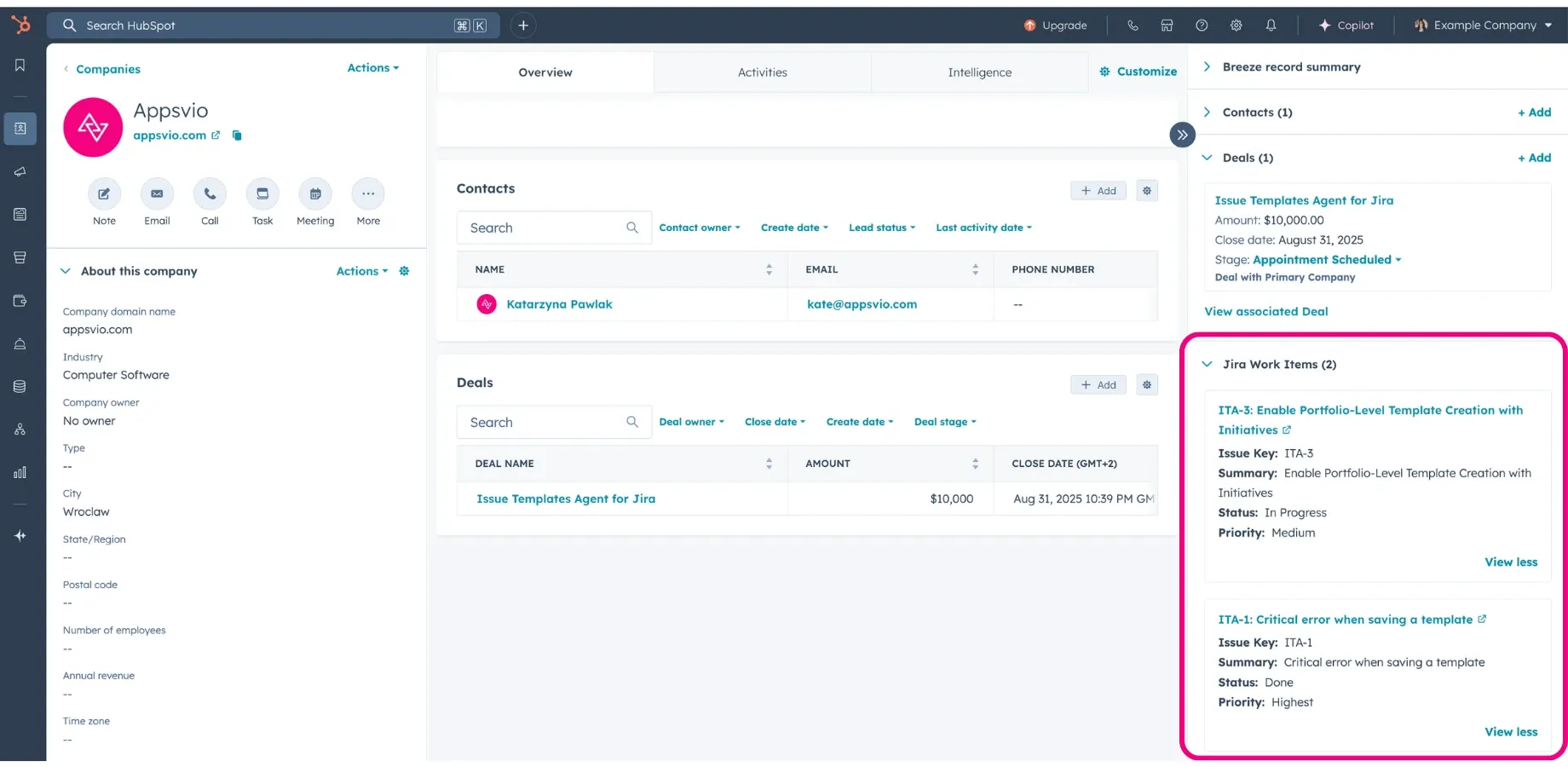
Jira Work Items inside HubSpot.
The Business Impact: Faster Service and Smarter Prioritization
Implementing a dedicated Jira Service Management HubSpot integration brings immediate, measurable improvements to daily operations:
- Accelerated Resolution Times: Because important details are available directly within the active ticket, agents stop system-hopping and close issues much faster.
- Intelligent Prioritization: Aligning support queues with actual CRM metrics ensures that your team always addresses high-priority, high-value accounts first.
- Elevated Customer Experience: Instant visibility into account health and history allows agents to tailor their tone and approach. Customers never have to repeat themselves, making them feel genuinely valued.
Beyond daily efficiency, a clean integration protects long-term data integrity. Eliminating manual data entry mitigates human error and outdated records, creating a stable foundation for sustainable growth.
Why Vendor Flexibility Matters for Integrations
Choosing the right integration tool involves more than checking off a list of current features. Integrations shouldn’t be rigid; they need to evolve alongside your teams and change as your business workflows change. Selecting a flexible vendor is just as important as the software itself.
When evaluating an integration app on the Atlassian Marketplace, look for a partner that offers:
- Continuous Product Evolution: Business workflows move fast. A good vendor rolls out regular updates and advanced features, like deep JQL support, to help you scale your automation, rather than leaving you with a static tool.
- An Active Feedback Loop: The best tools are shaped by real-world user feedback. A vendor that listens can actively refine features to handle complex, unique workflows without issues.
- Expert Guidance: Integrations connect critical business systems. Access to responsive, expert support ensures that if a workflow ever runs into a block, you can get it sorted out quickly without disrupting your teams.
For Service, Customer Success, and Sales, a collaborative approach is what matters most. Software should always adapt to your internal processes, never get in the way.
Final Thoughts: Stop Searching, Start Solving
You don’t need a complex new platform to align your teams. The priority is simply to stop wasting time on manual context hunting and fragmented data.
With the HubSpot CRM Integration for Jira, you bring real-time CRM visibility directly into JSM, unlock advanced Jira segmentation, and align your core revenue and service teams. If your support queue lives in Jira while customer insights remain trapped in HubSpot, the lesson is simple: you can skip the massive process overhaul because you just require a reliable connection to keep your teams aligned.
Ready to bridge the data gap in your organization?
Try the HubSpot CRM Integration for Jira to give your teams their time back with native CRM panels and JQL filtering.
Go to Atlassian MarketplaceRelated posts
Katarzyna Pawlak
•Sep 24, 2026
Dariusz Jaroń
•Aug 12, 2026