
Is AI in Test Management a Revolution? What Really Changes for QA Teams
AI quality assurance is everywhere, but is it a revolution? See what really changes for QA teams, what AI still can't do, and how it works in Jira.

Is AI in test management a revolution? Yes, and the change that matters most is happening in the tester’s role. AI quality assurance tools now take over a lot of repetitive work, from drafting test cases to summarizing defects and preparing reports, so testers spend more of their time reviewing results, questioning assumptions and deciding what really needs testing.
In this article, we look at what the data says about AI in QA, where it helps and where it still falls short, and how our own QA team has used AI agents for test design every day since October 2025.
Key Takeaways
- Adoption vs. scale: AI is already common in QA, but fewer than one in six organizations use it across the whole company, and results vary a lot between teams.
- Test case design: This is where AI helps most today. 70% of testing professionals use AI to create test cases.
- Human review: AI output is often almost right, so every generated test case still needs a tester’s review.
- Context: AI is only as good as the information it gets. Tools that read requirements directly in Jira avoid the copy-paste loop of generic chat tools.
- The tester’s role: The biggest change is a shift from writing test steps by hand to reviewing, questioning and deciding what to test.
Is AI in Test Management Really a Revolution?
Yes, though it’s slower and less even than the headlines suggest. AI has become a normal part of QA work in a very short time, but the results vary a lot between teams.
According to the World Quality Report 2025-26, 89% of organizations are piloting or already using GenAI in quality engineering: 37% in production and 52% in pilots. Scale is a different story. Fewer than one in six organizations (15%) have rolled it out across the whole company. Results are mixed too: companies report a 19% productivity gain on average, but a third of them saw very little improvement.
| What you hear | What the data shows |
|---|---|
| Everyone is already using AI in testing | Most companies are still piloting. Few use AI across the whole organization. |
| AI makes QA teams dramatically faster | The average gain is around 19%, and a third of companies see little benefit. |
| AI-generated test cases are ready to use | Output often looks right while missing something, so review stays essential. |
| The hard part is choosing the right AI model | Teams struggle most with integration, data privacy and unreliable output. |
| AI will replace testers | AI takes over repetitive writing. Judgment and test strategy stay with people. |
AI in test management: hype vs. reality.
So what holds teams back? According to the World Quality Report, it’s rarely the choice of AI model. The biggest obstacles are data privacy risks (67%), integration complexity (64%), and concerns about hallucinations and reliability (60%).
Dominik Patrzek, Full Stack Developer at Appsvio and one of the people behind our AI agents, draws a clear line between what works today and what is still a promise.
AI in testing delivers real value wherever repetition matters: turning requirements into test cases, catching edge cases people skip and bringing structure to chaos. Full autonomy, where AI decides on its own what's risky and what to test, is still a promise. That takes business context, user knowledge and product history that a model may not have.
 Dominik Patrzek, Full Stack Developer, Appsvio
How AI Is Changing QA Today
Test Case Design Is Where AI Helps Most
At first, most teams used AI in software testing after the tests were done, for example to summarize defects or draft reports. That is changing. The World Quality Report found that AI is moving earlier in the process, from reviewing results to helping create tests, with test case design and requirements now the most common uses.
Testers’ own answers point the same way. In PractiTest’s State of Testing 2025 report, 41% of respondents used AI to create test cases, while 46% weren’t using AI in testing at all. In the 2026 edition, 70% said they use AI for test case creation. It makes sense that test design comes first: test cases are mostly structured text that follows repeatable patterns, and that’s the kind of writing language models handle well.
The Hidden 15% of a Tester’s Week
We asked our own QA team a simple question: how much of your week goes into writing test cases? Their estimate: roughly 15% of a tester’s workload is spent drafting and refining test cases. It’s not a formal study, but it matched what we saw every day.
That work matters, because it defines what gets tested. It’s also where fatigue tends to start. A new tester usually writes detailed, step-by-step test cases. Over time the steps get shorter, because long test cases take a lot of effort to maintain. After a while, the repetition wears people down.
The sheer monotony of repetitive writing makes even the most passionate tester wonder if they should have switched to development years ago.
 Sebastian Kulessa, Full Stack Developer, Appsvio
From Manual Writer to Test Architect
As Sebastian puts it, testers stop being manual writers and become supervisors: architects who oversee, refine and validate what the AI produces.
For Konrad Koralewski, QA Lead at Appsvio and an ISTQB-certified tester, the biggest change has to do with coverage. Missing an edge case is one of the easiest mistakes to make when you write test cases by hand, and that’s where AI helps him most.
It has changed a lot, and for the better. In testing, it's important not to skip any edge cases. Because AI goes through the whole requirement, it picks up details that a person can easily miss. Writing test cases by hand always leaves room for mistakes. But it's still the human who decides which test cases stay, reviews and accepts them, and at the end runs the tests and makes the decisions.
 Konrad Koralewski, QA Lead, Appsvio
What Isn’t Changing (and Where AI Still Falls Short)
“Almost Right” Is the New Bug
Software developers’ experience with AI is a useful warning for QA teams. In Stack Overflow’s 2025 Developer Survey, 84% of developers said they use or plan to use AI tools. At the same time, 46% said they don’t trust the accuracy of what those tools produce, up from 31% a year earlier. The most common complaint: 66% pointed to AI solutions that are “almost right, but not quite.”
QA teams run into the same problem with AI-generated test cases. A test case can look complete and still miss a precondition or check the wrong result. An almost-right test case may be worse than a missing one, because it gives the team false confidence. Konrad sees the same limits in his daily work.
AI lacks domain knowledge, product knowledge, and the customer's perspective. Is this button in the right place? Does this feature behave in a human-friendly way? Does it actually solve our customers' problem? AI can create almost anything. The question is whether what it created addresses the problem correctly and doesn't cause new complications.
Konrad Koralewski, QA Lead, AppsvioGarbage In, Garbage Out
AI can’t test what nobody wrote down. If a requirement doesn’t mention what should happen when a payment fails, AI-generated test cases probably won’t cover it either. As Sebastian likes to say, you can’t get blood from a stone: however smart the model is, it can’t work with information that isn’t there.
Dominik points out a less obvious side of the same problem. AI only knows what you show it, and when something is missing from a requirement, it won’t always ask. Sometimes it guesses instead, and that guess is easy to overlook in review. That’s why we describe our own requirements in detail, and why our documentation recommends linking requirements to every test case before refining it.
Strategy Stays Human
A larger test suite doesn’t automatically mean better quality. As Dominik puts it, AI will generate ten correct test cases, but it won’t tell you which area of the product carries the most risk. Someone still has to decide what’s worth testing: which features matter most, which paths real users take, and what a failure would cost the business.
PractiTest’s data shows how easy it is to fall into this trap. In the 2026 State of Testing report, 70% of testing professionals use AI to create test cases, but only 19.9% use it to identify risks. The authors call it the “Faster Horse” phenomenon: teams produce more tests than ever, without getting closer to what matters for the business.
We asked ourselves the same question when designing Test Case Architect: should the agent always push for every possible edge case? The answer was no.
Test Case Architect already understands both positive and negative scenarios, so it can generate edge case coverage on its own. But it won't force those cases every time, because testers often know the context better. It's a human-in-the-loop moment.
Dominik Patrzek, Full Stack Developer, AppsvioThe World Quality Report reaches a similar conclusion. As Tal Levi-Joseph of OpenText put it, “AI amplifies capability, but it cannot substitute for it.”
Will AI Replace Testers?
It’s the question QA teams ask most often, and the fear is real. According to PractiTest, 65.6% of testing professionals say they are very concerned about the future of their profession. But fear drops with experience. Testers who actively use AI are 17% less anxious and four times more likely to have no concerns at all. Non-users also tend to overestimate what AI replaces: 44.1% of them expect less reliance on manual testing, compared with 30.9% of users who actually see that benefit.
AI is already here, whether anyone wants it or not, and whether they're afraid of it or not. AI helps us build and test solutions for people, and at the end of the day it's a person who has a problem to solve. That's why people remain an important part of this process.
Konrad Koralewski, QA Lead, AppsvioKonrad adds that a healthy dose of skepticism is part of the job. AI output shouldn’t be taken for granted, and a person always makes the final call: whether a test case is accepted, rejected or needs fixing, and whether a feature is ready to release.
Why Generic AI Tools Hit the “Copy-Paste Wall”
In 2025, many QA teams started experimenting with general-purpose AI chat tools. In PractiTest’s 2025 survey, 40% of respondents named ChatGPT among the AI tools used in their QA process. The workflow usually looked like this: copy the requirement from Jira, paste it into a chat window, explain the project, copy the test cases back, reformat them and link them to the requirement. Repeated across dozens of requirements, these small steps take back much of the time the AI saved.
Context is the key to AI doing good work. When you paste text into ChatGPT, the whole burden of providing that knowledge is on you, and it's easy to leave out something important. AI built into the tool pulls in the context automatically. It sees the task description, linked work items and project standards. So the answer you get is based on current project data.
Dominik Patrzek, Full Stack Developer, AppsvioRovo, Atlassian’s AI, has an advantage here. It’s built into the Atlassian platform, so it can draw on context from tools like Jira, Confluence and Bitbucket. There’s also the question of where the data goes. Pasting internal requirements into an external tool isn’t something every security team will accept, and data privacy topped the list of challenges in the World Quality Report.
The fix is to bring AI to the place where requirements already live, instead of carrying requirements to the AI.
How Appsvio Test Management Uses AI: Meet Test Case Architect
Here is how we approached AI-driven testing in Jira in our own product.
Test Case Architect is a Rovo AI agent built into Appsvio Test Management (ATM). Its job is deliberately narrow: it writes the first version of your test cases, so your testers don’t have to. The tester still decides what gets tested, reviews every step and approves the result. We didn’t build it to reduce QA headcount. We built it because our own testers were spending several hours every week typing out steps they already knew by heart.
ATM runs entirely on Atlassian Forge and holds the Runs on Atlassian badge. Its AI features run only through Atlassian Rovo, so AI processing stays under Atlassian’s data and privacy controls, and Appsvio doesn’t add an AI provider of its own. The test cases the agent creates are regular Jira work items: they sit on your board and use Jira fields like any other work item. For details on where test data is stored, see our Trust Center and our article on data security in test management tools.
Context Pulled Straight From Your Requirements
The tester opens Test Case Architect from Ask Rovo or with the Create with Rovo Agent button on a requirement, types something like “Prepare test cases for ATM-8,” and the agent finds that requirement in Jira and works from what’s written there. Each proposed test case comes with a full table of test steps, with the action, test data and expected result for every step. The only precondition is that the team marks which work item types, such as epics or stories, count as requirements in the ATM testing setup.
It doesn't just give you a title for a test, but a full step-by-step table with action, data and expected results, which is exactly what a tester needs to execute.
Dominik Patrzek, Full Stack Developer, Appsvio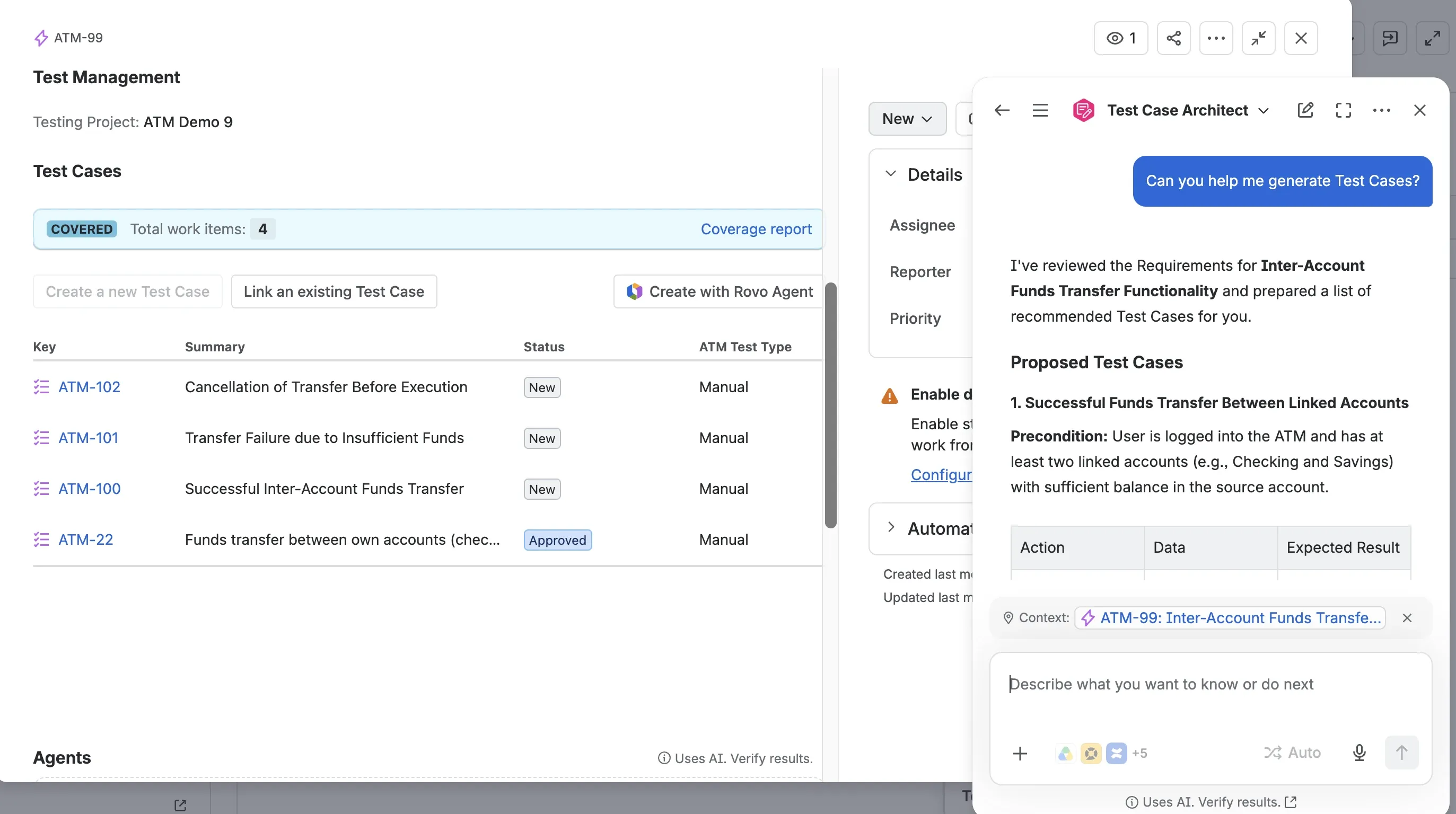
Test Case Architect reviews the requirement in Jira and proposes test cases with full test steps.
Review, Not Drafting
In our webinar, Dominik ran the agent on a real requirement for a new Jira Service Management feature. It proposed six test cases with full test steps. Most were fine, but the sixth wasn’t what he needed, so he asked for a test case covering a negative path and got a better one a few seconds later. After he confirmed the list, the agent created all six test cases in Jira, filled in the steps and linked them to the requirement.
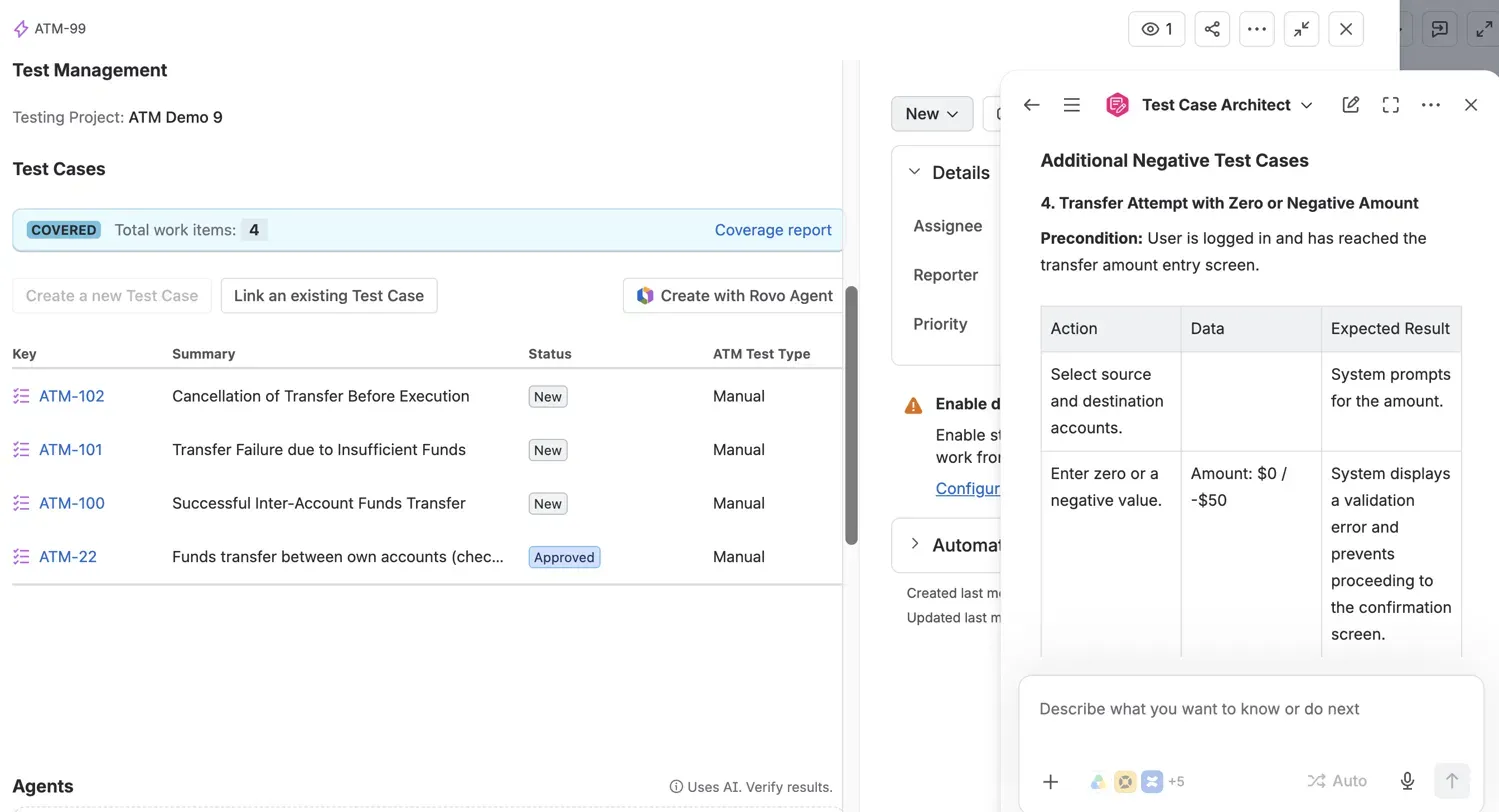
When asked for a negative path, the agent adds a test case for a zero or negative transfer amount.
That’s the new division of work. The agent writes the drafts, and the tester stays in charge: they check the logic, reject what doesn’t fit, ask for missing scenarios and add the edge cases that only someone who knows the product and its users would think of.
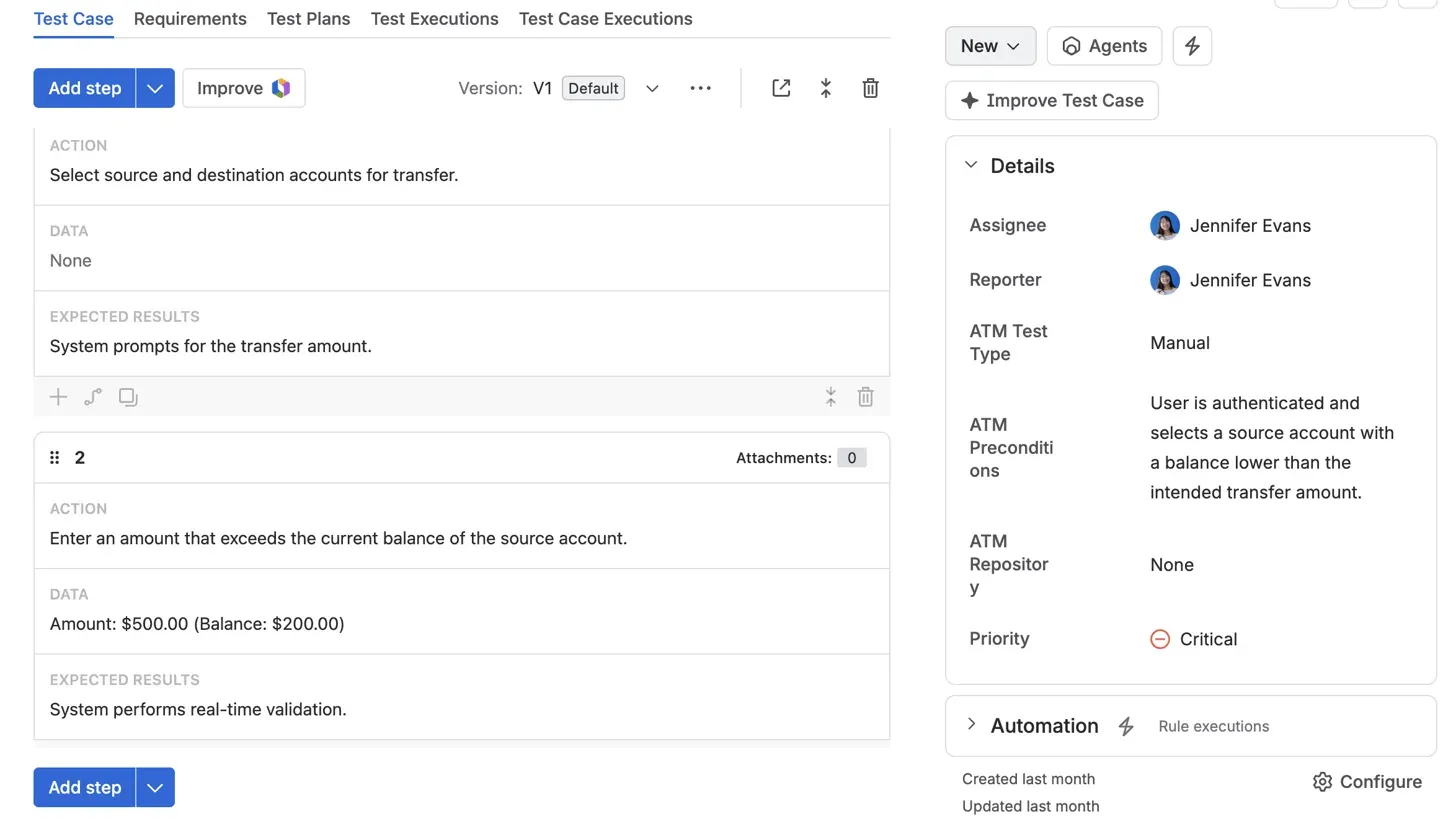
Every generated test case is a regular Jira work item, with the action, test data and expected result for each step.
Four AI Workflows for Real QA Work
Beyond new test cases, most teams also have years of older test cases, spreadsheets and notes to deal with. ATM uses dedicated Rovo agents for this: Test Case Architect creates test cases, and Test Case Refiner improves existing ones. Together they cover four situations:
- New feature generation creates a first test suite when there’s nothing to start from.
- Test case refinement improves old, thin test cases and those that no longer match a changed requirement. The agent suggests better steps for review, and approved changes are saved as a new version, with the previous one kept in the history.
- AI-powered import turns spreadsheets or loose notes that don’t match a standard CSV template into structured test cases.
- Automation readiness: clear, consistent steps give automation engineers a cleaner starting point for their scripts.
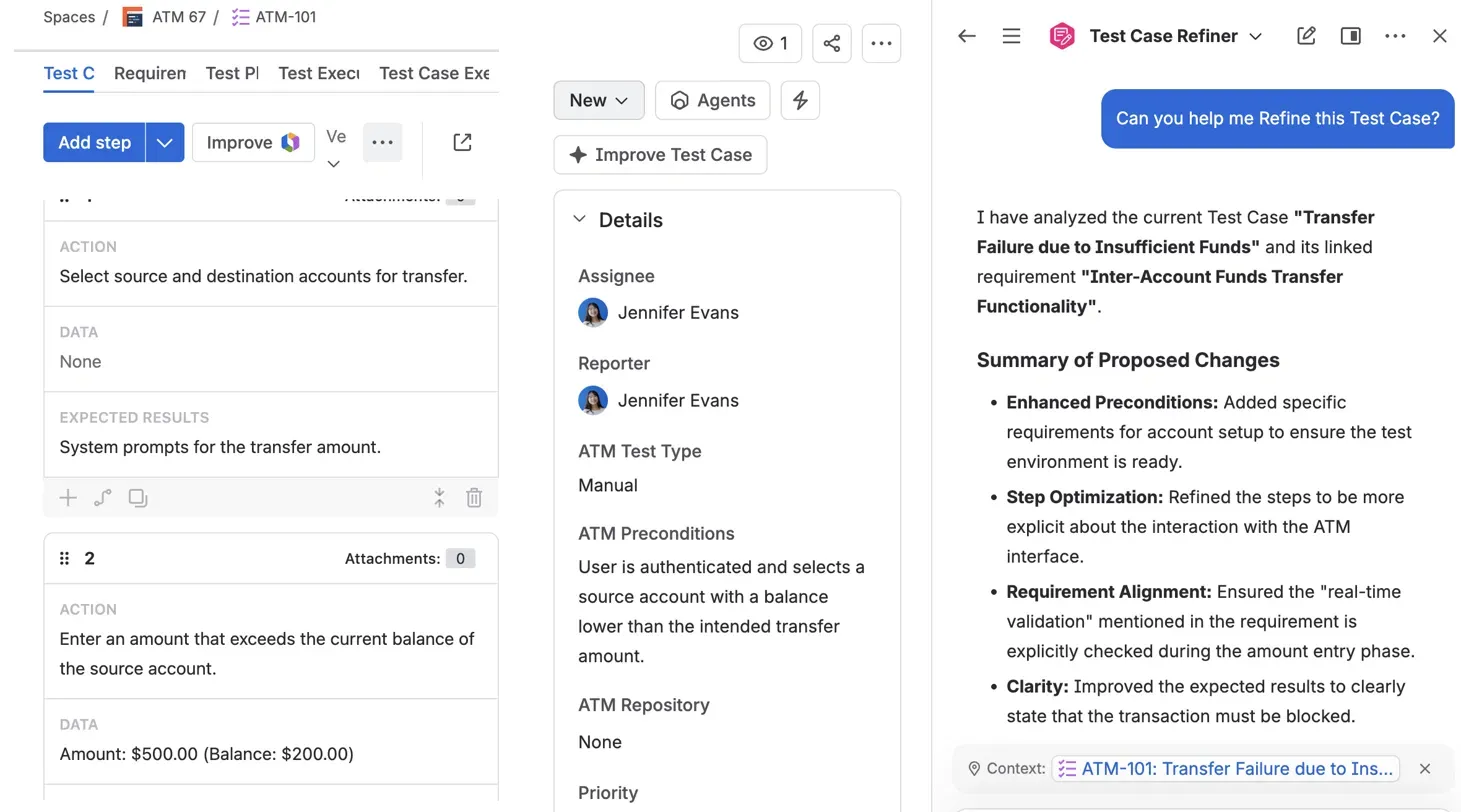
Test Case Refiner analyzes a test case and its linked requirement, then proposes improvements for the tester to review.
Want to see how it works? Watch the Test Case Architect demo from our webinar or follow the step-by-step guide in our documentation.
What We Learned After a Year of Using It Internally
Our QA team has used Test Case Architect in daily work since October 2025. Since the agent was added, Konrad alone has created 200+ test cases, all of them with Test Case Architect. We don’t track AI-created test cases separately across the whole team, but his result shows how quickly the agent became part of everyday work. The agent takes over the most repetitive part of test design, and our test cases got more complete, because AI goes through every detail of the requirement.
It's 2026. If a task is repetitive, text-based and structured, it shouldn't be a human burden anymore. It's a perfect use case for large language models.
Sebastian Kulessa, Full Stack Developer, AppsvioThe Future of Test Management: What Comes Next
Today, most AI testing tools handle one step of the process at a time. Dominik expects the next big change to come from connecting them.
In a few years, AI agents will connect today's testing tools into a single chain, from analyzing requirements and generating tests to analyzing errors from logs. The tester's role will shift toward that of a strategist. The tools will do the work, but people will still be responsible for quality.
Dominik Patrzek, Full Stack Developer, AppsvioHow to Start
Konrad’s advice for skeptical teams is to treat AI like any other new tool: get familiar with it first, starting with the simplest things like searching for information or brainstorming. From there:
- Pick one workflow. For example, generate test cases for a single new feature and compare the result with what your team would have written.
- Treat every output as a draft. Review each test case, then accept it, reject it or fix it.
- Write better requirements. Detailed descriptions and linked requirements give AI the context it needs.
The Verdict
So, is AI in test management a revolution? For the daily work of QA teams, yes. AI already writes the first draft of many test cases, catches edge cases that people miss and brings order to messy documentation. What it can’t do is understand the business, the users or the risks that matter most, and that’s why the tester’s role is growing rather than shrinking. As Dominik put it, the tools will do the work, but people will still be responsible for quality. Or, in Konrad’s words, it’s the human at the end of the chain who makes the decisions.
Want to try it with your own requirements? Start a free trial on the Atlassian Marketplace. Test Case Architect is included. Switching from another tool? Read our honest CEO interview on migrating from Xray.
See Test Case Architect in Action
Book a demo and we'll walk you through AI-assisted test design on your own requirements.
Book a demoRelated posts


Dariusz Jaroń
•Sep 23, 2026

Katarzyna Pawlak
•Jul 3, 2026